Using Web Import Profiles
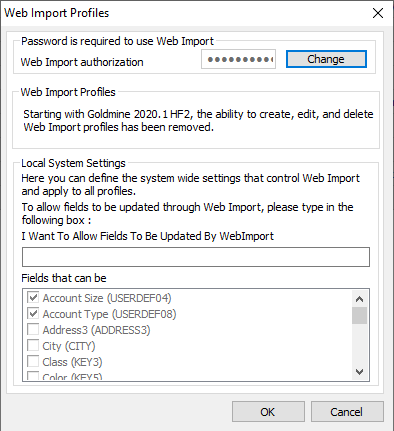
Access the Web Import Profiles dialog to configure the system-wide settings that control the Web Import. You can open the dialog one of two ways:
■ From the GoldMine menu bar, click Web > Setup Web Import.
■ From GoldMine Campaigns, select a campaign and click the Configure WebImport button.
Users with Master rights have these settings available:
■ Web Import authorization password: Protect the Web Import process with a password so only authorized incoming instruction files can be imported. This prevents unauthorized persons from sending e-mail messages and inundating a GoldMine system with unwanted data. A password is always required to use Web Import. The incoming instruction file will not be processed if it doesn’t contain a password or if it contains an invalid password. Note that you must set this password before the Web Import functions are made available.
■ Fields to be Updated by WebImport: Type “I Want To Allow Fields To Be Updated By WebImport” in the text box to let visitors to your Web site update their information in your GoldMine database.
■ Fields that can be updated: Select the fields to be updated by the Web Import.