The Antivirus Reports Page
All available reports are generated from the All Reports page. From this page, you select an antivirus report type and define the report parameters and options.
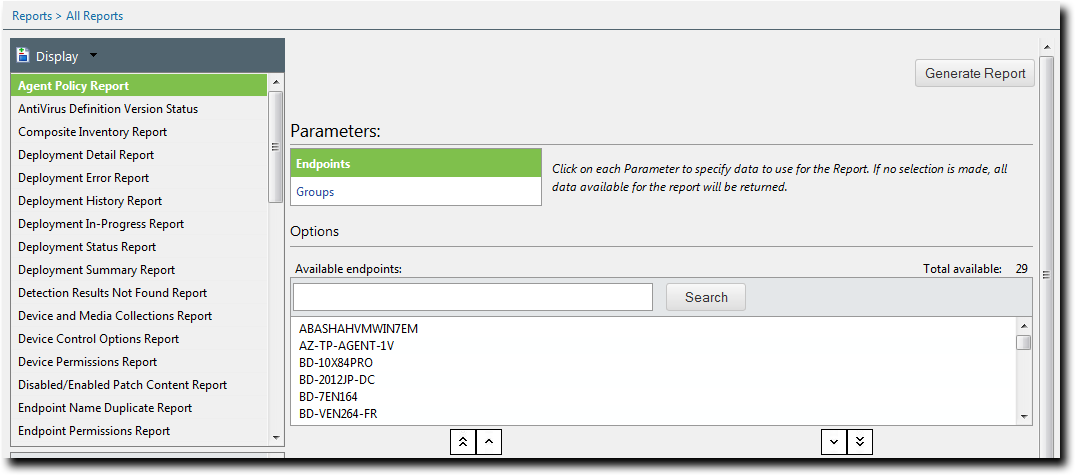
The Display list shows all the reports that can be generated. Expanding the AntiVirus heading displays the reports associated with antivirus activities:
- AntiVirus Definition Version Status
- Endpoint/Groups with Infections by Date
The report description provides a brief overview of the report type that is selected, along with its type, category, and format.
The Parameters list specifies the data to use for the report. Both antivirus reports have Endpoints and Groups parameters. In addition, the Endpoint/Groups with Infections by Date report has a Date Range parameter.
There are two Generate Report buttons. They both produce the same output.
The Options section enables you to refine the Endpoints and Groups parameter selection. It contains the following:
- Search field and button
- Available list
- Selected list
Buttons to move entries between the Available and Selected lists.
- The double up-arrow button moves all entries in the Selected list up to the Available list.
- The single up-arrow button moves highlighted entries in the Selected list up to the Available list.
- The single down-arrow button moves highlighted entries in the Available list down to the Selected list.
- The double down-arrow button moves all entries in the Available list down to the Selected list.
Setting Parameters and Options
In AntiVirus, you can set Endpoint and Group parameters to specify the data used in reports.
Because many networks contain large numbers of endpoints, you may want to limit the scope of a report to specific endpoints and/or groups. You can do this by setting the Endpoints and Groups parameters and their respective options.
The Endpoint/Groups with Infections by Date report has a third parameter called Date Range. For information on using this parameter, see Generating an Endpoint/Groups with Infections by Date Report.
- If you want to limit the report to certain endpoints, select the Endpoints parameter.
The Available endpoints list is populated with all available endpoints. - If necessary, find the required endpoint(s) by entering a full or partial endpoint name in the Search field and clicking the Search button.
- Select the required endpoint(s) and click the single down-arrow button (
 ).
). - If you want to limit the report to certain groups, select the Groups parameter.
The Available groups list is populated with all available groups. - If necessary, find the required group(s) by entering a full or partial group name in the Search field and clicking the Search button.
- Select the required group(s) and click the single down-arrow button ().
- When all the required endpoints and/or groups have been selected, click Generate Report.
You can move all the endpoints in the Available endpoints list by clicking the double down- arrow button ( ).
).
The selected endpoints are moved to the Selected endpoints list.
You can move all the groups in the Available groups list by clicking the double down-arrow button ().
The selected groups are moved to the Selected groups list.
Your browser may block the pop-up window containing the generated report from displaying. Consult your browser’s help to temporarily allow the pop-up, permanently allow the Ivanti Endpoint Security URL, or disable the pop-up blocker.