Wait Workflow Block
The Wait workflow block waits for a condition specified in the workflow block to become true, or for a timer to expire. By default, exit ports for this block allow for separate workflow paths for these events.
Defining parameters and conditions from the Design form interrupts the wait workflow block execution.
Wait Workflow Block Properties
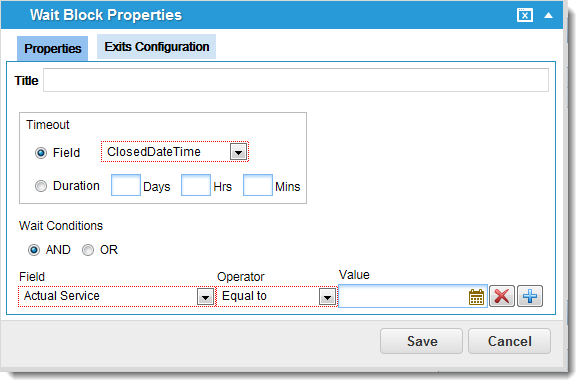
The timeout behavior is as follows:
If value-based timer (such as duration) is specified by values
| days | == | null && hours == null && minutes == null, | then infinite timeout or never times out |
| days | = | 0 && hours = 0 && minutes = 0, | then immediately times out and timeout exit is used |
| days | > | 0 && hours > 0 && minutes > 0, | then combined value is set as the timeout and exit timeout is used when the time passes. |
The maximum number of days allowed is 30, if it exceeds 30, a validation error is displayed.
If field-based timer
| fieldvalue | == | null, | then infinite timeout or never times out |
| fieldvalue | <= | UtcNow, | then immediately times out and timeout exit used |
| fieldvalue | > | UtcNow, | then combined value is set as the timeout and exit timeout is used when the time passes |
Exit Ports
You can define additional exit ports under the Exits Configuration tab. See Exits Configuration.
| Exit Port | Description |
|---|---|
| OK |
Continue to the next block. |
| Timed Out |
General exit port for a failed integration action. A logical next step is to trigger a notification. |
Properties
| Property | Description |
|---|---|
| Title | A unique name for the workflow block. |
| Timeout | |
| Field | The due date is generated relative to the field selected from the drop-down list. |
| Duration | Defines the due date according to the interval defined in the Days, Hrs (hours), and Mins (minutes) fields |
| Wait Conditions | |
| AND / OR | The child filter condition. |
| Field | The operand. Select from the drop-down list. |
| Operator | An additional operator. Select from the drop-down list. |
| Value | Adds a value. Depending on the child business object, this can be a drop-down list or calendar selection. |
Actions
| Button | Action |
|---|---|

|
Adds an expression to the workflow block. |

|
Removes an expression from the list. |
| Save | Commits your settings. |
| Cancel | Exits without saving. |