AI Search
AI Search feature enhances record retrieval by enabling users to search with natural language queries. The system interprets the query, identifies the relevant search criteria, and automatically applies the appropriate filters. This streamlines the search experience, eliminates the need for manual filter configuration, and helps users find relevant records more efficiently.
Enable AI Search
To use AI Search, an administrator must enable the feature from the AI Configuration Hub.
-
Log in to Ivanti Neurons for ITSM as an Administrator.
-
Click the Configuration Console.
-
In the left navigation pane, select AI Configuration Hub.
-
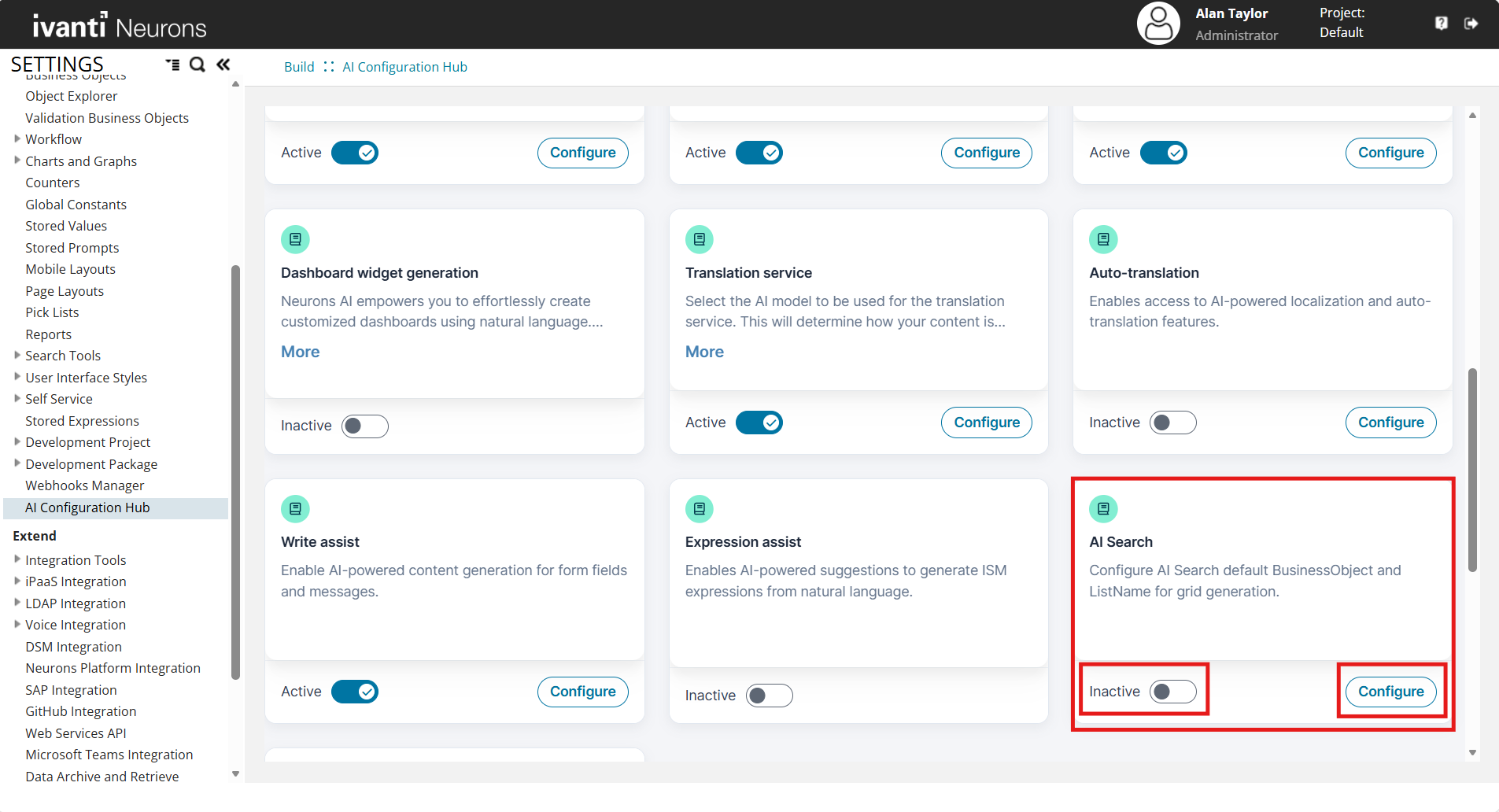
Turn ON the toggle for AI Search feature, and then click Configure.
-
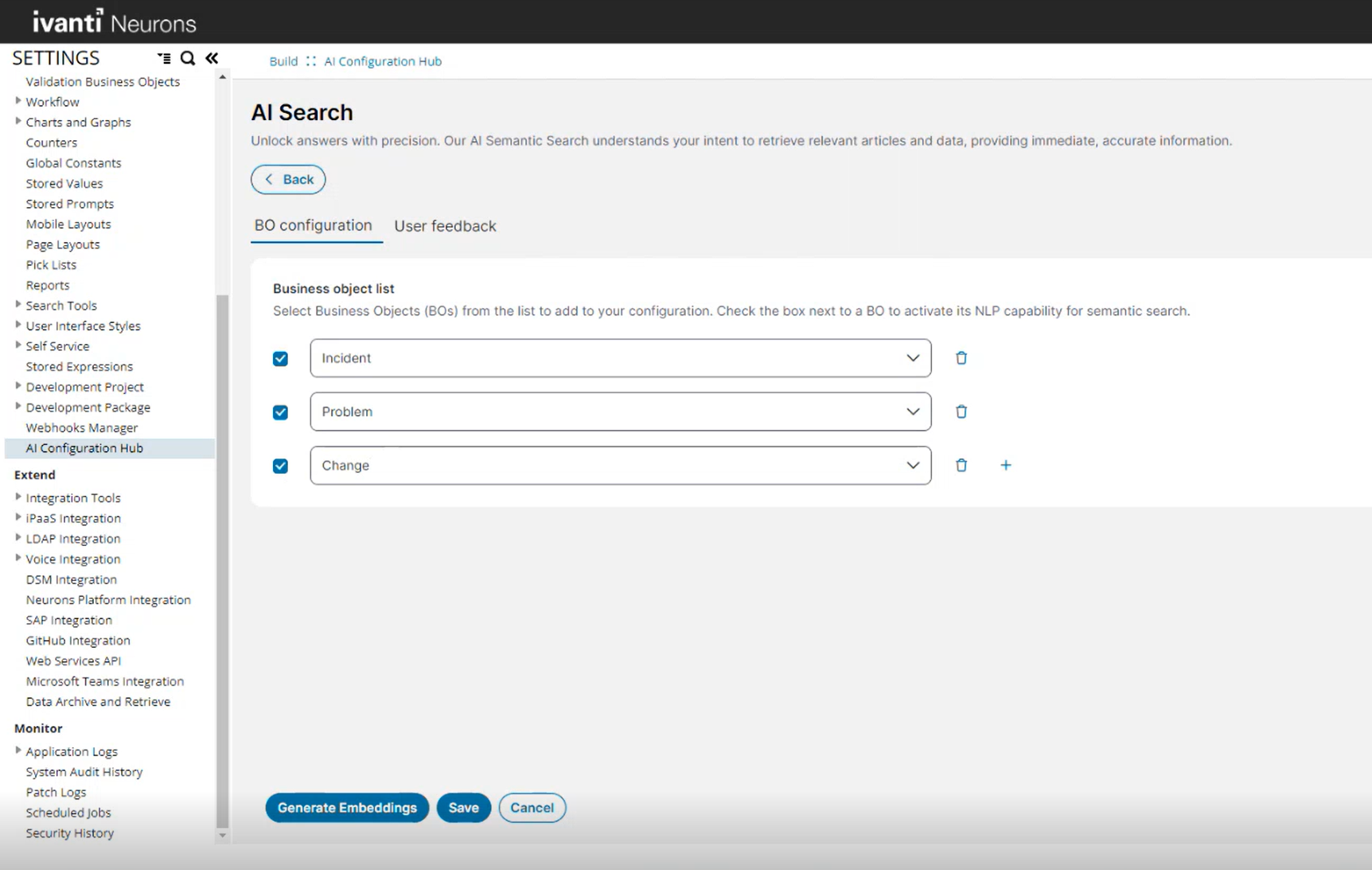
Under the BO configuration tab, select the business objects for which you want to enable the feature, and select the respective checkbox.
Use the Add
 icon to add additional business objects to the configuration list. Use the Delete
 icon to remove a business object from the configuration.
 -
Select the checkbox next to the selected business objects.
-
Click Generate Embeddings. This generates the vector embeddings for all fields and business objects.
It takes around 15 minutes to generate embeddings depends on the number of selected business objects.
-
Click Save.
Refer AI Search for more information on using this feature.
User Query Patterns
AI Search supports only a limited set of user query patterns. The following section explains the supported and non-supported user query patterns:
 Supported query patterns
AI Search supports filtering records in the data grid using natural language queries with single or multiple conditions.
List with two conditions
User query
"Show me all changes where status is 'Logged' and typeofchange is 'Major'."
Description
Filters the change records to display only those where the status is 'Logged' and the typeofchange is 'Major'.
List with three conditions
User query
"Can you further filter the results and show me only those changes where category is 'Software'."
Description
Further filters the already filtered change records to show only those where the category is 'Software', in addition to the previous conditions.
List with less than condition for date-time field
User query
"Show me all changes created before 1st Jan 2015."
Description
Filters the change records to display only those where the CreatedDateTime is before 1st January 2015.
List with greater than condition for date-time field
User query
"Now, show me all changes created after 15th February 2015."
Description
Filters the change records to display only those where the CreatedDateTime is after 15th February 2015.
List with between condition for date-time field
User query
"Now, show me all changes created between 1st January and 1st June 2011."
Description
Filters the change records to display only those where the CreatedDateTime is between 1st January 2011 and 1st June 2011.
List with less than condition for number field
User query
"Now, show me all changes whose priority is less than 3."
Description
Filters the change records to display only those where the priority is less than 3.
Unsupported query patterns
The following query patterns are not supported and might not return the expected results as follows:
Grouping queries
AI Search does not currently support grouping records in the data grid.
Single group by with non-date-time field
User query
"Show me all change records grouped by category."
Description
Displays all change records categorized by the category field.
Group by records with date-time field
User query
"Show me all change records grouped by the year of CreatedDateTime field."
Description
Groups change records by the year part of the CreatedDateTime field.
Single group by records with date-time field where the date part is not specified
User query
"Show me all change records grouped by createddatetime."
Description
Groups change records by the CreatedDateTime field as is.
Single group by ordered in descending order of aggregation field
User query
"I want to see all the change records grouped by priority, ordered in descending order of the count of records."
Description
Groups change records by the priority field and orders the groups in descending order based on the count of records within each group.
Single group by ordered in descending order of grouping field
User query
"I want to see all change records grouped by priority, ordered in descending order of the grouping field."
Description
Groups change records by the priority field and orders the groups in descending order based on the priority values.
Single group by ordered in ascending order of grouping field
User query
"I want to see all change records grouped by priority, ordered in ascending order of the grouping field."
Description
Groups change records by the priority field and orders the groups in ascending order based on the priority values.
Single group by with top filter
User query
"I want to see the top five change records grouped by category."
Description
Groups change records by the category field and filters to display only the top five groups based on the count of records.
Single group by grouped by month of date-time field
User query
"I want to see all change records grouped by the month of createddatetime."
Description
Groups change records by the month part of the CreatedDateTime field.
Single group by grouped by day of date-time field
User query
"I want to see all change records grouped by the day of createddatetime."
Description
Groups change records by the day part of the CreatedDateTime field.
Single group by records grouped by year of date-time field
User query
"I want to see all change records grouped by the year of createddatetime."
Description
Groups change records by the year part of the CreatedDateTime field.
Double group by records
User query
"Show me all change records grouped by category and priority."
Description
Groups change records first by category and then by priority within each category.
Double group by records where the first field is a date-time field
User query
"Show me all change records grouped by the month of closeddatetime and impact."
Description
Groups change records first by the month part of the ClosedDateTime field and then by impact within each month.
Incident-related queries
The following incident-related user queries do not return expected results.
-
Incident related to at least 1 task
-
All Active and Logged incidents
-
All breached incidents
-
Show all incidents created in this year
-
My team's active incidents
-
Show all VIP incidents
-
Show all incidents which are not closed
-
Incidents with high impact and low urgency
-
All incidents which are in waiting for customer status
-
All incidents which are related to atleast one task
-
All Incidents which are Resolved via FirstCallResolution (1 instead of Yes)
The user queries described in this topic are not supported in the current release.
The scope of widget creation using Neurons AI is limited to Business Object (BO). For any BO created in the application, you can generate a widget using AI search as long as you specify the BO name and at least one field name.