Getting the AutoInstall Window Displayed
The procedure for accessing the AutoInstall window is as follows:
- Log off from the system as user and then log on again.
- Wait until the
DSM Agent has started the AutoInstaller. As soon as the AutoInstaller
is active, the DSM Center icon
 appears in the Windows
task bar. It will remain on view for as long as maintenance work is being
carried out on the managed computer.
appears in the Windows
task bar. It will remain on view for as long as maintenance work is being
carried out on the managed computer. - To open the AutoInstall
window, click the DSM Center icon and choose Show AutoInstaller
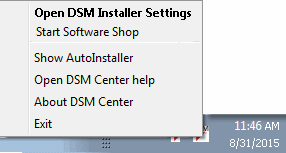
- If you wish that the actions of the AutoInstaller are always displayed in the foreground, deactivate the option Always minimize this window.