Package Variables
Variables defined on the package level overwrite all other definitions at package runtime.
Local DSM variables
Local variables are used in projects to simplify path specifications, for example. When you generate packages with the NetInstall Spy, Ivanti DSM automatically creates local variables for storing path specifications. The NetInstall Spy creates local variables with the NetInstall SET command.
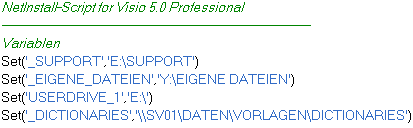
- Definition of the variables
_SUPPORT, _MY_FILES,
USERDRIVE_1 and _DICTIONARIES
in a script for installing Visio 5.0 Professional:
You can use the SET command in a package
- to create a new local variable and assign it a value or
- to assign a new value to an existing variable of any type. However, the value is only valid while this package is executing.
You can also set and modify local variables on the basis of registry entries, INI files or Windows NT SIDs (Security Identifiers). The Packaging Workbench includes a large number of special commands for this purpose. For more information, see the online command reference.
Local variables only apply
to the package in which they are defined. If you call other packages from
within this package (using the CallNIProc
command), the variables are also valid in the other packages. If you change
the value in a called package, it is also modified in the calling package.
By using the SET command, you can generate
a return value that is returned
to the calling package on exiting the called package.
Automatic Handling of Short Path Names
Some applications use short path names (DOS 8.3-compatible names) for compatibility reasons. For each path, Windows automatically generates short path names that, for example, you can view in the command line editor with dir /x.
The Installer cannot use these names directly in a script because they could be different depending on the computer. For example, the short names WINDOW~1 and WINDOW~2 denote the directories Windows Messaging and Windows NT; on a different computer they may denote different directories.
When the _Short command is used, the Installer uses the short path name generated by Windows at package runtime. The long path is stored in the script.
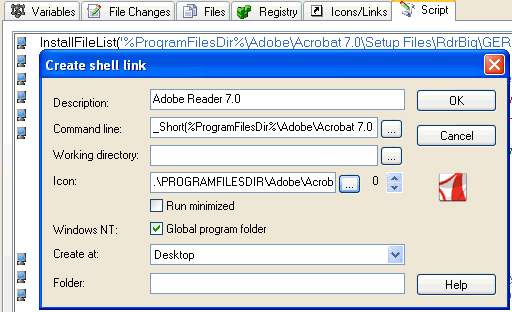
- Link generation using
_Short in a script for installing McAfee
VirusScan.