Transport Layer Cascades and Routing
Transport Layer connections can be cascaded. This allows you to route the requests that are processed via a Transport Layer over several Management Points with installed Transport Layer. The system always chooses the most direct route.
The direct route is not necessarily the cheapest and fastest, however. Please keep this in mind when you configure your Transport Layers.
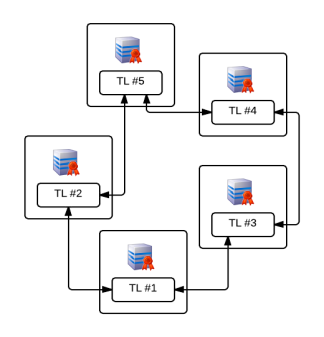
As seen in the example of a Transport Layer network above, a request set to TL#1 with the target TL#5 would always be routed via TL#2. If the connection between TL#2 and TL#5 fails, all requests will be automatically routed via TL#3, TL#4 and TL#5.
DSM provides a clear representation of all existing Management Points and their Transport Layer connections..
In the Infrastructure view select the Showing Transport Layer Connections command for the ORG object.
In addition to a clear representation, this view also provides the possibility to add or delete transport Layer Connections.