License Tab
The License tab provides detailed information about your current product license key. If no information is being shown it means you have not licensed the program and you should use the Enter / refresh license key button to activate your license. You can also use the Enter / refresh license key button to provide an upgraded license key and to refresh an expiring key. See the sections below for instructions on how to enter your license key.
Once you have entered a valid license, the program will immediately access and download the full Patch for Configuration Manager catalog. After that, the program will automatically check for a new catalog on a periodic basis.
The program will notify you if your license key has expired or is set to expire within the next 60 days.

Patch for Configuration Manager, US Federal Edition
When you purchase the US Federal Edition of Ivanti Patch for Configuration Manager, you receive a license key that enables you to view and use Information assurance vulnerability alerts (IAVA). IAVA is a notification of software application or operating system vulnerabilities identified by US-CERT (opens in a new window). These vulnerabilities are considered potential severe threats to US governmental systems and information.
Activating the license key enables you to:
- View IAVA details associated with application updates. Updates that contain fixes for vulnerabilities identified by US-CERT have an associated IAVA ID. This ID is used to identify the specific vulnerability in the IAVA database.
- View IAVA IDs in the Updates grid and use them to filter the grid. Select IAVA ID from the Column Chooser. For more details, see Understanding the Information in the Grid.
- Use IAVA IDs as rules when creating Custom Smart Filters.
Please contact your Ivanti Sales representative to acquire a Federal Edition license for Patch for Configuration Manager.
Obtaining the License
This section describes how to obtain license keys to obtain or update Patch for Configuration Manager using a 25 characters license key or trial activation.
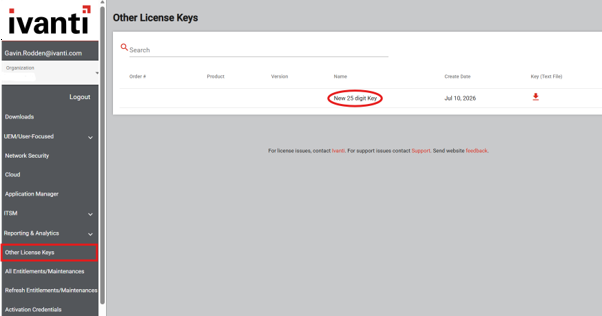
The Credentials-based activation method is now deprecated. To obtain your 25 characters license key, retrieve it from the Ivanti Licensing Portal under Other License Keys.
1. Open the Ivanti Licensing Portal at https://portal.ivanti.com/.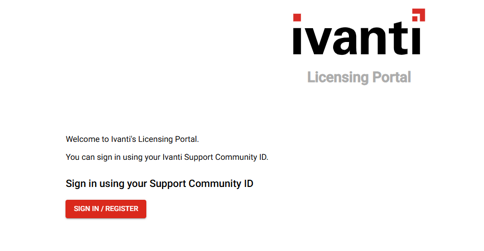
2. Sign in using your Community ID and password.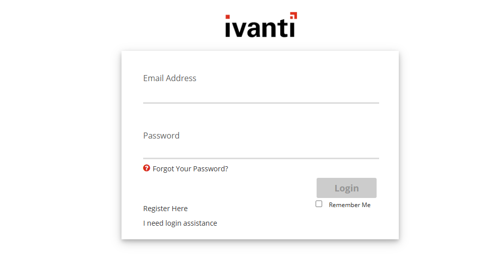
3. Locate the Other License Keys section to find your Patch for Configuration Manager 25-Characters license keys.
How to Enter a License Key
Until you activate Patch for Configuration Manager, you will be very limited in the actions you are allowed to perform.
- License Key Activation Method This is the primary activation method.
- Trial Activation Method This is the activation method that should be used if you are using the program on a trial basis. It enables you to test all the capabilities of Patch for Configuration Manager, but there are limitations. The license is only valid for 60 days, you are limited to 50 license seats and you can only publish five different updates. When the trial license expires, the program will stop refreshing its data files and many of the program features will no longer be available.
 License Key Activation Method
If You Have an Internet Connection
License Key Activation Method
If You Have an Internet Connection
You activate the program by entering one or more activation keys.
- If you have an electronic copy of your license key
- Click Enter / refresh license key.
The Activation dialog is displayed. - In the 25-digit keys box, click Launch.
The 25-Digit Key Activation dialog is displayed.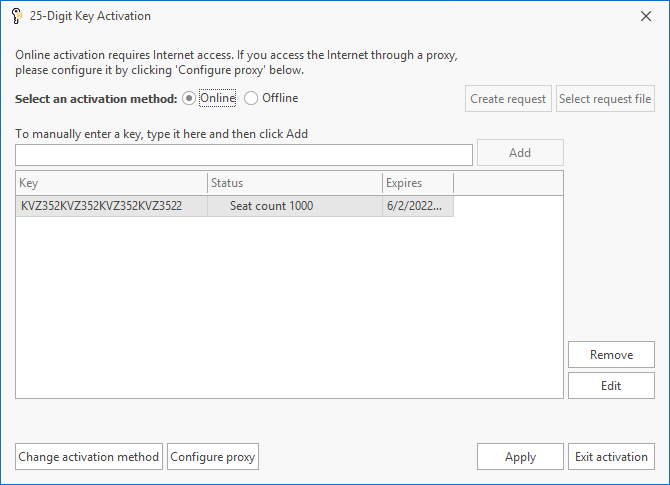
- (Optional) If your organization uses a proxy server, click Configure proxy and provide the credentials necessary for the activation process to reach the activation server.
- Choose Online activation.
- Verify that your activation key is specified in table in the center of the dialog.
Copy your key to your computer's clipboard and then paste it in the dialog by pressing Ctrl-v. Or, you can type the 25-character key into the To manually enter a key, type it here and then click Add box and then click Add. - Click Apply.
If the activation is successful the message Patch for Configuration Manager product activation successfully completed is displayed near the bottom of the dialog. - Click Exit activation.
If you have previously activated Patch for Configuration Manager using a key, the 25-Digit Key Activation dialog will instead be displayed; in this case, skip to Step 4.

If you are required to enter a user name and password each time you launch your browser and access the Internet, it typically means you are using a proxy server.
If you have multiple activation keys, repeat this step as needed.
Additional Functionality
- Remove: Enables you to remove the selected key.
- Edit: Enables you to modify the selected key.
-
If You Do Not Have an Internet Connection (Disconnected Network Mode)
This procedure will not work if you are at a secure site that does not allow files to be transferred out of the secure environment. For this case, see the section below titled If You are Activating From Within a Secure Disconnected Network.
- If you have an electronic copy of your license key
- Click Enter / refresh license key.
The Activation dialog is displayed. - In the 25-digit keys box, click Launch.
The 25-Digit Key Activation dialog is displayed. - Choose Offline activation mode.
- Verify that your activation key is specified in table in the center of the dialog.
Copy your key to your computer's clipboard and then paste it in the dialog by pressing Ctrl-v. Or, you can type the 25-character key into the To manually enter a key, type it here and then click Add box and then click Add. - Click Create request.
Two files are generated and saved to the desktop of your console computer: an XML file named LicenseInfo.xml and a text file named DisconnectedLicenseInfo.txt. The XML file is used in this procedure; the text file can be ignored. - Move the XML activation request file to a computer that has an Internet connection.
- On the Internet-connected computer, open a browser and go to the License Activation Portal (opens in a new window).
- Upload the LicenseInfo.xml activation request file.
The web portal will process the license information and generate a license file. - Download the processed license file and move it to the console computer.
- Within Patch for Configuration Manager, select Settings > License > Enter / refresh license key.
- In the 25-digit keys box, click Launch.
The 25-Digit Key Activation dialog is displayed. - Click Select request file.
- Go to the location of the processed license file and then click Open.
Patch for Configuration Manager will process the file and the program will be activated.
If you have previously activated Patch for Configuration Manager using a key, the 25-Digit Key Activation dialog will instead be displayed; in this case, skip to Step 4.
Additional Functionality
- Remove: Enables you to remove the selected key.
- Edit: Enables you to modify the selected key.
-
If You are Activating From Within a Secure Disconnected Network
Use this activation procedure if you are at a secure site that does not allow files to be transferred out of the secure environment.
- If you have an electronic copy of your license key
- Click Enter / refresh license key.
The Activation dialog is displayed. - In the 25-digit keys box, click Launch.
The 25-Digit Key Activation dialog is displayed. - Choose Offline activation mode.
- Verify that your activation key is specified in table in the center of the dialog.
Copy your key to your computer's clipboard and then paste it in the dialog by pressing Ctrl-v. Or, you can type the 25-character key into the To manually enter a key, type it here and then click Add box and then click Add. - Click Create request.
Two files are generated and saved to the desktop of your console computer: an XML file named LicenseInfo.xml and a text file named DisconnectedLicenseInfo.txt. The text file is used in this procedure; the XML file can be ignored. - Open the DisconnectedLicenseInfo.txt file and carefully copy the information contained in it to a piece of paper.
- On an Internet-connected computer, open a browser and go to the License Activation Portal (opens in a new window).
- Manually enter the activation request data and then click Submit.
The web portal will process the data and generate a license file. - Download the processed license file and move it to the console computer.
- Within Patch for Configuration Manager, select Settings > License > Enter / refresh license key.
- In the 25-digit keys box, click Launch.
The 25-Digit Key Activation dialog is displayed. - Click Select request file.
- Go to the location of the processed license file and then click Open.
Patch for Configuration Manager will process the file and the program will be activated.
If you have previously activated Patch for Configuration Manager using a key, the 25-Digit Key Activation dialog will instead be displayed; in this case, skip to Step 4.
Additional Functionality
- Remove: Enables you to remove the selected key.
- Edit: Enables you to modify the selected key.
-
Trial Activation Method
If You Have an Internet Connection
- Click Enter / refresh license key
The Activation dialog is displayed. - In the Trial box, click Launch.
The Trial Activation dialog is displayed.
- (Optional) If your organization uses a proxy server, click Configure proxy and provide the credentials necessary for the activation process to reach the activation server.
If you are required to enter a user name and password each time you launch your browser and access the Internet, it typically means you are using a proxy server. - Choose Online activation mode.
- Click Activate trial.
The trial key is automatically applied and information about the key is displayed in the dialog. If the activation is successful the message Patch for Configuration Manager product activation successfully completed is displayed near the bottom of the dialog. - Click Exit activation.
Additional Functionality
If you want to activate the program using a purchased license rather than a trial license, click Change activation method.
If You Do Not Have an Internet Connection (Disconnected Network Mode)
This procedure will not work if you are at a secure site that does not allow files to be transferred out of the secure environment. For this case, see the section below titled If You are Activating From Within a Secure Disconnected Network.
- Click Enter / refresh license key.
The Activation dialog is displayed. - In the Trial box, click Launch.
The Trial Activation dialog is displayed. - Choose Offline activation mode.
- Click Create request.
Two files are generated and saved to the desktop of your console computer: an XML file named LicenseInfo.xml and a text file named DisconnectedLicenseInfo.txt. The XML file is used in this procedure; the text file can be ignored. - Move the XML activation request file to a computer that has an Internet connection.
- On the Internet-connected computer, open a browser and go to the License Activation Portal (opens in a new window).
- Upload the LicenseInfo.xml activation request file.
The web portal will process the license information and generate a license file. - Download the processed license file and move it to the console computer.
- Within Patch for Configuration Manager, select Settings > License > Enter / refresh license key.
- In the Trial box, click Launch.
The Trial Activation dialog is displayed. - Click Select request file.
- Go to the location of the processed license file and then click Open.
Patch for Configuration Manager will process the file and the program will be activated.
Additional Functionality
If you want to activate the program using a purchased license rather than a trial license, click Change activation method.
If You are Activating From Within a Secure Disconnected Network
Use this activation procedure if you are at a secure site that does not allow files to be transferred out of the secure environment.
- Click Enter / refresh license key
The Activation dialog is displayed. - In the Trial box, click Launch.
The Trial Activation dialog is displayed. - Choose Offline activation mode.
- Click Create request.
Two files are generated and saved to the desktop of your console computer: an XML file named LicenseInfo.xml and a text file named DisconnectedLicenseInfo.txt. The text file is used in this procedure; the XML file can be ignored. - Open the DisconnectedLicenseInfo.txt file and carefully copy the information contained in it to a piece of paper.
- On an Internet-connected computer, open a browser and go to the License Activation Portal (opens in a new window).
- Manually enter the activation request data and then click Submit.
The web portal will process the data and generate a license file. - Download the processed license file and move it to the console computer.
- Within Patch for Configuration Manager, select Settings > License > Enter / refresh license key.
- In the Trial box, click Launch.
The Trial Activation dialog is displayed. - Click Select request file.
- Go to the location of the processed license file and then click Open.
Patch for Configuration Manager will process the file and the program will be activated.
Additional Functionality
If you want to activate the program using a purchased license rather than a trial license, click Change activation method.