MobileIron Threat Defense overview
The MobileIron Threat Defense Solution (MTD) consists of three components, as illustrated in the following figure.
- Mobile Device Management (MDM) server (MobileIron Core)
- MobileIron client application (Mobile@Work for iOS and Android)
- Management console (Threat Management Console)
Figure 1. MobileIron Threat Defense Solution
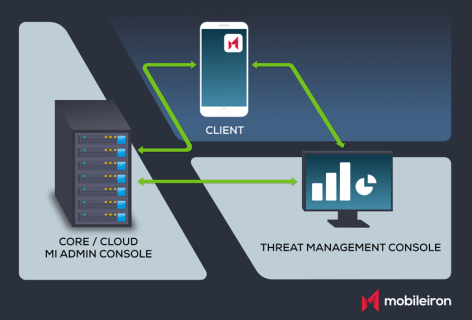
The Mobile Device Management (MDM) administrator is able to configure MobileIron Core to automatically install the required version of MobileIron client application, Mobile@Work for Android and iOS, deploy and enable an MTD Activation token on selected devices, and configure the components to interoperate to protect devices from mobile threats.
After an initial on-boarding, the list of workflows required to configure the MobileIron Threat Defense Solution are:
- MobileIron Core provides an MTD Activation token to Mobile@Work clients on selected devices.
- The threat defense functionality is enabled on selected devices.
- The Threat Management Console authenticates and establishes communication with MobileIron Core and synchronizes device parameters.
- The administrator defines threat defense policies on the Threat Management Console.
- The administrator defines MTD local actions policies on Core.
- MTD-enabled Mobile@Work clients check-in and begin communicating with Threat Management Console and with Core.
- MTD-enabled Mobile@Work clients periodically scan the device for threats and actions are taken in accordance with defined server-initiated and local action policies.