Authentication flow with Access
The following describe the authentication flow with MobileIron Access.
|
NOTE:
|
This section is not applicable if you are deploying Access + Standalone Sentry. |
Managed non-AppConnect app using Tunnel
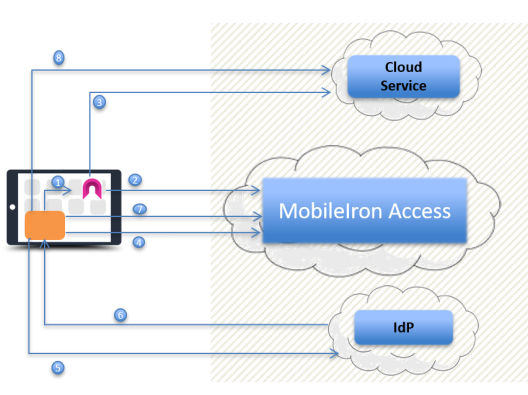
The following describes the authentication flow when a managed non-AppConnect app accesses a enterprise cloud service.
Figure 1. Authentication flow for a managed non-appconnect app
|
1.
|
A managed app triggers Tunnel. |
|
2.
|
If the device is in compliance, Tunnel establishes a secure connection with Access. |
|
3.
|
The managed app connects to the service provider (SP) through Tunnel. |
Split Tunneling is enabled: If split tunneling is enabled, and the split tunneling does not require tunneled connection to the service provider, the app connects directly with the service provider.
|
4.
|
If the managed app does not have a valid session token, the SP issues a SAML 2.0 AuthN Request to the app and redirects the app to MobileIron Access. |
|
5.
|
MobileIron Access issues a secondary SAML AuthN Request based on the AuthN Request in step 4. The AuthN Request is issued via SAML and points the user to the identity provider (IdP). |
|
6.
|
If the user does not have a current valid session token, the identity provider (IdP) requests the user’s credentials. If the credentials match, the IdP issues a SAML Assertion to the user. The SAML Assertion identifies the user and redirects the user to MobileIron Access. |
|
7.
|
The user presents the SAML Assertion to MobileIron Access. If conditional rules for access control allow, MobileIron Access issues a secondary SAML Assertion to the user. The secondary SAML Assertion identifies the user and redirects the user to the cloud service (SP). |
|
8.
|
The user presents the secondary SAML Assertion to the cloud service (SP). The SP verifies the secondary SAML Assertion and creates a session token to the app. The session token gives the user access to the SP. |
AppConnect apps with Access enabled (Core only)
AppConnect apps with Access enabled automatically use HTTP tunnel to MobileIron Access.