Configuring MobileIron Core as an intermediate CA
When you configure Core as an intermediate certificate authority, the managed device users can authenticate to servers within your company intranet; not just the MobileIron system.
After you get the certificate from your certificate vendor, you can add the certificates to MobileIron Core to create the intermediate certificate authority (CA).
Procedure
- In the MobileIron Core Admin Portal go to Services > Local CA.
-
Click on Add > Intermediate Enterprise CA.
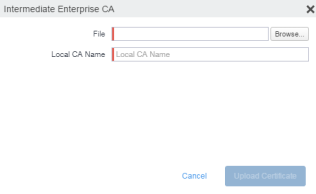
- Click Browse and navigate to the combined file.
- Click Open.
- Enter a recognizable name in the Local CA Name field.
-
Click Upload Certificate.
Your local certificate authority is now available to use. The local CA will be listed in Services > Local CA.