Certificates overview
Core is capable of distributing and managing certificates.
Certificates are mainly used for the following purposes:
- Establishing secure communications
- Encrypting payloads
- Authenticating users and devices
Certificates establish user identity while eliminating the need for users to enter user names and passwords on their mobile devices. Certificates streamline authentication to key enterprise resources, such as email, Wi-Fi, and VPN. Some applications require the use of certificates for authentication.
The following diagram compares a certificate to a passport:
Comparing certificates to a passport
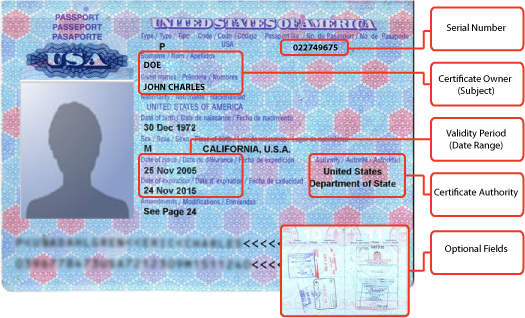
The certificate includes information that identifies the following information:
- the issuing certificate authority
- acceptable uses for the certificate
- information that enables the certificate to be validated.
This solution provides the flexibility to use Core as a local certificate authority, an intermediate certificate authority, or as a proxy for a trusted certificate authority.
Types of certificates
Core uses the following types of certificates:
|
Certificate type |
Description |
|
Portal HTTPS |
The identify certificate and its certificate chain, including the private key, that identifies Core, allowing a client (such as a browser or app) to trust Core. Typically, this certificate is the same certificate as the Client TLS and iOS Enrollment certificates. Core sends this certificate to the client as part of the TLS handshake over port 443 or 8443 when the client initiates a request to Core. This certificate must be a publicly trusted certificate from a well-known Certificate Authority if you are using mutual authentication. “Certificates you configure on the System Manager” in the Core System Manager Guide |
|
Client TLS |
The identify certificate and its certificate chain, including the private key, that identifies Core, allowing Mobile@Work for iOS and Android to trust Core. Typically, this certificate is the same certificate as the Portal HTTPS and iOS Enrollment certificates. Core sends this certificate to Mobile@Work for iOS or Android as part of the TLS handshake over port 9997 when Mobile@Work initiates a request to Core. “Certificates you configure on the System Manager” in the Core System Manager Guide |
|
MobileIron Core server SSL |
Can be either self-signed or third-party certificates. By default, Core generates self-signed certificates. You can use trusted certificates from third-party certificate providers such as Verisign, Thawte, or Go Daddy. Kerberos and Entrust certificates are also supported. |
|
Sentry server SSL |
Identifies the Sentry to the client and secures communication, over port 443, between devices and the Sentry. |
|
Windows Phone Enrollment |
Issued by Core to authenticate the device. This is the local CA certificate. |
|
Client identity |
Verifies the identity of users and devices and can be distributed through Certificate Enrollment. |
Windows devices require a root or intermediate certificate from a trusted certificate authority (CA) for registering with Core.