What you configure on Ivanti Neurons for MDM to use derived credentials
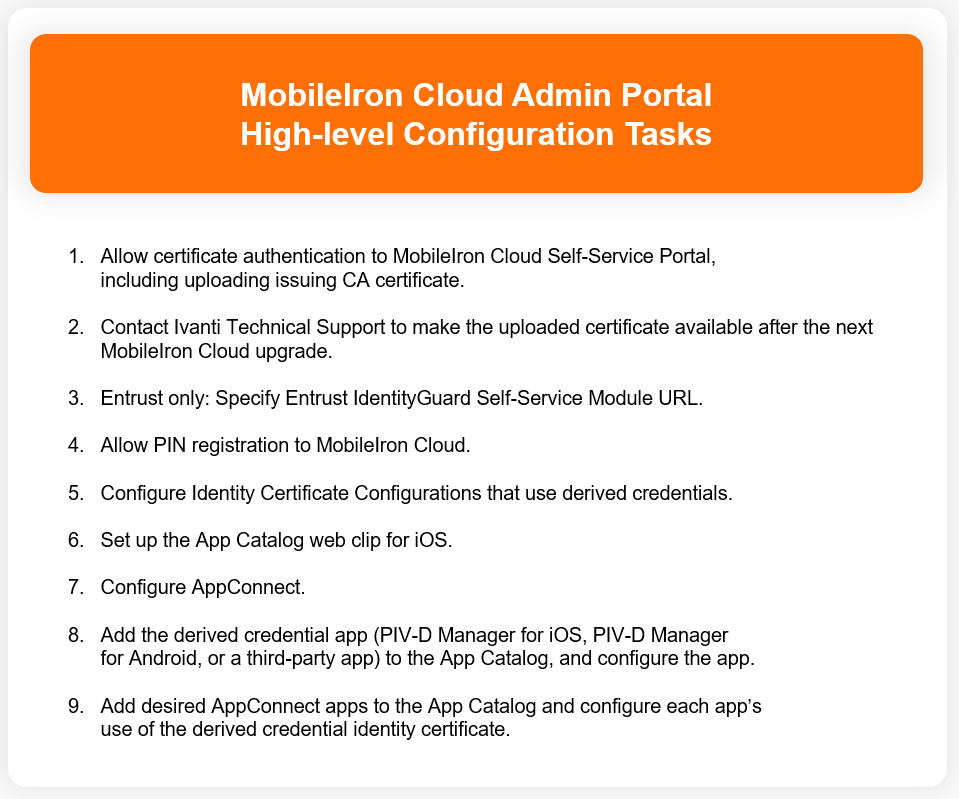
The following list shows the high-level configuration tasks necessary on Ivanti Neurons for MDM to support derived credentials for AppConnect.
Figure 1. High-level Configuration Tasks on Admin Portal
The following table provides more details. The table:
-
Describes each configuration task related to derived credentials that is necessary on Ivanti Neurons for MDM.
-
Indicates to which derived credential providers and device platform (iOS, Android AppConnect) the task applies.
-
Provides a cross-reference to the detailed steps for each task.
The task list assumes that you want device users to register Go using a registration PIN rather than with a user ID and password, since typically, device users who use smart cards do not have passwords. However, using a registration PIN is a requirement only with Entrust derived credentials. For other derived credential providers, it is not a requirement, and therefore the related tasks are optional.
|
Task |
Notes |
|
1. Allow device users to authenticate to the Ivanti Neurons for MDM self-service user portal with the identity certificate on their smart cards. Configuring certificate authentication to the Ivanti Neurons for MDM Self-Service Portal |
Allowing certificate authentication includes uploading to Neurons for MDM a valid issuing (CA) certificate or a valid supporting certificate chain. Entrust This task is required for Entrust derived credentials, because it is a prerequisite for configuring Neurons for MDM to use the Entrust IdentityGuard Self-Service Module (SSM) URL. All other derived credentials providers Although not strictly required for other derived credential providers, device users who use smart cards typically do not have passwords. Therefore, if you want them to be able to access the self-service user portal to, for example, generate a registration PIN, this step is required. IMPORTANT: The certificate that you upload to Ivanti Neurons for MDM is not immediately available for device users to authenticate against. It is only available for authentication after the next Ivanti Neurons for MDM upgrade. Contact Ivanti Technical Support to ask Ivanti to make your certificate available for use after the next upgrade. |
|
2. Provide the Entrust IdentityGuard Self-Service Module (SSM) URL to Ivanti Neurons for MDM. |
Entrust Ivanti Neurons for MDM uses this URL to get derived credentials from Entrust. The device user will use the PIV-D Manager app for iOS or the PIV-D Manager app for Android to activate the derived credential on a device. |
|
3. Allow device users to register Go on their devices to Ivanti Neurons for MDM using a one-time registration PIN. |
Entrust This task is required for Entrust derived credentials because device users need a registration PIN to request an Entrust derived credential. All other derived credentials providers Although not strictly required for other derived credential providers, device users who use smart cards typically do not have passwords. Therefore, if you want them to be register Go using a one-time registration PIN, this step is required. |
|
4. Configure Identity Certificate Configurations that use derived credentials. |
All derived credential providers The activated derived credentials are stored in Go for iOS or Secure Apps Manager for Android. Each of these components provides an identity certificate from the derived credential to the AppConnect app. You configure an AppConnect app to use derived credentials by referencing an Identity Certificate Configuration that specifies using derived credentials. The reference to the Identity Certificate Configuration is in the app’s AppConnect Certificate Configuration. You configure an Identity Certificate Configuration for one of these purposes, as needed: authentication, signing, or encryption. |
|
5. Set up the App Catalog web clip for device users. |
All derived credential providers iOS only You use the App Catalog web clip on devices to distribute apps from the Ivanti Neurons for MDM App Catalog. |
|
6. Configure AppConnect. |
All derived credential providers Configuring AppConnect allows device users to use AppConnect apps, including the derived credential app. |
|
7. Add the derived credential app to the App Catalog on Ivanti Neurons for MDM. Adding the PIV-D Manager app for iOS to the App Catalog Adding a third-party iOS derived credential app to the App Catalog |
Entrust on Android Add the PIV-D Manager app for Android to the App Catalog on Ivanti Neurons for MDM. Entrust and DISA Purebred on iOS Add the PIV-D Manager app for iOS to the App Catalog on Ivanti Neurons for MDM Other derived credential providers on iOS Add the appropriate third-party derived credential app to the App Catalog on Ivanti Neurons for MDM. |
|
8. Configure the PIV-D Manager app for iOS. Adding the PIV-D Manager app for iOS to the App Catalog |
iOS only Configure the PIV-D Manager app for iOS as follows: Entrust
DISA Purebred
For both Entrust and DISA Purebred
|
|
9. Configure the PIV-D Manager app for Android. |
Entrust Android only Configure the PIV-D Manager app for Android to:
|
|
10. Configure a third-party iOS derived credential app. Adding a third-party iOS derived credential app to the App Catalog |
Derived credential providers other than Entrust or DISA Purebred Derived credential providers other than Entrust or DISA Purebred iOS only You configure an iOS third-party derived credential app to receive app-specific settings from Ivanti Neurons for MDM, as defined by the app vendor or developer. |
|
11. Add the AppConnect apps that will use the derived credential to the App Catalog on Ivanti Neurons for MDM. These AppConnect apps can include Web@Work, Docs@Work, Email +, and in-house AppConnect apps. Adding Web@Work for iOS to the App Catalog Adding Web@Work for Android to the App Catalog Adding Docs@Work for iOS to the App Catalog Adding Docs@Work for Android to the App Catalog Setting up Email+ to use derived credentials |
All derived credential providers When you add each AppConnect app that uses derived credentials to the App Catalog, you specify in its AppConnect Certificate Configuration which derived credential identity certificate to use. |