Appendix
Clustering in a Federated Deployment
You can deploy clustered Ivanti Policy Secure appliance as IF-MAP servers or IF-MAP clients. You can configure IF-MAP servers in an Active Passive cluster. IF-MAP clients must be configured with the cluster's virtual IP (VIP) and must communicate with only the active node.
The session changes in federation cluster networks are propagated rapidly. The clients can access resources without experiencing delays, and there is no single point of failure. If any single device fails, the passive node recovers in seconds. You can configure IF-MAP client in Active/Active or Active/Passive cluster.
You can also use clustered Ivanti Policy Secure appliances as server replicas. The following figure illustrates a complex network of clustered and standalone Ivanti Policy Secure appliance.
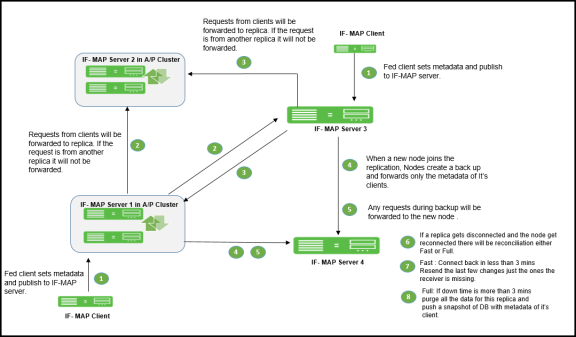
Replica IF-MAP Server
The IF-MAP server has the capability to replicate all of its IF-MAP data to other IF-MAP servers. For example, if you have a network in Boston and a network in London, you can run IF-MAP servers in both places and configure the IF-MAP servers in both locations to replicate data to one another. An endpoint that accesses Ivanti Policy Secure or Ivanti Connect Secure can access protected resources behind any of the Ivanti Policy Secure devices connected to local or replica IF-MAP server.
Each replica IF-MAP server communicates in a bidirectional way with all the connected IF-MAP server replicas. The data on each IF-MAP server is available on every server and enhances the system performance. A 3-way replica in mesh topology in which all the servers are connected to each other is supported.
The following figure depicts one possible deployment replica scenario.
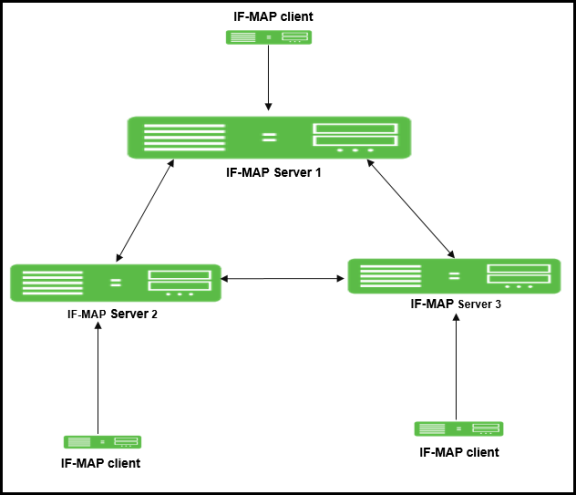
Bandwidth issues determine the effectiveness of the entire IF-MAP Federation's operation. A key to timeliness is that IF-MAP servers should generally be placed geographically close to IF-MAP clients to ensure the most efficient operation. Replicas in an IF-MAP federated network allow user session data to be shared over greater distance. For example, the user in Boston can connect with servers in London through the replicated IF-MAP server in London.
To configure IF-MAP server replicas to communicate:
- Select System > IF-MAP Federation > This Server.
- Click the Replicas tab and then select New IF-MAP replica to configure Replica settings.
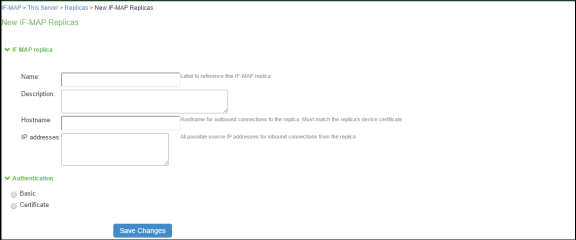
- Type a Name for the replica IF-MAP server.
- (Optional) Enter a Description for the replica or replica network.
- For Hostname, enter the hostname that exactly matches the replica's device certificate. This is used when this IF-MAP server initiates a connection to the replica. Use the fully qualified domain name (FQDN) of the replica's internal or external interface. For a cluster, use the FQDN of the internal or external VIP.
- After IP addresses, provide one or more IP addresses from which the replica can initiate connections to this server. If the replica is standalone, for survivability list both the internal and external network interfaces. If the replica is a cluster, for survivability list the internal and external network interfaces of both cluster nodes.
- Select the Authentication method: Basic or Certificate.
- For Basic, enter a username and password.
- For Certificate, select the CA that issued the IF-MAP replica's certificate. Enter restrictions, one per line. If any restrictions match, (for example CN=ic.example.com), the certificate is accepted.
- Click Save Changes to create the connection for the replica.
Coordinated Threat Control in a Federated Environment
You can use Juniper Networks IDP Series Intrusion Detection and Prevention Appliance with Federation to detect attacks from within the network. Any endpoint that is on any connected Ivanti Policy Secure device or Ivanti Connect Secure can be monitored for suspicious activity. IF-MAP clients can work together to provide coordinated threat control across all attached enforcement points.
Endpoints that access Ivanti Connect Secure can be monitored by standalone IDP. Endpoints that access Ivanti Policy Secure device can be monitored by either standalone IDP, Integrated Security Gateway Intrusion Detection and Prevention ISG-IDP, or SRX Series Services Gateway IDP.
The IDP device reports attacks to the Ivanti Policy Secure or Ivanti Connect Secure to which it is connected. The Ivanti Policy Secure or Ivanti Connect Secure configured as an IF-MAP client reports the user's activity to the IF-MAP server using IF-MAP. The IF-MAP server notifies the authenticating Ivanti Policy Secure or Ivanti Connect Secure about the attack, and the authenticating device applies its IDP sensor policies. If new roles or restrictions are imposed on the endpoint based on policies configured on the device, the Ivanti Policy Secure or Ivanti Connect Secure publishes the new session information for the endpoint to the IF-MAP server.
When any other Ivanti Policy Secure or Ivanti Connect Secure polls the IF-MAP server, the newly published session information for the user determines the protected resources that the user can access. The following figure shows a deployment with IDP.
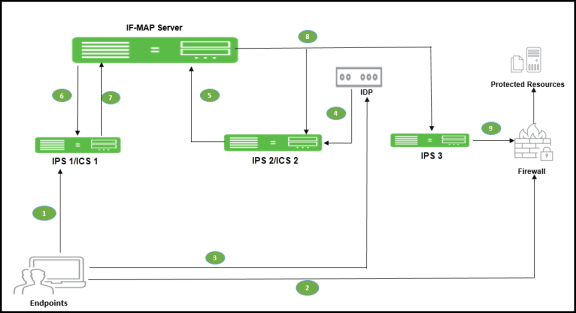
The following steps summarize the interaction with IDP in an IF-MAP federated network.
- The endpoint successfully accesses Ivanti Policy Secure or Ivanti Connect Secure 1 and publishes session data to the IF-MAP server through Session-Export policies.
- The endpoint attempts to access protected resources behind the SRX firewall, which is connected to Ivanti Policy Secure 3. Ivanti Policy Secure 3 uses IF-MAP to query the IF-MAP server for session information about the endpoint. After receiving session information, Ivanti Policy Secure 3 uses Session-Import policies to determine roles and then provisions an auth table entry on the SRX firewall. Ivanti Policy Secure 3 subscribes to updates about the endpoint's session data.
- After the endpoint is successfully connected to resources behind the SRX firewall, IDP detects an attack originating from the endpoint.
- IDP notifies Ivanti Policy Secure 2 of the attack. (If IDP is standalone IDP, Ivanti Policy Secure 2 could also be an Ivanti Connect Secure. If IDP is an SRX firewall with the ISG-IDP security module, Ivanti Policy Secure 2 cannot be a Ivanti Connect Secure, because the Ivanti Connect Secure does not communicate with the SRX firewall.)
- Ivanti Policy Secure 2 updates the endpoint session data on the IF-MAP server with information about the attack.
- The IF-MAP server notifies Ivanti Policy Secure or Ivanti Connect Secure 1 (the original authenticating device) about the attack. The authenticating Ivanti Policy Secure or Ivanti Connect Secure is responsible for consuming the attack.
- The authenticating Ivanti Policy Secure or Ivanti Connect Secure applies its sensor policies to the endpoint and updates the endpoint's session according to actions specified in the sensor policies. For example, the endpoint must be assigned a more restrictive role. The Ivanti Policy Secure or Ivanti Connect Secure publishes the new session information to the IF-MAP server, and the new information replaces the old data.
- The IF-MAP server notifies any Ivanti Policy Secure that subscribe to updates about the endpoint. This includes Ivanti Policy Secure 3, which is connected to the SRX firewall.
- Ivanti Policy Secure 3 applies Session-Import policies to the new session data for the endpoint and pushes the resulting roles to the SRX firewall.
- If the new set of roles denies access to the protected resources, access is denied.
Performance and Scalability
The IF-MAP server is supported on both hardware and virtual platforms.
The scalability of the IF-MAP server depends on:
- Type of platform- Hardware or VM image.
- If the IF-MAP server is used as a dedicated IF-MAP server and the virtual memory available. You must configure Ivanti Policy Secure as dedicated only when you want it to be fully used as an IF-MAP server and not for other processes such as authentication.
- Number of roles and attributes.
- For example, PSA 7000 has no impact of dedicated IF-MAP server setting option due to kernel memory limit of process. With single role for session, scale limit is up to 300K fed-wide sessions.
- PSA5000/SM360/PSA3000, the scale limit is 150K fed-wide session on dedicated IF-MAP appliance.
- For virtual platform (VM image), scalability is limited and based on the size of virtual memory.
The performance on IF-MAP server is described below:
- The IF-MAP server supports 24 export/import requests together per second.
- The time interval required to access the resource protected by the firewall after the user log in is 20 seconds.
- Latency and bandwidth between IF-MAP replicas affect the amount of time taken to replicate large amounts of data during heavy IF-MAP server utilization.
- The IF-MAP federation replica is supported over transatlantic link, however we might face issues due to WAN connection and latency between the devices.
- For clustering or replication, there is no impact on the scalability.