Configuring System Maintenance Options
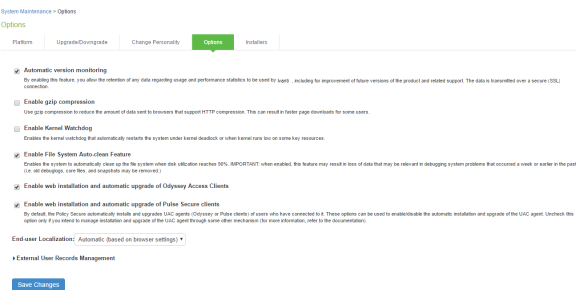
You can use the maintenance options page to enable various system maintenance features.
To enable various system maintenance features:
- Select Maintenance > System > Options to display the maintenance options page.
- Select options as described in table.
- Save the configuration.
|
Options |
Guidelines |
|---|---|
|
Automatic version monitoring |
If you enable this option, the system reports the following data to Ivanti Policy Secure:
We strongly recommend that you enable this service. |
|
Kernel Watchdog |
Enables the kernel watchdog that automatically restarts the system under kernel deadlock or when kernel runs low on some key resources. Enable the kernel watchdog only when instructed by Ivanti Global Support Center. |
|
File System Auto-clean |
Enables the system to automatically clean up the file system when disk utilization reaches 90%. The clean-up operation deletes files that might be relevant in debugging—for example, debug logs, core files, and snapshots might be deleted. |
|
Web installation and automatic upgrade of Ivanti Secure Access Client |
After you deploy Ivanti Secure Access Client software to endpoints, software updates occur automatically. A Ivanti Secure Access Client can receive updates from the server. If you upgrade the software on your server, updated software components are pushed to a client the next time it connects. A bound endpoint receives connection set options and connections from its binding server, but it can have its Ivanti Secure Access Client software upgraded from any server that has the automatic upgrade option enabled. During a client software upgrade the client loses connectivity temporarily. |
|
Virtual Terminal console |
Enables the virtual terminal on a virtual appliance. Clear this check box to use the serial console. Changing this setting will restart the system. |
|
End-user Localization |
Select one of the following options: •Automatic (based on browser settings) •English (U.S.) •Chinese (Simplified) •Chinese (Traditional) •French •German •Japanese •Korean •Spanish |
|
External User Records Management |
|
|
Persistent user records limit |
Specify the maximum number of user records. This feature is useful when system performance is affected due to many user records. We highly recommend you consult Ivanti Global Support Center prior to using this feature. Deleting a user record removes all persistent cookies, SSO information, and other resources for that user. It does not remove the user record from the external or internal authentication server. If you delete a user record and that user logs back in to the authentication server, new user records are created. Records are not removed if that user is currently logged in. |
|
Number of records to delete when the limit is exceeded |
Specify a number. Older records are removed first. A user record is not deleted if that user is currently logged in. |
|
Delete records now |
Check whether the persistent user records limit has been exceeded. If it is, delete the number of user records specified in the option above. |
|
Automatic deletion of user records during new user log ins |
Check whether the persistent user records limit will be exceeded whenever a new user record is about to be created. If true, delete the records prior to creating the user new record. |