Configuring Ivanti Policy Secure with PAN Next Generation Firewall
The network security devices are configured with Ivanti Policy Secure for admission access control. A high-level overview of the configuration steps needed to set up and run the integration is described below:
-
The Administrator configures the PAN syslog client on Ivanti Policy Secure Admin UI.
The network security device acts as a syslog client on which syslog forwarding is enabled and Ivanti Policy Secure receives the forwarded syslog messages.
-
The Administrator then configures a set of policies that define what actions are to be taken on user sessions, based on the data in the threat events.
The actions on sessions supported are
-
Ignore - Logs and ignores the syslog message.
-
Terminate session - Removes the user session.
-
Disable - Removes the user session and disables the user.
-
Change role - Update the user session with limited role specified. The role change can also be marked as permanent or only for that session.
-
-
The user templates are used to identify events supported by the security device. It also provides the pattern match for collecting values for predefined variables which are used for acting on a session. The predefined variable used are source IP, source user, event and severity.
This section covers the following topics:
Admission Control Template
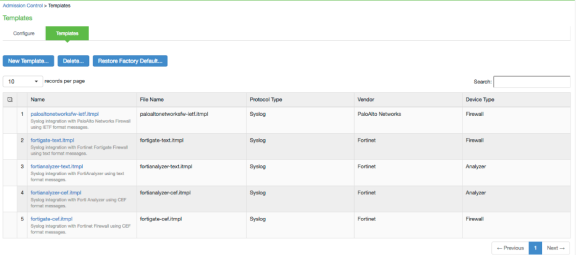
The admission control template provides the list of possible events that can be received from the network security device along with regular expression to parse the message. The template also provides possible actions that can be taken for an event.
Ivanti Policy Secure is loaded with default templates for Fortigate, Fortianalyzer and PAN next generation firewall. Admin can create templates for other security devices and can upload to templates.
You can view the list of configured integration templates that provides the list of network security devices and the supported protocol type using Endpoint Policy > Admission Control > Templates.
To view the admission control templates:
-
Select Endpoint Policy > Admission Control > Templates.
Admission Control Policies
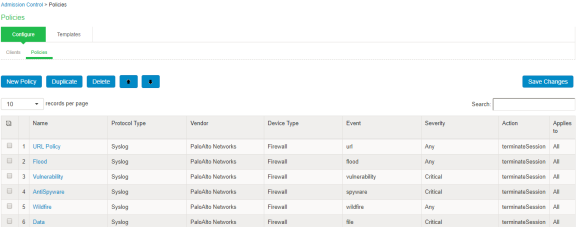
The admission control policies define the list of actions to be performed on Ivanti Policy Secure for the user sessions. The actions are based on the event and the severity information received from the network security device.
To view and add the new integration policy:
-
Select Endpoint Policy > Admission Control > Policies.
-
Click New Policy.
-
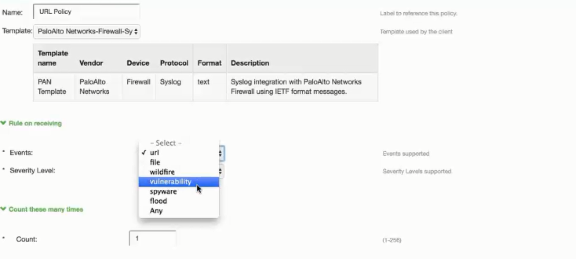
Enter the policy name.
-
Select PaloAlto Networks-Firewall-Syslog-text as a template.
-
Under Rule on Receiving, select the event type and the severity level. The event types and the severity level are based on the selected template.
-
Under Count these many times, enter the number between 1-256.
-
Under then perform this action, select the desired action.
-
Ignore (log the event) —Received syslog event details are logged on the Ivanti Policy Secure and no specific action is taken.
-
Terminate user session— Terminates the user session on the Ivanti Policy Secure for the received messages.
-
Disable user account— Terminates the user session and disables the user on the Ivanti Policy Secure for the received messages.
-
Replace user role with this role— Changes the roles assigned to the user on Ivanti Policy Secure so that restriction/privileges for the user can be changed.
-
Specify whether to apply the role assignment permanently or only for the session.
-
-
-
Under Roles, specify:
-
Policy applies to ALL roles—To apply the policy to all users.
-
Policy applies to SELECTED roles—To apply this policy only to users who are mapped to roles in the Selected roles list. You must add roles to this list from the Available roles list.
-
Policy applies to all roles OTHER THAN those selected below—To apply this policy to all users except for those who map to the roles in the Selected roles list. You must add roles to this list from the Available roles list.
-
-
Click Save changes.
Admission Control Client
The admission control clients are the network security devices on which the syslog forwarding is enabled. The messages are received by the syslog server module running on Ivanti Policy Secure.
To add a client:
-
Select Endpoint Policy > Admission Control > Clients.
-
Click New Client.
-
Enter the name of the client that will be added in the Ivanti Policy Secure.
-
Enter the description.
-
Enter the IP address of the client.
-
Select the template used by the client.
-
PaloAlto Networks-Firewall-Syslog-text
-
-
Click Save Changes.