Troubleshooting and FAQs
This section covers issues encountered during Ivanti Secure Access Client iOS configurations.
1. How to collect ISAC iOS logs?
To collect client logs on iPhone or iPad:
1.On your iPhone / iPad, open the Ivanti Secure app.
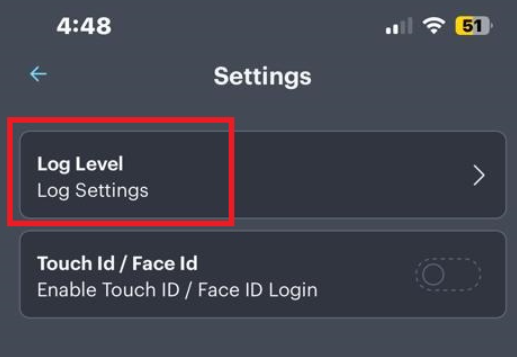
2. Go to Settings and click on Log Level.
3. Clear the old logs, and set it to high.
2. IKEV2 connection fails on iOS due to IKE code change in iOS17.
IKEv2 VPN connection fails when users upgrade their iOS to version 17. This is because of a change in the IKE code to make it stricter in compliance with RFC7296.
Ivanti strongly recommends not to upgrade the iOS version to iOS17, if you are using IKEV2 connections, until the issue is fixed.
3. How to install certificate in ISAC on iOS device?
To install certificate in ISAC on iOS device:
1.Share the certificate to your Gmail/Outlook mail Id.
2.Open the Gmail/Outlook app in your iOS device.
3.Open the email.
4.Click on certificate.
5.From the options provided at the top right corner of the screen, select the ISAC application.
6.Enter the password to import the certificate.
7.Then, select the connection URL, and map it to certificate from the drop-down list.
4. Client Authentication Certificate Is missing in Ivanti Secure Access Mobile Client while using Intune on iOS 9.11.0.
Some of the conditions causing the issue include:
•An iOS or ISAC upgrade.
•There is a plugin identifier instead of NetworkExtension identifiers on the iOS app which is causing this issue from the MDM vendors side.
•There are multiple certificate auth issues detected in Intune environment.
•iOS client (Pulse Secure) does not have any custom code to read the certificate from the designated store where the MDM agent stores them. ISAC uses Apple APIs to read the certificate.
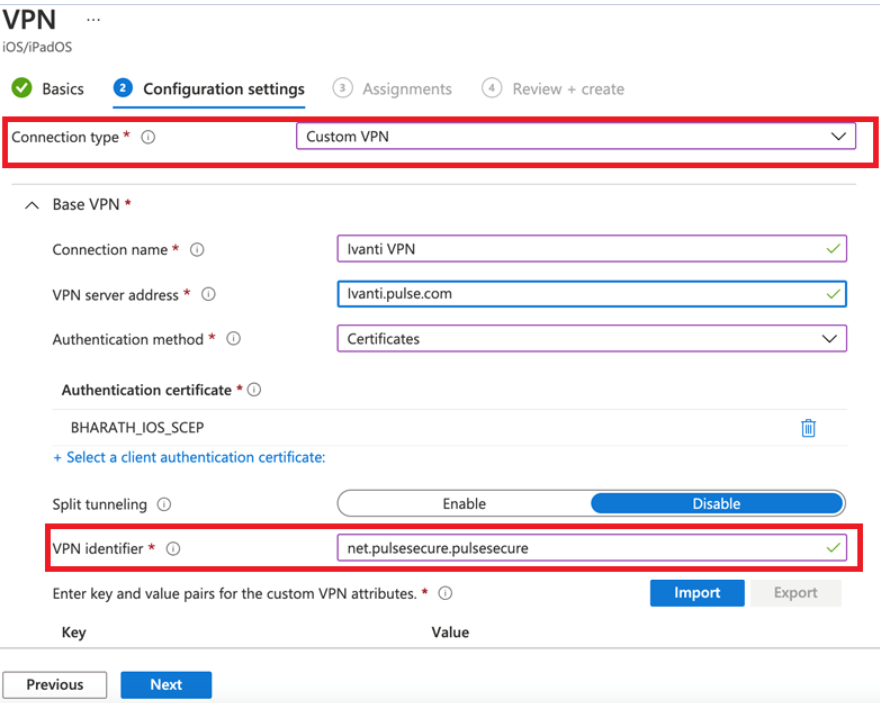
Ivanti recommends to use the Custom VPN identifier " net.pulsesecure.pulsesecure" as a permanent workaround to overcome this issue. Moving to a Custom Identifier helps to avoid migrating certificate from the Plugin identifier to NetworkExtension during the ISAC or iOS upgrade.
The key/value pair within Intune should be selected as Connection Type = "Custom VPN" and VPN Identifier as "net.pulsesecure.pulsesecure".