A REST-Based Architecture
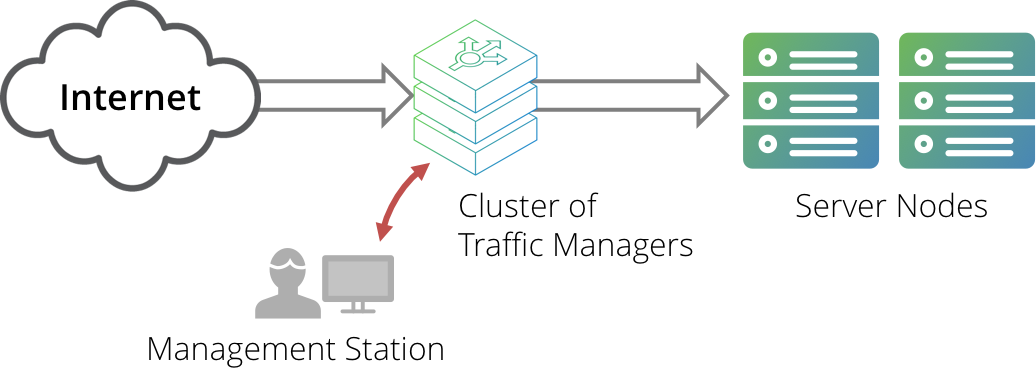
A cluster of Traffic Managers is typically managed through the web-based administration user interface (Admin UI) on one of the cluster members. The Traffic Manager’s REST API provides an alternative means to remotely administer, configure, and monitor a Traffic Manager cluster.
The REST service is enabled by default for new Traffic Manager instances. To toggle the REST service between enabled and disabled, see Enabling and Disabling the API.
For Traffic Managers running version 11.0 or earlier, the REST service is disabled by default. To preserve the integrity of your configuration, the REST service state is unchanged during an upgrade to a Traffic Manager version later than 11.0.
The Traffic Manager REST API can be used by any HTTP client or application environment that supports HTTP services.
A management application can issue a REST request to any one of the Traffic Managers in a cluster. The application may be running on a stand-alone management server, one of the server nodes, or even on one of the Traffic Managers. All Traffic Managers in the cluster automatically synchronize their configuration, so a configuration change sent to one machine is automatically replicated across the cluster.
ATTENTION
When upgrading your Traffic Manager cluster to the latest software version, do not attempt to use the REST API until all cluster members have been successfully upgraded. As configuration is automatically synchronized across all cluster members, only one Traffic Manager should be used to update the entire cluster at a time. Use of the REST API on a cluster in a mixed-version state can result in unexpected behavior. For more information on upgrading, see the Pulse Secure Virtual Traffic Manager: Installation and Getting Started Guide applicable to your product variant.
ATTENTION
Due to the nature of the REST API's ability to access and modify your Traffic Manager configuration, it is strongly recommended that you disallow access to this service from outside of your trusted network.