Exporting a Configuration Document From the Admin UI
To obtain a pre-constructed configuration document representing the configuration of the current Traffic Manager, click Services > Configuration Summary in the Admin UI. To generate a configuration document, use the "Export Configuration document" section.
This functionality is also available for previously-saved configuration backups, through the System > Backups page.
Exporting a configuration document representing the current configuration
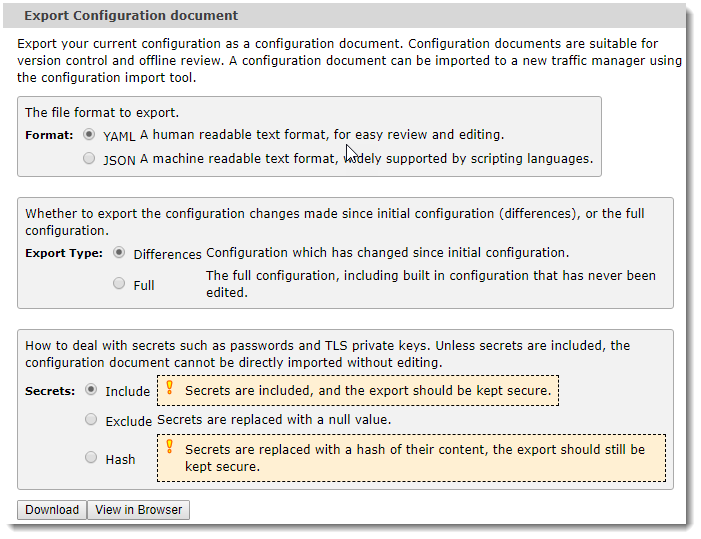
To modify the appearance of a configuration document, use the following options:
|
Option |
Value |
Description |
|
Format |
YAML |
Create the configuration document in human-readable YAML text format. |
|
JSON |
Create the configuration document in machine-readable JSON text format. |
|
|
Export Type |
Differences |
Include only those configuration changes made since the Traffic Manager was first configured. |
|
Full |
Include all configuration present on the Traffic Manager, irrespective of whether the configuration was set during initial configuration or at some time since. |
|
|
Secrets |
Include |
Include all secret data, such as passwords and TLS private keys. A configuration document created with this option is complete and ready to be used with the Configuration Importer, but is unsafe to share publicly. Ivanti strongly recommends taking additional security measures when creating configuration documents with this option selected. |
|
Exclude |
Redact all secret data. A configuration document created with this option is safe to share publicly (as allowed by your organizational security policy), or to check into a version control system. However, to properly configure a new Traffic Manager instance from this configuration document, you must first edit in all required secret data items. |
|
|
Hash |
Replace all secret data items with a hash of their contents. Use this option to compare configuration document versions and to observe when secret data might have changed, without revealing the secrets to casual observers. Ivanti recommends that a document created with this option should be kept securely to minimize the risk of offline password cracking and other such attacks. |
To generate a configuration document based on the selected options, click one of the following buttons:
•To download the configuration document to your local workstation, click Download.
•To display the configuration document in your browser, click View in Browser.