Sizing Your Cluster
Back-End Servers
The Virtual Traffic Manager can support an unlimited number of back-end servers. These might include Web servers, mail servers and FTP servers. They can run any software on any platform to provide the services the Virtual Traffic Manager manages.
The servers can be arranged into pools to serve different types of content. For instance, you can have several groups of Web servers, including Windows machines running IIS™ and UNIX machines running Zeus Web Server or Apache™, to serve different types of static and dynamic Web content. The Virtual Traffic Manager’s system of pools and rules allows you to classify requests and send them to different groups of servers. Pools and rules are explained in Initial Configuration
The number of servers you dedicate to a certain function may vary. To serve static Web pages, if requests are light, two Linux machines could be sufficient; while more complex Sun JSP™ or Microsoft ASP pages might be served by larger numbers of machines.
The Virtual Traffic Manager allows you to use any number of machines; should your requirements change, you can add or remove back ends dynamically without disrupting your service.
Content Management on Back Ends
If a number of back ends serve the same site, changes in the site content must be propagated to each back-end server. This can be done in one of two ways:
•Each back end can store a local copy of the content, and the data can be synchronized regularly.
•A shared file system can be used, such as an NFS file server. This stores the content, and each back-end server retrieves data when required.
To serve static Web content, either content management method works well. For SMTP or POP3 servers, a shared file system will be needed because files are modified by that service.
Front-End Servers
A simple deployment of Virtual Traffic Managers would involve one front-end machine. This gives access to the full functionality of the Virtual Traffic Manager software, except for front-end fault tolerance. In other words, the Virtual Traffic Manager machine is a potential single point of failure.
For a fully fault-tolerant set-up, two or more Virtual Traffic Managers should be used. Their IP addresses can be arranged into a Traffic IP Group which provides fault tolerance if one machine should fail. Traffic IP groups are described in Traffic IP Groups and Fault Tolerance
A common network deployment is to have the front-end machines on two separate networks: one to communicate with the Internet, and one with the back ends (probably a private network). It is possible, however, to deploy front ends and back ends on just one network. You should ensure that all machines routable from the Internet are appropriately firewalled. See System Security for a discussion of firewalling and network security.
You might want to increase throughput by adding extra network cards to your Virtual Traffic Managers. Having two network cards can also simplify deploying a Virtual Traffic Manager on two separate networks, although it is not necessary for this.
The Virtual Traffic Manager is highly scalable. Adding more servers or upgrading your existing hardware will increase the performance of your traffic management correspondingly. If you wish to add more Virtual Traffic Manager machines later, this can be done easily without disturbing your existing set-up or interrupting your service.
If you are using a software version of the Virtual Traffic Manager product family, you should ensure that the host machine is not overloaded with other applications and services. For example, running a web browser or other GUI tools on the same server will diminish the capacity of the software to manage traffic on the server.
The diagram that follows shows a typical traffic-managed server farm. The front-end machines have separate front-end and back-end network cards as described previously.
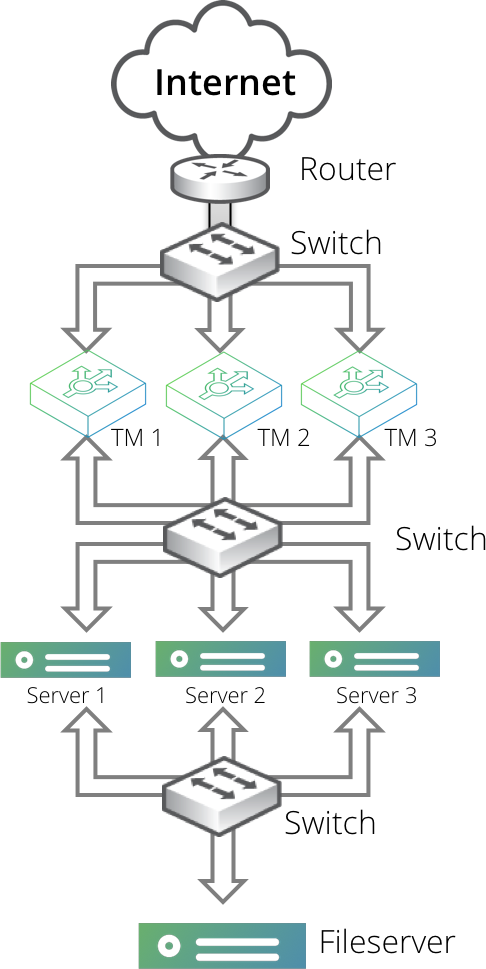
Content served by the back ends is held on an NFS file server. Each back-end server has two network cards, one to talk to the Virtual Traffic Manager machines and one to talk to this file server, to maximize throughput.