Ivanti Neurons for Zero Trust Access Overview
Ivanti Neurons for Zero Trust Access (nZTA) is a cloud-based SaaS (software as a service) application that provides fully-managed zero-trust authentication and access control for an organization’s application infrastructure. nZTA enables administrators to define end-to-end authorization and authentication policies that control application visibility, access, and security for all users and their devices.
The diagram below illustrates the different components in nZTA:
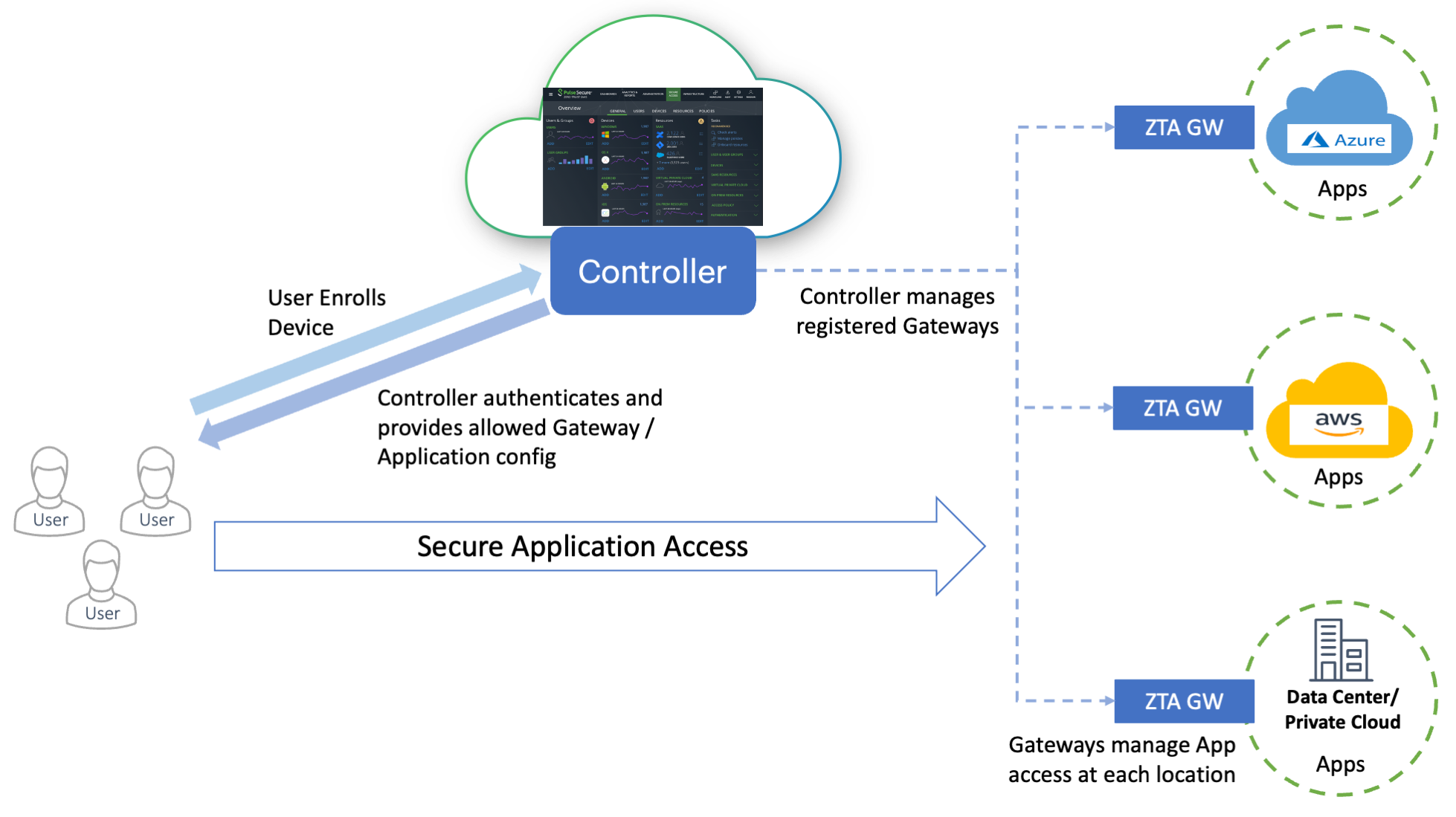
A typical nZTA deployment
Best Practice
Always call the logout endpoint to end the session
When using the Neurons for Zero Trust Access REST APIs:
•Always call the logout endpoint to end the session:
•On normal completion of your API workflow.
•In error paths and on timeouts (use a finally block or equivalent to guarantee execution).
•Before re-attempting login if you receive authentication errors that could be session-related.
This practice ensures clean session management, improves security, and helps avoid unexpected authentication issues.
Using the logout endpoint
GET /api/my-session/logout
Purpose: Terminates the current authenticated session.
Authentication: Requires a valid active session (for example, session cookie or Authorization header).
Request:
Query parameters: none
Body: none
Responses:
200 OK – Logout successful. The current session is invalidated; subsequent API calls require re-authentication. Response body may be empty.
401 Unauthorized – No active session or invalid/expired credentials.
405 Method Not Allowed – If GET is not permitted on this endpoint.
5xx – Server-side error.
Example requests:
Using bearer token: curl -k -X GET "https://<nsa-host>/api/my-session/logout" -H "Authorization: Bearer <access_token>"
Using session cookie: curl -k -X GET "https://<nsa-host>/api/my-session/logout" -H "Cookie: <session_cookie_name>=<session_id>"
Example response: HTTP/1.1 200 OK
If you receive 200 OK for this endpoint, logout is successful.
To learn more about nZTA, see the Tenant Admin Guide.
This guide describes the REST API service running on the Controller and includes a list of supported API calls.
Customer code calling Ivanti REST APIs must always handle HTTP return codes; for example, both cloud products can return 429 (Rate Limited), 503 (Service Unavailable), etc. Server side cloud capacity and rate limits are subject to change over time without notice. It is important to ensure that all integration code properly handles HTTP status codes and can retry requests at a later time where applicable.
