Any time you make changes to profiles, settings or configurations in the Avalanche Console, perform a server synchronization to send all the changes to your servers. A server synchronization updates the settings for the selected location or locations.
To perform a synchronization:
| • | Click the Sync Now button in the tool bar to synchronize all the servers immediately. |
-Or-
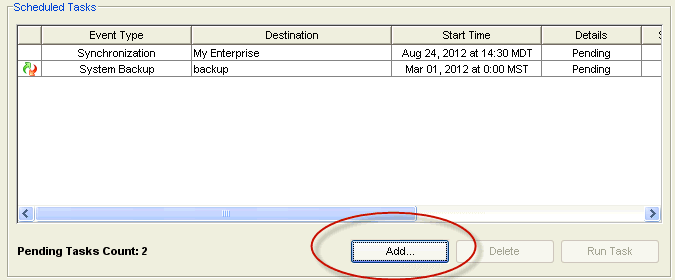
| 1 | Click Tools > Task Schedule. |
The Task Schedule dialog box appears.
Scheduled Tasks
| 2 | Click Add. |
The Scheduled Tasks Wizard appears.
| 3 | Select Synchronization from the Task Type drop-down list and click Next. |
The Select Task Destinations screen appears.
| 4 | Select the locations by enabling the check box next to the location name. You can select all locations by clicking Select All. |
| 5 | Click Next. |
The Select Scheduling Options screen appears.
| 6 | Determine when the event will occur and click Next. |
The Review Your Task screen appears.
| 7 | Review your the task to ensure that it is correct and click Next. |
The Task Scheduled! screen appears.
| 8 | Click Next to schedule a new event, or click Finish. |
The task is added to the Scheduled Tasks list. Once it has completed, it will move to the Completed Tasks list.

© 2012 Wavelink Corporation. All Rights Reserved.