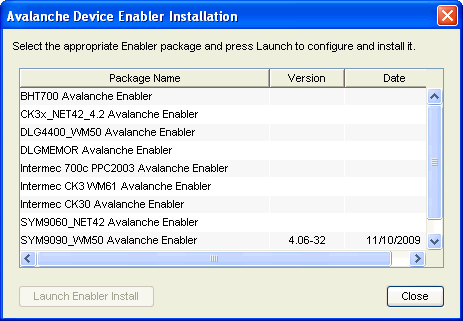
The Enabler Installation Tool allows you to configure and deploy Enablers to mobile devices directly from the Avalanche Console using Microsoft ActiveSync.
To use the Enabler Installation Tool, you must have the following:
| • | Enabler installation files on the machine where you are running the Console. |
| • | Mobile devices connected to the machine through ActiveSync. |
To install an Enabler:
| 1 | From the Quick Start tab, select Install Avalanche Enabler. |
The Avalanche Device Enabler Installation dialog box appears.
Avalanche Device Enabler Installation
| 2 | From the dialog box, select which Enabler package you want to install on the mobile device and click Launch Enabler Install. |
Note: You must have at least one Enabler installation package on your machine or this dialog box will be blank.
The Enabler Configuration Utility appears.
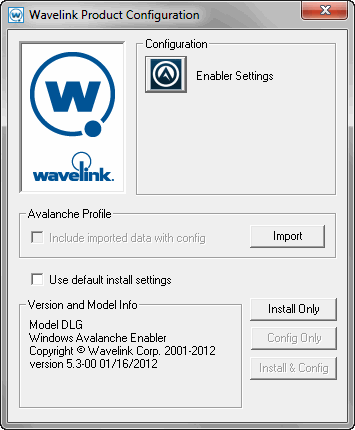
Wavelink Product Configuration Utility
| 3 | Configure the Enabler as desired. |
| 4 | Click Install OnlyUse ActiveSync to send the Enabler to your connected mobile device. |
For details about all the configuration options of the Enabler and information about using ActiveSync, see the Avalanche Enabler User Guide.

© 2012 Wavelink Corporation. All Rights Reserved.