MTD features and enhancements in this release
Each version of the MobileIron Threat Defense Solution guide contains all MTD features that are currently fully tested and available for use on both server and client environments. Because of the gap between server and client releases, MobileIron releases new versions of the MTD guide as the features become fully available.
The following features and enhancements are a part of the MobileIron Threat Defense Solution for Core 10.7.0.0.
MTD features and enhancements for iOS devices
These features, updates, and enhancements are availble for iOS devices in this release:
Advanced multi-level phishing protection
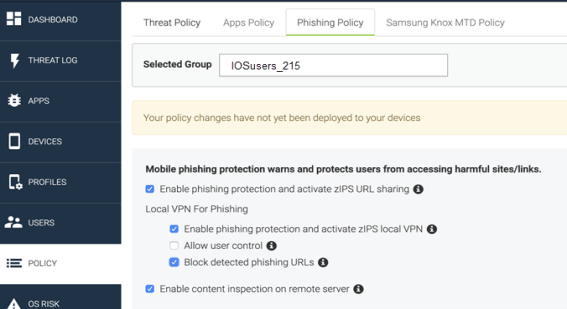
From Core 10.7.0.0 through the most recently released version as supported by MobileIron, advanced anti-phishing protection for MTD-enabled iOS devices can be pushed to devices without user action, independently of MTD Content Blocker. This advanced phishing tool provides full coverage against risky URLs. The configuration is pushed to the end user through an automatically enabled, on-device VPN. For full information, see Advanced phishing protection for iOS devices.
Figure 1. Threat Management Console Phishing policy options
| NOTE: | If Content Blocker is previously enabled on a device, it remains on the device even after Content Blocker is disabled. |
Mobile@Work sinkhole compliance VPN without user action
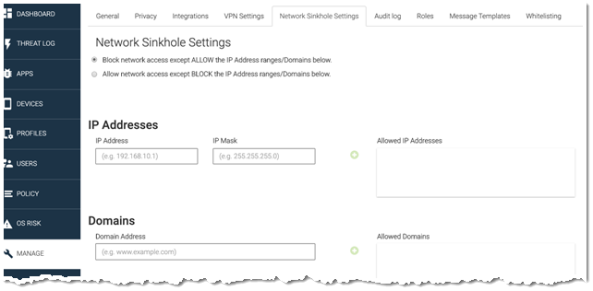
MTD Administrators for iOS devices now have additional sinkhole configuration options to automatically redirect risky client Internet traffic away from the Enterprise without user action. Previously when a threat triggered a sinkhole, all network activity on the client was blocked. From
Figure 2. Threat Management Console Network Sinkhole Settings page
Risky link notifications display within client app
When client users click on secure HTTP (HTTPS) phishing URLs, it is by design that the user notification appears within the app, and not on the browser.
MTD features and enhancements for Android devices
These features, updates, and enhancements are available for Android and Android Enterprise devices in this release:
Additional network threats for Android devices
Three new network threats are included in Risky Wi-Fi threats for Android devices. You can enable threat notifications and apply MTD local actions when these threats are detected.
The threat types are:
- ARP_MITM: Protects against man-in-the-middle (MITM) attacks over address resolution protocol (ARP).
- ICMP_REDIR_MITM: Protects against redirect client-only MITM attacks over Internet control message protocol (ICMP).
- SSL_STRIP: Protects against the downgrading of your connection from secure HTTPS to insecure HTTP within the secure sockets layer (SSL).
These threats display in the Mobile@Work app Threat Defense home page, and the Threat Details page. Users see:
- Threat type: Risky Wi-Fi
- Description: Your data can be stolen and your device can be compromised
- Suggested action: Disconnect from this Wi-Fi immediately or turn off Wi-Fi on your device
For information on Mobile@Work support for Android devices, refer to MobileIron Core Device Management Guide for Android and Android enterprise Devices .
General MTD features and enhancements
The following MTD general features, updates, and enhancements are available in this release:
MTD wake-up interval increased to 60 minutes
From version 10.7.0.0 through the most recently released version as supported by MobileIron, the MTD default wake-up interval is 60 minutes, which provides the best combination of battery life and threat detection. For more information, see Creating an MTD activation configuration .