Deploying Virtual Appliances on VMware
•Deploying Virtual Appliances on VMware ESXi Through vCenter Using OVF File
Supported Platforms Systems
This section helps you in choosing the instance types that should be deployed with Ivanti Connect Secure.
 25.1.0.0
•ISA4000-V
•ISA6000-V
•ISA8000-V
25.1.3.0
•ISA4500-V
•ISA6500-V
•ISA8500-V
In 25.1.3.0 release, the legacy SCSI storage subsystem is replaced with a high-performance NVMe (Non-Volatile Memory Express) controller on VMware.
For more details, see ISA VA Supported Platforms.
Deploying Virtual Appliances on VMware ESXi Through vCenter Using OVF File
ICS needs vTPM to be enabled at the ESXi infrastructure. To enable vTPM, you need VMware vSphere and a key provider, such as Native Key Provider. vTPM and Native Key Provider are licensed for use in all vSphere versions. Supported ESXi version 8.0.x.
vTPM is a VMware component, and for the latest documentation, please refer to VMware product documentation.
To deploy Virtual ICS (vICS) from OVF:
1.Select Compute > vApps > New, and then select the Add vAPP From OVF option.
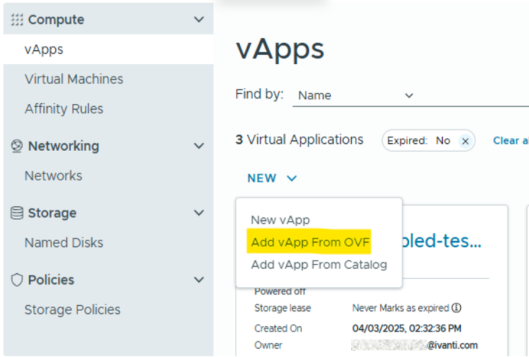
2.Select all three files required for deployment of vICS:
•OVF file - example: ISA-V-VMWARE-ICS-25.1.3.0-<build-number>-VT-ISA8500-V.ovf
•NVRAM file - example: ISA-V-VMWARE-ICS-25.1.3.0-<build-number>-VT-file1.nvram
•VMDK file - example: ISA-V-VMWARE-ICS-25.1.3.0-<build-number>-VT-disk1.vmdk
3.Follow the wizard and configure the necessary details as per your requirement. Click Finish.
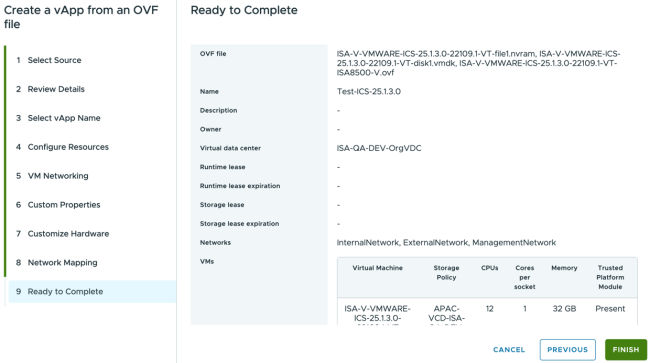
4.Click Start to power on vICS.
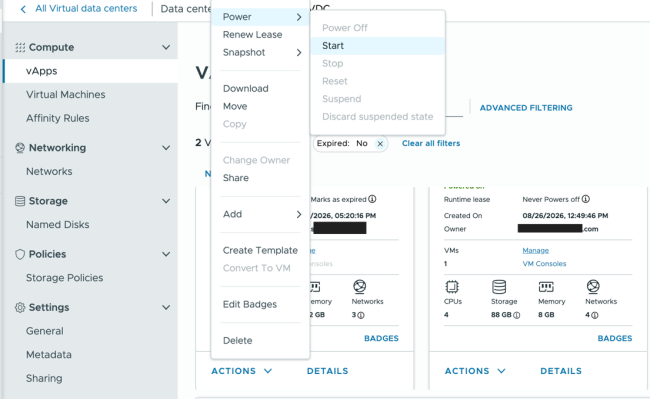
vTPM on ESXi 8.0.x
No additional steps are required to add vTPM when the ESXi itself is enabled with vTPM support.
Prerequisites
•vCenter license
•ESXi 8.0 license and hardware version 20 minimum
•Key Management Server on vCenter
•vTPM requirements as specified by Broadcom: vTPM Requirements
Limitations
•Upgrade from any older releases to 25.1.3.0 is not supported for virtual ICS on VMware platform.
•Removing vTPM from virtual ICS can make virtual ICS non recoverable.
•Cloning virtual ICS with replace TPM option is not supported.
•Exporting virtual ICS with vTPM to template is not supported by VMware.