Configuring a Metadata Provider in Pulse Connect Secure
You do not have to perform the process in the section if your appliance is at v8.3r1 or later, and you have already performed auto-configuration of SAML, see Automatically Configuring a SAML idP on Pulse One.
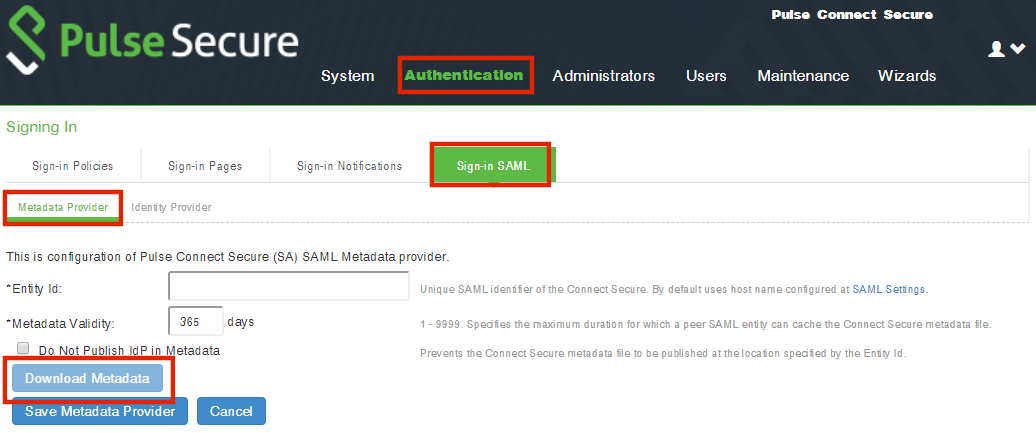
This section provides the steps to configure Metadata Provider on Pulse Connect Secure.
If the PCS server is already configured to operate as a SAML IdP, skip the steps 2 to 6.
To configure a Metadata Provider in the PCS server:
1.Log in to Pulse Connect Secure server.
2.Navigate to Authentication > Signing-In > Sign In SAML > Metadata Provider.
3.The SAML Metadata Provider Entity Id property is pre-populated. It is generated by the system, based on the value for the Host FQDN for SAML setting on the System > Configuration > SAML > Settings page.
4.Set Metadata Validity to 365 days.
5.Clear the Do Not Publish IdP in Metadata check box.
6.Click Save Metadata Provider.
7.Click Download Metadata and save the file to your computer.