Using the ServURI Root Partsices Director REST API
Introducing REST
Representational State Transfer (REST) is an architectural style for API design. It is based on the standard HTTP protocol and supports the GET, POST, PUT and DELETE methods.
A REST interface partitions the API into a series of resources, each of which you can access using one or more HTTP methods. With the Services Director, only the GET, PUT, and POST methods are used. (The action resource also supports the DELETE method due to the transient nature of the data contained within it. For more details, refer to action Resource. Each method operates on the Services Director as follows:
•GET - Obtain a representation of the resource without modifying the server state (except perhaps for logging purposes).
•PUT - Create a new resource or apply some change to a resource. If the resource exists, only those properties specified in the request are modified; all others remain unchanged. If a resource object does not exist, a new one is created.
•POST - Create a new resource based on the details contained in the request body. If the resource exists, it is overridden. This method applies to the controller_license_key and bandwidth_pack_license_key resources only. The add_on_pack_license_key resource also supports the POST method for resource creation.
You cannot delete resources for auditing purposes (with the exception of the action resource). Instead, mark a resource as inactive by altering its status property. You cannot mark a resource as Inactive if it is in use, and it cannot be altered after you mark it as Inactive (the name cannot be re-used).
An Accept header, if present, provides a list of acceptable MIME types. If you specify an Accept header in your request, it must allow a MIME type of application/json for all resource types except license.
Accept: application/json
The license resource allows a MIME type of either application/json or text/plain. This can be used to extract the raw text of the FLA license file if required. See license Resource.
The Content-type header when using PUT and POST methods matches the content type expected by each resource, which is typically application/json. However, when you POST license keys to <license type>_license_key resources, you must set the Content header to plain text.
Content-Type: text/plain
Each resource is uniquely identified with an address or uniform resource identifier (URI). In other words, if you know the URI, you can access the Authentication resource (subject to the authorization and authentication process).
Because all resources have URIs, resources can point to other resources by embedding the URIs of related resources within their representations.
In the Services Director, all resources are represented as JavaScript Object Notation (JSON) structures. Requests and responses that interact with the Services Director through the REST API must adopt the same format.
The full range of HTTP return codes is available in REST, although in practice you can identify and apply a useful subset consistently. For example, the response can tell you whether a request has succeeded or not without any need for parsing the body of the response. However, the Services Director always attempts to provide extra information regarding a failure into the response body.
Authentication
All requests to the Services Director REST API must be authenticated by means of HTTP Basic Authentication. You must create an initial Services Director user outside of the REST API, but you can create and manage other users using the REST API. You must access the Services Director REST API through HTTPS. Client certificates are not checked for validity, and HTTPS is used only for encryption and to allow the FLA license to verify the server identity.
URI Root Parts
All inventory database resources are provided through a common base URI that identifies the root of the resource model
https://<host>:<port>/api
There are three main versioned branches beneath this:
https://<host>:<port>/api/sd/1.1
https://<host>:<port>/api/tmcm/2.9
https://<host>:<port>/api/tmpl/1.0
In these examples, <host> is the hostname of the server containing the inventory database, and <port> is the port that the REST API is published on. You can find all inventory resources at this URI. You can perform a GET request on any level of the base URI to obtain a list of the child elements it contains.
Inventory Resources
This table summarizes inventory resources. Each of the inventory resources is located under a specific URI.
|
Resource URI |
Description |
|---|---|
|
action |
The list of pending, blocked, or waiting deployment actions. See action Resource. |
|
add_on_pack_license_key |
The list of installed Add-On license keys. This resource is only supported by "old-style" Services Director licenses. |
|
add_on_sku |
The list of supported Add-On SKUs. This resource is only supported by "old-style" Services Director licenses that use the add_on_pack_license_key resource. See add_on_sku Resource. |
|
config/analytics/splunk1/collection_endpoint |
The list of collection endpoints to support vTM analytics. See collection_endpoint Resource. See also search_endpoint Resource. |
|
config/analytics/splunk/log_export |
The list of log export types to support vTM analytics. See log_export Resource. |
|
config/analytics/splunk/profile |
The list of analytics profiles to support vTM analytics. See profile Resource. |
|
config/analytics/splunk/search_endpoint |
The list of search endpoints to support vTM analytics. See search_endpoint Resource. See also collection_endpoint Resource. |
|
config/authentication/access_profile |
The list of access profiles to support user authentication on Traffic Manager instances. See access_profile Resource. |
|
config/authentication/authenticator |
The list of authenticators to support user authentication on Traffic Manager instances. See authenticator Resource. |
|
config/authentication/permission_group |
The list of permission groups to support user authentication on Traffic Manager instances. See permission_group Resource. |
|
config/backup |
The list of cluster backups. See backup Resource. |
|
bandwidth_pack_license_key |
The list of installed Bandwidth Pack license keys. See bandwidth_pack_license_key Resource. |
|
cluster |
The list of defined Services Director clusters. See cluster Resource. |
|
controller_license |
The list of installed Services Director licenses. See controller_license Resource. |
|
controller_license_key |
The list of installed Services Director license keys. See controller_license_key Resource. |
|
dashboard |
A summary view of certain Services Director operations. See dashboard Resource. |
|
feature_pack |
The list of feature packs that you can apply to Traffic Manager instances. See feature_pack Resource. |
|
host |
The list of Traffic Manager instance hosts on which you can deploy Traffic Manager instances. See host Resource. |
|
instance |
The list of Traffic Manager instances. See instance Resource. |
|
license |
The list of license files that you can apply to instances. See license Resource. |
|
manager |
The list of individual Services Director instances that share the same database. The list also contains mode settings that you can manipulate to achieve HA for the Services Director. See manager Resource. |
|
monitoring |
A read-only resource containing monitoring state data on Services Directors and Traffic Manager instances in your deployment. See monitoring Resource. |
|
ping |
This can be used in a GET to confirm the service is running. |
|
registration |
This is used during self-registration of Traffic Manager instances. See registration Resource. |
|
resource_pack_license_key |
The list of installed Resource license keys. |
|
schedule |
The list of defined backup schedules. These can be assigned to clusters to create automatic cluster backups. See schedule Resource. |
|
settings |
Various settings for Services Director functions. See settings Resources. |
|
sku |
The list of SKUs that you can use to create feature packs to apply to Traffic Manager instances. See sku Resource. |
|
status |
This enables you to check the status of other inventory resources. See Using the REST API to Check Status. |
|
template |
An application template. See template Resource. |
|
template_instance |
An instance of an application template. See template_instance Resource. |
|
user |
The set of Services Director administrative users. See user Resource. |
|
version |
The list of Traffic Manager versions you can apply to instances. See version Resource. |
|
|
|
All resource names can be any acceptable URL part. URL encoding allows characters such as spaces. These might not be legitimate user or hostnames in the underlying system, but this is not checked or enforced by the REST API.
Resource Reference
This section contains a full description of the resource objects that you can obtain data from the Services Director REST API. Each resource contains properties and a set of rules governing how you can interact with its properties.
Understanding the Tag Property
Every resource has a unique ID. Many resources also have a tag property which provides an alternative way of identifying the resource.
A tag is a user-friendly name which, unlike the unique ID for a resource, can be changed or re-used (subject to some restrictions).
A tag is useful in the situation where you want to identify a resource by a consistent name. For example, if an error occurs that requires a Traffic Manager instance to be deleted, the unique ID is no longer available, as the instance persists with a Deleted status. The tag, however, can be re-used on a new instance, enabling consistent naming.
Restrictions to tag values are as follows:
•A tag cannot be the same as a unique ID of any resource (except itself).
This restriction includes Deleted Traffic Manager instances.
•A tag must be unique among the tags of all resources.
This restriction does not include Deleted Traffic Manager instances.
•The tag can contain:
•the characters a-z, A-Z and 0-9.
•other ASCII character between 32 (space) and 126 (tilde), excluding reserved gen-delims punctuation.
•the tag can include spaces, but cannot be made entirely of spaces.
•other characters can be included, but will be displayed using their ANSI escape sequences. That is, the ä character is displayed as \xe4. The same limitation applies to the \ character, which displays as \x5c.
access_profile Resource
An access_profile resource combines an authenticator resource (see authenticator Resource) with one or more permission_group resources (see permission_group Resource) for the purposes of user authentication.
This information is applied to a Virtual Traffic Manager (vTM) when the vTM’s user authentication is set from the Services Director. See Applying User Authentication to a vTM.
There are no default access profiles.
You cannot delete authenticator resources or permission_group resources that are included in an access_profile resource.
The access_profile resource is located under the /api/tmcm/2.9/config/authentication resource.
The access_profile resource will accept the following HTTP methods:
•POST, for creation.
•PUT, for update.
•GET.
•DELETE.
An access_profile resource contains the following properties.
|
Property |
Description |
|
tag |
(Optional) If unset, this is set to the ID of the access profile. The name of the access profile. This must be unique amongst IDs and tags of access_profile resources, except when empty or set to its own ID. |
|
authenticator_id |
The ID of the authenticator for the access profile. |
|
permission_group_ids |
(Optional) A list of permission group IDs. Typically, there will be one or more. |
Create an access_profile resource using the REST API. For example:
$ curl -k --basic -H "Content-Type: application/json" -H "Accept: application/json"
-D headers.txt -u admin:adminPassword -X POST -d '{"authenticator_id":"Authenticator-X1UB-AAC1-2WQ6-X1SN","permission_group_ids":["Permission-Group-0XZS-8EIJ-420T-T59D"]}' https://servicesdirector1.demo.com:8100/api/tmcm/2.9/config/authentication/access_profile
The response body to a POST contains the properties of the created access_profile resource. For example:
{"access_profile_id": "Access-Profile-IPLT-UFHD-327L-OVAB", "tag": "Access-Profile-IPLT-UFHD-327L-OVAB", "permission_group_ids": ["Permission-Group-0XZS-8EIJ-420T-T59D"], "authenticator_id": "Authenticator-X1UB-AAC1-2WQ6-X1SN"}
Applying User Authentication to a vTM
You can specify an access_profile when you first register an externally-deployed vTM, see instance Resource.
You can also define the user authentication for a registered vTM from the Services Director as follows:
1.Create the required authenticator resource, see authenticator Resource.
2.Create any required permission_group resources, see permission_group Resource.
3.Create an access_profile resource, combining an authenticator with the required permission groups, see access_profile Resource.
4.Reference the access_profile resource in the required instance resource as follows:
/api/tmcm/2.9/instance/<instance>?access_profile=<access_profile_id>
For example:
/api/tmcm/2.9/instance/my_instance_07?access_profile=Access-Profile-2JSI-1XKF-CZZT-AM9P
The authenticator and permission groups are then applied to the vTM. Existing authenticators and permission groups may be overwritten, but none will be deleted. All members of a cluster are affected.
To be eligible for this process, a vTM instance must be marked as Active and have its REST API enabled.
A registered instance cannot be relicensed and have an access profile applied as a single request; licensing will take priority.
action Resource
An action resource describes a deployment action. Whenever a REST request that affects an instance resource triggers a deployment action, an action resource is created. The resource is removed when the action is completed. An action resource can persist for the following reasons:
•If the Services Director experiences a failure or interruption before an action is completed, an action resource is retained and is retried when the Services Director recovers.
•If an action fails, the action resource is retained and marked as Blocked. It is not automatically retried, but it can be queued for implementation after any underlying problem has been addressed.
•The REST API does not allow direct creation of an action resource. However, you can delete an action resource by making a DELETE request. You cannot recover a deleted action.
An action resource contains the following properties.
|
Property |
Description |
Actions |
|
request_user |
The name of the user whose request triggered the action. |
Read Only |
|
request_ip |
The IP address of the request that triggered the action. |
Read Only |
|
action_type |
A string representation of the action: DEPLOY, START, STOP, UPGRADE, or DELETE. |
Read Only |
|
action_args |
A string representation of the arguments to the action. |
Update |
|
status |
The status of the action resource: Waiting - Scheduled and waiting to be implemented. Pending - Currently being processed. Blocked - An error occurred. |
Update |
|
created |
A timestamp string representation of the date and time that the action was created. |
Read Only |
|
instance |
A structure with the name and href of the Traffic Manager instance that the action is intended to change. |
Read Only |
|
blocked |
A string representation of the date and time when the action was blocked (only applicable when the status is Blocked). |
Read Only |
|
block_reason |
A description of the reason the action was blocked, intended to aid in debugging and fixing the problem (only applicable when the status is Blocked). |
Read Only |
You can change the status of an action resource from Blocked to Waiting using a PUT request (which causes the request to be reattempted). You can also change its action_args property. No other property changes are supported.
add_on_pack_license_key Resource
This resource is only supported by "old-style" Services Director licenses.
An add_on_pack_license_key resource describes the contents of a decoded Services Director Add-On license key.
An add_on_pack_license_key resource contains the following properties.
|
Property |
Description |
Actions |
|
bandwidth |
The bandwidth limit for this license. |
Read Only |
|
controller_license |
The optional associated Services Directorcontroller_license_key resource. |
Read Only |
|
feature_sku |
The feature sku resource this key applies to. |
Read Only |
|
license_key |
The license key string. |
Read Only |
|
serial |
The serial number of this license |
Read Only |
|
timestamp |
A timestamp encoded in this license. |
Read Only |
|
valid |
Describes whether the key was successfully validated (with a currently active controller license key): true or false. |
Read Only |
|
valid_from |
The license start date (Perpetual). |
Read Only |
|
valid_until |
The license end date (Perpetual). |
Read Only |
Create a new add_on_pack_license_key resource by making a POST request to the resource with the license key text in the request body.
POST /api/tmcm/2.9/add_on_pack_license_key HTTP/1.1
Content-Type: text/plain
LK1-ERSSCAPFIPS:1:VXTNN000C5725:20130808T0931351375969495-0000-0000-5-ACB8-AE89-67EE
You must include a Content-Type header set to text/plain.
add_on_sku Resource
This resource is only supported by "old-style" Services Director licenses.
An add_on_sku resource defines a set of additional licensable features that can be added to those of an stm_sku to extend Traffic Manager or Services Director functionality. You do not apply an add_on_sku directly to a Traffic Manager instance, but you can use it in a feature_pack to apply additional functionality to the base stm_sku of the pack.
The add_on_sku resources are pre-installed in the Services Director software, based on sets of features described by existing Traffic Manager template licenses and additional Services Director features. The add_on_sku resource is read-only; PUT and POST HTTP requests to create or modify add_on_sku resources are not possible.
An add_on_sku resource contains the following properties.
|
Property |
Description |
Actions |
|
info |
An optional descriptive string. |
Read Only |
|
features |
The features enabled by this add_on_sku. The features property is a string containing a space-separated list of licensable Traffic Manager or Services Director feature names that the add_on_sku enables. See sku Resource. |
Read Only |
|
status |
The status of this resource: Active or Inactive. |
Read Only |
admin_ca Resource
An admin_ca resource specifies a CA certificate. This certificate is required to communicate with a secure LDAP server used for either vTM or Services Director authentication, see authenticator Resource.
•The admin_ca resource for a Services Director is located under the /api/sd/1.1/ resource.
•The admin_ca resource for a vTM is located under the /api/tmcm/2.9/config/authentication resource.
The admin_ca resource will accept the following HTTP methods:
•POST, for creation.
•PUT, for update.
•GET.
•DELETE.
An admin_ca resource contains the following properties.
|
Property |
Description |
|
tag |
(Optional) If unset, this is set to the ID of the access profile. The name of the CA certificate. This must be unique amongst IDs and tags of admin_ca resources, except when empty or set to its own ID. |
|
admin_ca_id |
The ID of the CA certificate. |
|
certificate_authority |
The text of the CA certificate. |
Create an admin_ca resource for a Services Director using the REST API. For example:
$ curl -k --basic -H "Content-Type: application/json" -H "Accept: application/json"
-D headers.txt -u admin:adminPassword -X POST -d '{"admin_ca_id": "Admin-CA-5XJ0-HP0Y-YQAX-69O2", "tag": "Test_3", "certificate_authority": "-----BEGIN CERTIFICATE-----...<cert_text>...-----END CERTIFICATE-----"}' https://servicesdirector1.demo.com:8100/api/sd/1.1/admin_ca
The response body to a POST contains the properties of the created admin_ca resource. For example:
{"certificate_authority": "-----BEGIN CERTIFICATE-----...<cert_text>...-----END CERTIFICATE-----", "admin_ca_id": "Admin-CA-5XJ0-HP0Y-YQAX-69O2", "tag": "Test_3"}
Create an admin_ca resource for a vTM using the REST API. For example:
$ curl -k --basic -H "Content-Type: application/json" -H "Accept: application/json"
-D headers.txt -u admin:adminPassword -X POST -d '{"admin_ca_id": "Admin-CA-4JD0-SD01-123Y-223J", "tag": "Test_2", "certificate_authority": "-----BEGIN CERTIFICATE-----...<cert_text>...-----END CERTIFICATE-----"}' https://servicesdirector1.demo.com:8100/api/tmcm/2.9/config/authentication/admin_ca
The response body to a POST contains the properties of the created admin_ca resource. For example:
{"certificate_authority": "-----BEGIN CERTIFICATE-----...<cert_text>...-----END CERTIFICATE-----", "admin_ca_id": "Admin-CA-4JD0-SD01-123Y-223J", "tag": "Test_2"}
authenticator Resource
There are two different authenticator API resources:
•An authenticator resource for vTM user authentication, refer to authenticator Resource (vTM User Authentication).
•An authenticator resource for Services Director user authentication, refer to authenticator Resource (Services Director User Authentication).
authenticator Resource (vTM User Authentication)
An authenticator resource for vTM user authentication defines an external user authentication service. This information is applied to a Virtual Traffic Manager (vTM) when the vTM’s user authentication is set from the Services Director.
An access_profile resource (see access_profile Resource) combines an authenticator resource with one or more permission_group resources (see permission_group Resource) for the purposes of user authentication.
Three proprietary authentication services are supported:
•LDAP. See Properties for LDAP Authenticators.
•RADIUS. See Properties for RADIUS Authenticators.
•TACACS+. See Properties for TACACS+ Authenticators.
There are no default authenticators.
The authenticator resource for vTM user authentication is located under the /api/tmcm/2.9/config/authentication resource, and will accept the following HTTP methods:
•POST, for creation.
•PUT, for update. You cannot update the authenticator type.
•GET.
•DELETE. This can only succeed if the authenticator resource is not in use by an access_profile resource (see access_profile Resource).
To enable testing of authenticators without necessarily creating them, the '?test=username:password' query parameter is supported. This query parameter turns a request into a synchronous test of the authenticator. When the query parameter is used in combination with a POST request (because the resource does not yet exist), the resource is not created. Instead, the output of the test is logged and a 202 response is sent back with the output of the test. In case of existing resources, the user is expected to update the properties before issuing a GET request using the query parameter. Other requests will silently ignore the query parameter.
authenticator Resource (Services Director User Authentication)
An authenticator resource for Services Director user authentication defines an external user authentication service.
Three proprietary authentication services are supported:
•LDAP. See Properties for LDAP Authenticators.
Both secure and non-secure LDAPS authenticators are supported.
•RADIUS. See Properties for RADIUS Authenticators.
•TACACS+. See Properties for TACACS+ Authenticators.
There are no default authenticators.
The authenticator resource for Services Director user authentication is located under the /api/sd/1.1/authentication resource, and will accept the following HTTP methods:
•POST, for creation.
•PUT, for update. You cannot update the authenticator type.
•GET.
•DELETE.
To enable testing of authenticators without necessarily creating them, a query parameter ('?test=username:password') is supported. This query parameter turns a request into a synchronous test of the authenticator. When the query parameter is used in combination with a POST request (because the resource does not yet exist), the resource is not created. Instead, the output of the test is logged and a 202 response is sent back with the output of the test. In case of existing resources, the user is expected to update the properties before issuing a GET request using the query parameter. Other requests will silently ignore the query parameter.
Properties for LDAP Authenticators
The following table describes all possible properties for an LDAP authenticator resource. There are some differences between vTM authenticators and Services Director authenticators.
Both secure and non-secure LDAPS authenticators are supported.
|
Property |
Description |
|
tag |
(Optional) If unset, this is set to the ID of the authenticator. The name of the authenticator. This must be unique amongst IDs and tags of authenticator resources, except when empty or set to its own ID. |
|
type |
The user authentication service for the authenticator. Set this to ‘ldap’. Not allowed on update. |
|
server |
The IPv4 address or resolvable hostname/FQDN of the user authentication server. |
|
port |
The port used to connect to the user authentication server. Default is 389 for LDAP. |
|
timeout |
(Optional) The timeout period (in seconds) for a connection to the user authentication server. For vTM user authorisation, this value must be an integer between 0 and 4294967295. The default is 30. For Services Director user authorisation, this value must be 30 or less. The default is 10. |
|
fallback_group |
(Optional) The permissions group to which a valid user will belong if its group is not identified. Set this to the ID of a permission group resource. Required for LDAP unless group_attribute is set. |
|
group_attribute |
(Optional) The LDAP attribute that gives a user's group. For example: "memberOf". If multiple values are returned by the LDAP server the first valid one will be used. Default is an empty string for LDAP. Required unless fallback_group is set. |
|
group_field |
(Optional) The sub-field of the group_attribute that gives a user's group. For example: if group_attribute is "memberOf" which delivers "CN=mygroup, OU=groups, OU=users, DC=mycompany, DC=local", set group_field to "CN". The first matching field will be used. Default is an empty string for LDAP. |
|
base_dn |
The base DN (Distinguished Name) for directory searches. Cannot be empty. |
|
bind_dn |
(Optional) A template to construct the bind DN from the username. This is only used (and is required) when the dn_method is ‘construct’. The string "%u" is replaced by the username. For example: "%[email protected]", OR "cn=%u, dn=mycompany, dn=local". |
|
dn_method |
Value determines relevance/requirement of bind_dn and search_dn. Can be set as follows: ‘construct’ - the bind DN for a user can be constructed from a known string. See the bind_dn property. ‘search’ - the bind DN for a user can be searched for in the directory. This is necessary if you have users under different directory paths. See the search_dn and search_password fields. ‘none’. This setting is not supported for Services Director user authentication. |
|
filter |
A filter that uniquely identifies a user located under the base_dn. The string "%u" will be substituted with the username. For example: "sAMAccountName=%u" (Active Directory), OR "uid=%u" (Unix LDAP) Cannot be empty. |
|
group_filter |
(Optional) If the user record returned by the filter does not contain the required group information, you can specify an alternative group search filter here. This will typically be required if you have Unix/POSIX-style user records. If multiple records are returned, the list of group names will be extracted from all of them. The string "%u" will be replaced by the username. For example: "(&(memberUid=%u)(objectClass=posixGroup))" |
|
ssl |
(Optional) Specify the required LDAP security type: none. Select this if your LDAP server does not support secure connections. starttls. Select this if your LDAP server supports STARTTLS secure connections. You must ensure that a matching admin_ca resource is present to use this option, see admin_ca Resource. ldaps. Select this if your LDAP server supports LDAPS secure connections. You must ensure that a matching admin_ca resource is present to use this option, see admin_ca Resource. |
|
search_dn |
(Optional) The DN to use when searching the directory for a user's bind DN (see also search_password). You can leave this blank if it is possible to perform the bind DN search using an anonymous bind. Only relevant if dn_method is 'search'. |
|
search_password |
(Optional) The password to use when searching the directory for a user's bind DN (see also search_dn). You can leave this blank if it is possible to perform the bind DN search using an anonymous bind. Only relevant if dn_method is 'search'. |
|
status |
(Services Director user authorisation only). Indicates whether the authenticator is enabled or disabled. Only one Services Director authenticator can be enabled. If status is enabled, the status for all other Services Director authenticators are disabled automatically. |
You create an LDAP authenticator resource for vTM user authentication using the REST API. For example:
$ curl -k --basic -H "Content-Type: application/json" -H "Accept: application/json" -D headers.txt -u admin:adminpassword -X POST -d '{"base_dn":"OU=users, DC=demo, DC=local", "bind_dn":"%[email protected]", "dn_method":"construct", "fallback_group":"admin", "filter":"sAMAccountName=%u", "group_attribute":"memberOf", "group_field":"CN", "group_filter":"(&(memberUid=%u)(objectClass=posixGroup))", "port":389, "search_dn":"", "search_password":"", "server":"xx.xx.xx.xx", "tag":"MyLDAPServer", "timeout":30, "type":"ldap", "ssl":"none"}' https://servicesdirector1.demo.com:8100/api/tmcm/2.9/config/authentication/authenticator
The response body to this POST contains the properties of the created LDAP authenticator resource. For example:
{"search_dn": "", "group_field": "CN", "authenticator_id": "Authenticator-I8EX-9PNE-3TR5-ZMW4", "bind_dn": "%[email protected]", "dn_method": "construct", "group_attribute": "memberOf", "group_filter": "(&(memberUid=%u)(objectClass=posixGroup))", "server": "xx.xx.xx.xx", "filter": "sAMAccountName=%u", "tag": "MyLDAPServer", "timeout": 30, "base_dn": "OU=users, DC=demo, DC=local", "fallback_group": "admin", "search_password": "", "type": "ldap", "port": 389, "ssl":"none"}
You create an LDAP authenticator resource for Services Director user authentication using the REST API. For example:
$ curl -k --basic -H "Content-Type: application/json" -H "Accept: application/json" -D headers.txt -u admin:adminpassword -X POST -d '{"base_dn":"OU=users, DC=demo, DC=local", "bind_dn":"%[email protected]", "dn_method":"construct", "fallback_group":"", "filter":"sAMAccountName=%u", "group_attribute":"memberOf", "group_field":"CN", "group_filter":"(&(memberUid=%u)(objectClass=posixGroup))", "port":389, "search_dn":"", "search_password":"", "server":"xx.xx.xx.xx", "tag":"MyLDAPServer", "timeout":30, "type":"ldap", "ssl":"starttls"}' https:// servicesdirector1.demo.com:8100/api/sd/1.1/authentication/authenticator
The response body to this POST contains the properties of the created LDAP authenticator resource. For example:
{"status": "enabled", "group_filter": "(&(memberUid=%u)(objectClass=posixGroup))", "search_dn": "", "tag": "MyLDAPServer", "base_dn": "OU=users, DC=demo, DC=local", "port": 389, "group_field": "CN", "authenticator_id": "Authenticator-NMBT-7B4Y-4BE7-HEUS", "bind_dn": "%[email protected]", "server": "10.62.169.170", "filter": "sAMAccountName=%u", "group_attribute": "memberOf", "timeout": 30, "dn_method": "construct", "fallback_group": "", "search_password": "", "type": "ldap", "ssl":"starttls"}
Properties for RADIUS Authenticators
The following table describes all possible properties for a RADIUS authenticator resource. There are some differences between vTM authenticators and Services Director authenticators.
|
Property |
Description |
|
tag |
(Optional) If unset, this is set to the ID of the authenticator. The name of the authenticator. This must be unique amongst IDs and tags of authenticator resources, except when empty or set to its own ID. |
|
type |
The user authentication service for the authenticator. Set this to ‘radius’. Not allowed on update. |
|
server |
The IPv4 address or resolvable hostname/FQDN of the user authentication server. |
|
port |
The port used to connect to the user authentication server. Default is 1812 for RADIUS. |
|
timeout |
(Optional) The timeout period (in seconds) for a connection to the user authentication server. For vTM user authorisation, this value must be an integer between 0 and 4294967295. The default is 30. For Services Director user authorisation, this value must be 30 or less. The default is 10. |
|
fallback_group |
(Optional) The permissions group to which a valid user will belong if its group is not identified. Set this to the ID of a permission_group resource. Required for RADIUS unless group_attribute is set. |
|
group_attribute |
(Optional) The attribute that specifies an account's group. For RADIUS, must be an integer between 0 and 4294967295 inclusive. Default is 1. Required unless fallback_group is set. |
|
secret |
(Optional) The secret key shared with the RADIUS server. |
|
group_vendor |
(Optional) The RADIUS identifier for the vendor of the RADIUS attribute that specifies an account's group. Must be an integer between 0 and 4294967295. Default is 7146. Leave blank if using a standard attribute such as Filter-Id. |
|
nas_identifier |
(Optional) A string identifying the Network Access Server (NAS) which is requesting authentication of the user. This value is sent to the RADIUS server. If left blank, the address of the interface used to connect to the server will be used. |
|
status |
(Services Director user authorisation only). Indicates whether the authenticator is enabled or disabled. Only one Services Director authenticator can be enabled. If status is enabled, the status for all other Services Director authenticators are disabled automatically. |
You create a RADIUS authenticator resource for vTM user authentication using the REST API. For example:
$ curl -k --basic -H "Content-Type: application/json" -H "Accept: application/json" -D headers.txt -u admin:adminpassword -X POST -d '{ "fallback_group": "admin", "group_attribute": 1, "group_vendor": 1476, "nas_identifier": "Internal RADIUS", "nas_ip_address": "127.0.0.1", "port": 1812, "secret": "*", "server": "xx.xx.xx.xx", "tag": "RADIUS Server", "timeout": 30, "type": "radius"}' https:// servicesdirector1.demo.com:8100/api/tmcm/2.9/config/authentication/authenticator
The response body to this POST contains the properties of the created RADIUS authenticator resource. For example:
{"authenticator_id": "Authenticator-IYGN-4BW2-M9FF-FW3O", "nas_ip_address": "127.0.0.1", "group_vendor": 1476, "group_attribute": 1, "server": "xx.xx.xx.xx", "secret": "*", "tag": "RADIUS Server", "timeout": 30, "fallback_group": "admin", "type": "radius", "port": 1812, "nas_identifier": "Internal RADIUS"}
You create a RADIUS authenticator resource for Services Director user authentication using the REST API. For example:
$ curl -k --basic -H "Content-Type: application/json" -H "Accept: application/json" -D headers.txt -u admin:adminpassword -X POST -d '{ "fallback_group": "", "group_attribute": 1, "group_vendor": 1476, "nas_identifier": "Internal RADIUS", "nas_ip_address": "127.0.0.1", "port": 1812, "secret": "*", "server": "xx.xx.xx.xx", "tag": "RADIUS Server", "timeout": 30, "type": "radius"}' https:// servicesdirector1.demo.com:8100/api/sd/1.1/authentication/authenticator
The response body to this POST contains the properties of the created RADIUS authenticator resource. For example:
{"status": "enabled", "group_vendor": 1476, "tag": "RADIUS Server", "port": 1812, "authenticator_id": "Authenticator-VPCA-QDSS-HS77-38HL", "nas_ip_address": "127.0.0.1", "server": "xx.xx.xx.xx", "secret": "*", "group_attribute": 1, "timeout": 30, "fallback_group": "", "type": "radius", "nas_identifier": "Internal RADIUS"}
Properties for TACACS+ Authenticators
The following table describes all possible properties for a TACACS+ authenticator resource. There are some differences between vTM authenticators and Services Director authenticators.
|
Property |
Description |
|
tag |
(Optional) If unset, this is set to the ID of the authenticator. The name of the authenticator. This must be unique amongst IDs and tags of authenticator resources, except when empty or set to its own ID. |
|
type |
The user authentication service for the authenticator. Set this to ‘radius’. Not allowed on update. |
|
server |
The IPv4 address or resolvable hostname/FQDN of the user authentication server. |
|
port |
The port used to connect to the user authentication server. Default is 49 for TACACS+. |
|
timeout |
(Optional) The timeout period (in seconds) for a connection to the user authentication server. For vTM user authorisation, this value must be an integer between 0 and 4294967295. The default is 30. For Services Director user authorisation, this value must be 30 or less. The default is 10. |
|
fallback_group |
(Optional) The permissions group to which a valid user will belong if its group is not identified. Set this to the ID of a permission group resource. Required for TACACS+ unless group_service is set. |
|
secret |
(Optional) The secret key shared with the TACACS+ server. |
|
auth_type |
The TACACS+ authentication type, either ‘pap' (default) or 'ascii'. |
|
group_service |
The TACACS+ "service" that identifies a user's group field. Required unless fallback_group is set. |
|
status |
(Services Director user authorisation only). Indicates whether the authenticator is enabled or disabled. Only one Services Director authenticator can be enabled. If status is enabled, the status for all other Services Director authenticators are disabled automatically. |
You create a TACACS+ authenticator resource for vTM user authentication using the REST API. For example:
$ curl -k --basic -H "Content-Type: application/json" -H "Accept: application/json" -D headers.txt -u admin:adminPassword -X POST -d '{"auth_type": "pap","fallback_group": "admin","group_field": "mygrp","group_service": "demo","port": 49,"secret": "mysecret","server": "xx.xx.xx.xx","tag": "TACACS_plus_Server","timeout": 30,"type": "tacacs_plus"}' https:// servicesdirector1.demo.com:8100/api/tmcm/2.9/config/authentication/authenticator/
The response body to this POST contains the properties of the created TACACS+ authenticator resource. For example:
{"auth_type": "pap", "group_field": "mygrp", "authenticator_id": "Authenticator-X1UB-AAC1-2WQ6-X1SN", "server": "10.62.164.80", "group_service": "demo", "secret": "mysecret", "tag": "TACACS_plus_Server", "timeout": 30, "fallback_group": "admin", "type": "tacacs_plus", "port": 49}
You create a TACACS+ authenticator resource for Services Director user authentication using the REST API. For example:
$ curl -k --basic -H "Content-Type: application/json" -H "Accept: application/json" -D headers.txt -u admin:adminPassword -X POST -d '{"auth_type": "pap","fallback_group":"","group_field": "permission-group","group_service": "zeus","port": 4900,"secret": "mysecret","server": "auth.demo.com","tag": "demoservice","timeout": 10,"type": "tacacs_plus"}' https://servicesdirector1.demo.com:8100/api/sd/1.1/authentication/authenticator/
The response body to this POST contains the properties of the created TACACS+ authenticator resource. For example:
{ "auth_type":"pap", "authenticator_id":"Authenticator-FP2J-MFG0-J8VK-I8QK", "fallback_group":"","group_field":"permission-group", "group_service":"zeus", "port":4900,"secret":"mysecret","server":"auth.demo.com","status":"enabled","tag":"demoservice","timeout": 10,"type":"tacacs_plus"}
backup Resource
A backup resource is a backup of a cluster configuration. A backup resource is created automatically for the Services Director for each cluster resource that has an assigned backup schedule resource. The schedule for each cluster defines the frequency of backups. You can also create a immediate cluster backup manually. See the Pulse Secure Services Director Getting Started Guide for full details of cluster backup and restore.
The backup resource is located under the /api/tmcm/2.9/config resource.
The backup resource will accept the following HTTP methods:
•POST, for creation.
•PUT, for update.
•GET.
•DELETE.
The following table lists properties for backup.
|
Property |
Description |
|
backup_id |
The UUID of the backup. |
|
cluster_id |
The UUID of the cluster that requested the backup. |
|
date |
A timestamp for the date/time of the backup. |
|
description |
A description of the backup. By default, this is the cluster name plus the sequence_number. |
|
retain |
A Boolean flag, indicating if the backup is Retained. This should be set to true if the backup is to be kept indefinitely, and considered as a candidate for deletion as part of the automated backup rotation. |
|
sequence_num |
The sequence number of this backup, incremented for every backup taken |
|
size |
The size of the backup. |
|
tag |
The user-facing (and reusable) cluster backup resource name. This field can be set by the user at any time. |
The response body to a POST contains a JSON structure representing the properties of the created backup resource. For example:
{
"backup_id": "Backup-9URJ-UQJM-RP10-8I42",
"cluster_id": "Cluster-21TN-WWC0-EH2J-Z5RY",
"date": "2016-07-06 12:15",
"description": "Radegund Cluster#2",
"retain": false,
"sequence_num": 2,
"size": 133120,
"tag": "Backup-9URJ-UQJM-RP10-8I42"
}
See cluster Resource for details of a cluster that can be backed up.
See schedule Resource for details of backup schedules that control the creation of backups for a cluster.
bandwidth_pack_license_key Resource
A bandwidth_pack_license_key resource describes the contents of a decoded Services Director Bandwidth Pack license key.
A bandwidth_pack_license_key resource contains the following properties.
|
Property |
Description |
Actions |
|
valid |
Determines whether the key was successfully validated (with the currently active Services Director license): true or false. |
Read Only |
|
status |
Determines whether the key is currently in use by the Services Director: Active or Inactive. You can set this property to Active only. |
Update |
|
valid_from |
The license start date (Perpetual). |
Read Only |
|
valid_until |
The license end date (Perpetual). |
Read Only |
|
stm_sku |
The sku resource this license applies to. |
Read Only |
|
bandwidth |
The bandwidth limit for this license. |
Read Only |
|
serial |
The serial number of the Bandwidth Pack license. |
Read Only |
|
timestamp |
The timestamp of the Bandwidth Pack license. |
Read Only |
|
controller_license_serial |
The serial number of the associated Services Director license. |
Read Only |
|
controller_licenses |
An optional list of associated Services Directorlicense resources. |
Read Only |
|
license_key |
The license key string. |
Read Only |
|
expiry_warning_days |
The number of days warning that is given for an impending license expiry. |
Read Only |
Create a new bandwidth_pack_license_key resource by making a POST request to the resource with the license key text in the request body.
POST /api/tmcm/2.9/bandwidth_pack_license_key HTTP/1.1
Content-Type: text/plain
LK1-ERSSCTPSTM_B_200:1:VXTNN000C5725:20131351375969495-0000-0000-5-ACB8-AE89-67EE
You must include a Content-Type header set to text/plain.
Unlike other REST API resources, the Services Director determines the name of the created resource and the content of each property based on the license key you use. If successful, the Services Director returns a standard POST response of HTTP/1.1 201 Created and the resource name in the Content-Location header.
The response body contains a JSON structure representing the properties of the created resource:
{
"valid": "true",
"status": "Active",
"valid_from": "Perpetual",
"valid_until": "Perpetual",
"stm_sku": "STM-B-200",
"bandwidth": "1",
"serial": "VXTNN000C5725",
"timestamp": "2013-08-08T09:31:35.1375969495",
"controller_license_serial": "00003",
"controller_license": "ERSSC00003-XXXX-YYYY",
"license_key": "LK1-ERSSCTPSTM_B_200:1:VXTNN000C5725:20130808T0931351375969495-0000-0000-5-ACB8-AE89-67EE"
}
The request body in a POST request to the bandwidth_pack_license_key resource must contain exactly one valid Bandwidth Pack license key.
The bandwidth property of the controller_license_key resource on which it depends is updated as appropriate.
After a bandwidth_pack_license_key resource has been created, the Services Director typically activates it automatically. The exception to this is when activation would cause the current deployment to have insufficient licensed bandwidth; this is the case when an existing Bandwidth Pack license provides bandwidth, in use by the Services Director, that would not be provided by the new Bandwidth Pack license.
Activation also fails in the following circumstances:
•A license has a valid_from date in the future.
•A license has a valid_until date in the past.
•Activating a license would result in the Services Director deployment having insufficient licensed bandwidth for its current Traffic Manager instance configuration. (This is the case when multiple Bandwidth Packs have been issued with the same license key; activating one pack requires deactivation of whichever pack is currently active.)
•The license is invalid.
You can activate a Bandwidth Pack license manually by setting the status property to Active using a PUT request:
PUT /api/tmcm/2.9/bandwidth_pack_license_key/VXTNN000C572-1234567890 HTTP/1.1
{"status": "Active"}
After the license has been activated, you cannot set this property back to Inactive.
You cannot activate invalid license keys (including those keys that do not validate against any installed Services Director license). These keys have their valid property set to false.
The Services Director populates the controller_license property with any matching controller_license resource this Bandwidth Pack license is validated against. The bandwidth licensed by the Bandwidth Pack is listed in the controller_license_key resource when queried. If no matching Services Director license is found, valid is set to false and controller_license is left blank.
If you attempt to reinstall an existing Bandwidth Pack license, the Services Director license state is unchanged. If you attempt to install a malformed or invalid key, the Services Director responds with HTTP/1.1 400 Bad Request and an appropriate error message in the response body.
To view existing licenses, perform a GET request for the bandwidth_pack_license_key resource:
https://<sdhost>:<port>/api/tmcm/2.9/bandwidth_pack_license_key
The response to this request contains a JSON structure representing the list of installed licenses:
{
"children" : [
{
"href" : "/api/tmcm/2.9/bandwidth_pack_license_key/VXTNN000C572-1234567890",
"name" : "VXTNN000C572-1234567890"
},
{
"href" : "/api/tmcm/2.9/bandwidth_pack_license_key/VXTNN000C573-1234567890",
"name" : " VXTNN000C573-1234567890"
},
{
"href" : "/api/tmcm/2.9/bandwidth_pack_license_key/VXTNN000C574-1234567890",
"name" : " VXTNN000C574-1234567890"
}
]
}
To view the details for an individual Bandwidth Pack license key, perform a GET request for the specific license resource:
https://<sdhost>:<port>/api/tmcm/2.9/bandwidth_pack_license_key/ VXTNN000C572-1234567890
The response to this request contains a JSON structure representing the license resource. The properties displayed are the decoded contents of the license key:
{
"valid": "true",
"status": "Active",
"valid_from": "Perpetual",
"valid_until": "Perpetual",
"stm_sku": "STM-B-200",
"bandwidth": "1",
"serial": "VXTNN000C5720",
"timestamp": "2013-08-08T09:31:35.1375969495",
"controller_license_serial": "00003",
"controller_license": "ERSSC00003-XXXX-YYYY",
"license_key": "LK1-ERSSCTPSTM_B_200:1:VXTNN000C5720:20130808T0931351375969495-
0000-0000-5-ACB8-AE89-67EE"
}
To delete a Bandwidth Pack license, use the DELETE request method with the desired bandwidth_pack_license_key resource in the URI:
DELETE /api/tmcm/2.9/bandwidth_pack_license_key/VXTNN000C572-1234567890 HTTP/1.1
If you attempt to delete a Bandwidth Pack license key that is used to provide bandwidth for the Services Director's current configuration of Traffic Manager instances, the request is rejected with an HTTP/1.1 400 Bad Request status code.
cluster Resource
A cluster resource describes a Traffic Manager cluster. You put the name of the cluster resource into the cluster_id property of each Traffic Managerinstance resource you want to add to that cluster.
Creating a cluster resource does not automatically create the actual Traffic Manager cluster. You must first create the Traffic Managerinstance resources (which in turn triggers deployment of your Traffic Manager instances) with the cluster_id property set to the name of the cluster resource.
The Services Director automatically clusters together all Traffic Managerinstance resources using the same cluster_id property during deployment.
Instances in a cluster must use the same feature pack. Not doing so will lead to the instances running with disparate features across the cluster which could mean that some features will not work as expected.
When adding a Traffic Manager instance to an existing cluster, you must have at least one Traffic Manager instance already running (with a status property of Active) within the cluster; otherwise, resource creation fails.
When creating a cluster resource, you can specify the following properties.
|
Property |
Description |
Actions |
|
cluster_type |
This field is populated by Services Director when the cluster resource is created. There are two types: Discovered -for cluster records which were created by Services Director for the purposes of cluster awareness, User Created - for cluster records created via the Services Director REST API. |
Read-Only |
|
in_use |
This Boolean field is populated by the Services Director during response generation. It is true for cluster records which have dependent vTM Instance records (excluding Instance records in status Deleted or Failed_to_deploy). |
Read-Only |
|
members |
A list of all vTMs in the cluster. |
Create/Update |
|
next_backup_time |
The time at which the next backup is due, according to the backup_schedule. |
Read-Only |
|
number_backups |
The number of non-retained backups that should be stored for this cluster. When a new backup is being made, if the number of non-retained backups for the cluster exceeds <number_backups>, one will be deleted. |
Create/Update |
|
owner |
The owner resource for the instance. See owner Resource. |
Create/Update |
|
schedule_id |
(Optional) The automated backup schedule associated with this cluster. See schedule Resource. |
Create/Update |
|
status |
The status of this resource: Active or Inactive. |
Update |
|
tag |
The user-facing (and reusable) cluster resource name. This field can be set by the user at any time. |
Create/Update |
|
task |
A href and task ID for the most recent user triggered backup/restore/upload action. |
Read-Only |
|
analytics_profile_id |
The ID of the analytics profile for the vTM cluster, where used. Refer to profile Resource. |
Read-Only |
|
user_data |
The user data for the cluster. This is replaces the user data from the cloud registration resource when you are creating additional cluster members on AWS. See the Pulse Secure Services Director Getting Started Guide for full details of this process. |
Read-Only |
There are no required properties for this resource, but the request body must be a valid JSON object. The cluster name is the resource name.
The response to a GET request for a cluster resource contains an additional read-only list members property. This list contains the names of all Traffic Manager instances in the cluster.
{
"status": "Active",
"share_tips": true,
"in_use": true,
"cluster_type": "Discovered",
"number_backups": 5,
"tag": "Cluster1",
"members": ["Instance-MXP8-575A-VL1A-VU5P","Instance-OKKT-9MU0-DTZH-70YF"],
"owner": "Owner-X287-ZB46-SCYV-HEZT",
"analytics_profile_id": "Analytics-Profile-V5PM-QWI8-2L1C-UTLP"
}
You can set the owner property only when first creating a cluster resource. You cannot update this property in an existing cluster resource.
You can mark a resource as inactive by changing the status property to Inactive.
You can delete an empty resource by sending a DELETE http request with an empty request body to api/tmcm/2.9/cluster/<cluster id>.
See owner Resource for details of owner resources.
See schedule Resource for details of backup schedules that are available to a cluster.
See backup Resource for details of backups taken for a cluster.
collection_endpoint Resource
An collection_endpoint resource on the Services Director records details for a collection endpoint from your analytics system. This is assigned automatically when vTM analytics is activated on a vTM cluster.
The Services Director uses two kinds of endpoints for vTM analytics:
•Collection endpoints, described in this section.
•Search endpoints, described in search_endpoint Resource.
See the Pulse Secure Services Director Getting Started Guide for full details of vTM analytics.
The collection_endpoint resource is located under the /api/tmcm/2.9/config/analytics/splunk resource.
The collection_endpoint resource will accept the following HTTP methods:
•POST, for creation.
•PUT, for update.
•GET.
•DELETE.
The following table lists properties for collection_endpoint.
|
Property |
Description |
|
transaction_export_address |
The address that transaction data is exported to, in the form <server>:<port>. For example: example.com:7090 |
|
transaction_export_tls |
Boolean. Indicates whether transaction data requires secure transmission. |
|
transaction_tls_verify |
(Optional) Boolean. If true, indicates that verification of the secure connection to the transaction collection endpoint is required. If true, you must also specify transaction_endpoint_certificate, and you can optionally specify transaction_tls_verify. This can only be specified if transaction_export_tls is true. |
|
transaction_endpoint_certificate |
The certificate of the transaction export collection endpoint. This is required if transaction_tls_verify is is true. |
|
auth_type |
The required authorisation. This can be set to: "None": This indicates no authorisation is required. "Basic": This indicates that basic HTTP authorisation is required. You must also specify auth_username and auth_password. "Splunk": This indicates that authorisation is performed on the Splunk platform. You must also specify auth_token. |
|
log_export_address |
The address that log data is exported to, in the form: <protocol><server>:<port><filepath> where <protocol> can be either http:// or https://. For example: http://example.com:8080/logs/collector If protocol is set to https://, you must also specify log_endpoint_certificate. |
|
auth_username |
The username for HTTP Basic authentication. This is required when auth_type is "Basic". |
|
auth_password |
The password for HTTP Basic authentication. This is required when auth_type is "Basic". |
|
auth_token |
The HEC authorisation token required by the Splunk platform. This is required when auth-type is "Splunk". |
|
log_tls_verify |
(Optional) Boolean. If true, indicates that verification of the secure connection to the log collection endpoint is required. |
|
log_endpoint_certificate |
The certificate of the log export collection endpoint. This is required if the <protocol> in log_export_address is https://. |
|
tag |
(Optional) The customer-facing name for the resource. If this is not set, the tag is set to the UUID value for the resource automatically. |
|
analytics_endpoint_id |
The UUID of the resource. |
The response body to a POST contains a JSON structure representing the properties of the created backup resource. For example:
{
"transaction_tls_verify": true,
"auth_type": "basic",
"transaction_export_address": "example.com:7070",
"log_export_address": "https://example.com:8080/logs/collector",
"auth_token": "",
"analytics_endpoint_id": "Analytics-Endpoint-VWX7-SMLI-SB51-M5QK",
"transaction_endpoint_certificate": "LS0tLS1CRUdJTi...UgS0VZLS0tLS0=",
"transaction_export_tls": true,
"log_endpoint_certificate": "LS0tLS1CRUdJTiBDR...ZBVEUgS0VZLS0tLS0=",
"tag": "JK-EP-Collection-01",
"log_tls_verify": true,
"auth_password": "password",
"auth_username": "admin"}
}
See also the following analytics resources:
controller_license Resource
A controller_license resource describes the license being used by the Services Director to which you send the REST request. The resource only supports the GET method and is typically used only for identifying the license currently in use by a particular Services Director.
The controller_license_key resource is used to install Services Director licenses, but Bandwidth Pack license must be installed using the bandwidth_pack_license_key resource.
A controller_license resource contains the following properties.
|
Property |
Description |
Actions |
|
license_key |
The full license key for this Services Director license. |
Read Only |
|
license_key_valid_from |
The license start date. |
Read Only |
|
license_key_valid_until |
The license end date. |
Read Only |
controller_license_key Resource
A controller_license_key resource describes the contents of a decoded Services Director license key.
A controller_license_key resource contains the following properties.
|
Property |
Description |
Actions |
|
add_on_packs |
The list of Add-On license keys associated with this Services Director license key. This property is applicable to Enterprise license keys only; for CSP license keys, this property is omitted. |
Read Only |
|
bandwidth |
The dictionary of licensed SKUs and the bandwidth allowance supplied to each one by this license and associated Add-On and Bandwidth Packs. This property is applicable to Enterprise license keys only; for CSP license keys, this property is omitted. |
Read Only |
|
bandwidth_packs |
The list of Bandwidth Packs associated with this Services Director license key. This property is applicable to Enterprise license keys only; for CSP license keys, this property is omitted. |
Read Only |
|
cluster_bandwidth |
The dictionary of licensed SKUs and the total bandwidth allowance supplied for each one by all valid license keys and associated Add-On and Bandwidth Packs. This property is applicable to Enterprise license keys only; for CSP license keys, this property is omitted. |
Read Only |
|
license_key |
The license key string. |
Read Only |
|
license_type |
The type of this license: Enterprise or Cloud Service Partner. |
Read Only |
|
serial |
The serial number of this license |
Read Only |
|
status |
Determines whether the key is currently in use by the Services Director: Active or Inactive. |
Read Only |
|
valid |
Indicates whether this license is a valid license. That is, whether the license is in the correct format and the checksum is correct. |
Read Only |
|
valid_from |
The license start date (Perpetual). |
Read Only |
|
valid_until |
The license end date (Perpetual). |
Read Only |
|
bandwidth |
The list of licensed SKUs and the bandwidth limit applicable to each one under this license. For Enterprise Licensing keys, it also lists dependent Bandwidth Packs. |
Read Only |
|
cpsh |
Data model changes for a future release. |
|
|
cspm |
Data model changes for a future release. |
|
Create a new controller_license_key resource by performing a POST request to the resource with the license key text (such as LK1-RSSC123456-3E30-3E8A-5-0123-4567-89AB) in the request body.
POST /api/tmcm/2.9/controller_license_key HTTP/1.1
Content-Type: text/plain
LK1-RSSC123456-3E30-3E8A-5-0123-4567-89AB
You must include a Content-Type header set to text/plain.
Unlike other REST API resources, the Services Director determines the name of the created resource and the content of each property based on the license key you use. If successful, the Services Director returns a standard POST response of HTTP/1.1 201 Created and the resource name in the Content-Location header.
The response body contains a JSON structure representing the properties of the created resource.
For example (Enterprise license):
{
"add_on_packs": [],
"bandwidth": [],
"bandwidth_packs": [],
"license_key": "LK1-XX_XXX_XXXX_XXXXXX_C_01:114-41A1-38BB-5-D4D5-6A97-69BC",
"license_type": "Enterprise",
"serial": "123456",
"status": "Active",
"valid": true,
"valid_from": "2013-01-01",
"valid_until": "2013-12-31",
}
For example (CSP license):
{
"csph": xxxxx,
"cspm": xxxxx,
"license_key": "LK1-XX_XXX_XXXX_XXXXXX_C_01:114-47B1-42DEF-5-D4D5-6A97-69BC",
"license_type": "Cloud Service Partner",
"serial": "123",
"status": "Active",
"valid": true,
"valid_from": "2016-01-01",
"valid_until": "2016-11-30"
}
The request body in a POST request to the controller_license_key resource must contain exactly one valid Services Director license key. License keys you have installed via the REST API in a clustered Services Director deployment might need to be validated by a different cluster member and might not be immediately activated as a result.
If you attempt to reinstall an existing controller license key, the Services Director license state is unchanged. If you attempt to install a malformed or invalid license key, the Services Director responds with HTTP/1.1 400 Bad Request and an appropriate error message in the response body.
To view existing licenses, perform a GET request for the controller_license_key resource:
https://<sdhost>:<port>2.8/controller_license_key
The response to this request contains a JSON structure representing the list of installed licenses:
{
"children" : [
{
"href" : "2.8/controller_license_key/XYZ123",
"name" : "XYZ123"
},
{
"href" : "2.8/controller_license_key/ABC123",
"name" : "ABC123"
}
]
}
To view the details for an individual controller license key, perform a GET request for the specific license resource:
https://<sdhost>:<port>2.8/controller_license_key/ABC123
The response to this request contains a JSON structure representing the license resource. The properties displayed are the decoded contents of the license key.
To delete a Services Director license, use the DELETE request method with the desired controller_license_key resource in the URI:
DELETE 2.8/controller_license_key/ABC123 HTTP/1.1
If you attempt to delete an enterprise license key used to provide licensed bandwidth for the current deployment, the request is rejected with a HTTP/1.1 400 Bad Request status code.
You cannot delete cloud service provider license keys, for metering reasons, until their valid_until date is at least 180 days in the past.
dashboard Resource
A dashboard resource provides a summary view of certain Services Director operations. This is compiled automatically by the Services Director, and is read-only.
Currently, only a summary of the metering health information for the Services Director is included in the dashboard resource.
The dashboard resource is located under the 2.8/ resource.
The dashboard resource will only accept GET methods.
A dashboard resource contains the following properties.
|
Property |
Description |
Actions |
|
metering_health |
A parent property for the remaining properties. |
Read-Only |
|
alert_level |
A summary alert level for the Services Director's instances. This can be 1 (all instances report 1 = "OK") or 3 (one or more instances report 3 = "Warning"). |
Read-Only |
|
alert_level_short_text |
A summary text for the Services Director's instances . This can be either "OK" (all instances report this) or "Warning" (one or more instances report this). |
Read-Only |
|
alert_reason |
Only present if alert_level is 3. When present, this is always "Possible accounting discrepancy". |
Read-Only |
The response body to a GET contains a JSON structure representing the properties of the dashboard resource. For example, if one or more instances report a metering discrepancy:
{
"metering_health": {
"alert_level": 3,
"alert_level_short_text": "Warning"
"alert_reason": "Possible accounting discrepancy"
}
}
feature_pack Resource
A feature_pack resource describes a set of licensable features that you can apply to a Traffic Manager instance. A feature pack is defined relative to a SKU.
A feature pack is defined by a list of features excluded from a SKU (the list is empty). Therefore, the feature pack is always the same as a SKU or a strict subset of a SKU. When you deploy or modify a Traffic Manager instance, the feature pack controls which licensable features are allowed (but does not specify bandwidth limits).
The add_on_sku field of the feature_pack resource is used to specify a list of one or more Add-On SKUs to the feature pack. Similar to base SKUs (that is, the stm_sku field ), these are paid for via an Add-On license for Enterprise licensed customers and via metered usage for CSP licensed customers.
When creating a feature_pack resource, you can specify the following properties.
|
Property |
Description |
Actions |
|
add_on_skus |
Optionally, a list of Add-On SKUs used by this feature pack. It might be an empty list if no Add-On SKUs are included. |
Create |
|
excluded |
A space-separated list of features excluded from the parent SKU. The excluded property is an empty list (in which the feature_pack includes all features from the parent SKU). The feature names in the excluded list must be only those from the parent SKU features property. |
Create |
|
info |
An optional descriptive string. You can change the info property by updating an existing feature_pack resource, but you cannot change the stm_sku and excluded properties. |
Create/Update |
|
status |
The status of this resource: Active or Inactive. You can mark the resource as inactive by changing the status property to Inactive. |
Update |
|
stm_sku |
The name of the parent SKU. |
Create |
The response body to a GET contains a JSON structure representing the properties of the feature_pack resource. For example:
{
"add_on_skus": [],
"excluded": "auto",
"info": "",
"status": "Inactive",
"stm_sku": "STM-400"
}
host Resource
A host resource describes a Traffic Manager instance host you can use to deploy Traffic Manager instances. The host must have specific directories set up and an SSH user enabled for access from the Services Director servers. These requirements are of the Services Director user.
If you use a host to deploy Traffic Manager instances outside containers, you must name the resource using the FQDN of the Traffic Manager instance host to allow the licensing server to operate correctly, or an IP address where Universal Licensing is used.
If you create host resources solely for use with externally-deployed instances, the Services Director does not use the username and install_root properties. In this case, you do not need to set up passwordless SSH access if the host is solely to be used by externally-deployed instances. For more information about externally-deployed instances, see Properties for an Externally-Deployed Instance.
When creating a host resource, specify the following properties.
|
Property |
Description |
Actions |
|
info |
An optional descriptive string. |
Create/Update |
|
work_location |
The absolute path of a temporary directory to which you can copy and create files. |
Create |
|
install_root |
The absolute path of a directory under which Traffic Manager instances are created. Do not set the path to /var/lib/lxc/. |
Create |
|
retained_info_dir |
This property is currently not in use. |
Create/Update |
|
username |
The name of a user that is used by means of passwordless SSH to carry out actions on the host. For several purposes, the user should be root. |
Create/Update |
|
usage_info |
This property is currently not in use. |
Create/Update |
|
size |
Defines the size (in instances) of the host |
Create/Update |
|
cpu_cores |
This property is currently not in use. |
Create/Update |
|
status |
The status of this resource: Active or Inactive. |
Update |
The hostname is the name of the host resource, and this must be resolvable in the local network environment.
The Services Director does not perform checks on the validity of the work_location and install_root directories, and there is not a check that the directories are absolute directories. Once defined, you cannot change the work_location and installation_root directories.
You can mark the resource as inactive by changing the status property to Inactive.
The host REST API supports a single query parameter, status_check=true or status_check=false , on GET requests. The default is false; however status_check=true causes a check of the host for network connectivity, user validity, and the state of the install_root and work_location directory.
If status_check=true is set on a GET request for a host resource, an extra property is included in the response:
•status_check - A string that is empty (if there are no problems) or that contains a description of any problems found.
Ivanti recommends that you perform this check after creating a host resource.
instance Resource
An instance resource describes a Traffic Manager instance. Creating or altering an instance resource causes the Traffic Manager instance to be deployed, deleted, or altered.
A REST request to create or alter an instance returns promptly before the action is carried out (to avoid timeouts). You can then use a GET request to verify the status of the instance resource.
When you create an instance using the REST API, the request supports a URL parameter ?managed=[true/false]. This is used as follows:
•Include ?managed=true to indicate that you are creating a deployed instance. For example:
https://<sdhost>:<port>2.8/instance/stm1?managed=true
•Include ?managed=false to indicate that you are creating an externally-deployed instance. For example:
https://<sdhost>:<port>2.8/instance/stm1?managed=false
When creating and deploying an instance resource, you can specify the following properties.
|
Property |
Description |
Actions |
|
owner |
The owner resource for the instance. See owner Resource. |
Create/Update |
|
cluster_id |
The optional name of a cluster resource to which the instance belongs. If you specify an entry for this property, it must refer to a cluster resource. You must also set the config_options (or config_options_json ) property to include admin_ui=yes and start_flipper=yes. |
Create |
|
stm_version |
The name of the Traffic Managerversion resource for the instance. If you modify this property, the Services Director upgrades the Traffic Manager instance to the new version. You can change this property only if the instance status is Idle. |
Create/Update |
|
observed_version |
When an instance resource is created, this is populated automatically from the version of the externally-deployed Traffic Manager. This also occurs during licensing and monitoring operations. |
Read Only |
|
host_name |
The name of the Traffic Manager instance host on which you deploy the instance. This name must match the FQDN of the instance host that was created, or an IP address where Universal Licensing is used. |
Create |
|
container_name |
The name of the LXC container for the Traffic Manager instance. If this is an empty string or set to none, the Traffic Manager is not run inside a container. If you specify a name, you must create an appropriate container configuration file of the form <containername>.conf in the install_root directory of the container host. For example, a container_name of stm1.example.com requires a container configuration file named stm1.example.com.conf. The container configuration file must set lxc.utsname to the container name for the licensing server to operate correctly. |
Create |
|
container_configuration |
A space-separated string used to set up the default network gateway inside the LXC container. See instance Resource. Use this format: "{\"gateway\":\"<ip_address>\"}" For LXC deployments, this is the IP address raised on the bridge interface to which this container is connected. When you specify this property, do not specify the container_configuration_json property. |
Create/Update |
|
container_configuration_json |
A JSON data structure that is equivalent to the container_configuration property. See Specifying Container Options. When you specify this property, do not specify the container_configuration property. |
Create/Update |
|
config_options |
A space-separated string used to define configuration options. See Specifying Configuration Options. default - This option has no effect and is used to avoid an empty string. If this is option is used, no other options can be specified in the config_options. admin_ui=yes/no - Start or bypass the Administration UI for the Traffic Manager instance (default: yes). You must set this to yes if you use the cluster_id property. maxfds=<number> - The maximum number of file descriptors. This setting must be consistent between all instances in a cluster. (See Notes, below). webcache!size=<number> - The size of RAM for the web cache (default: 0). This value can be specified in %, MB, GB by appending the corresponding unit symbol to the end of the value when not specifying a value in bytes. For example, 100%, 256MB, 1GB, and so on. This setting must be consistent between all instances in a cluster. (See Notes, below). java!enabled=yes/no - Start or bypass the Java server (default: no). This setting must be consistent between all instances in a cluster. (See Notes, below). statd!rsync_enabled=yes/no - Synchronize historical activity data within a cluster. If this data is unwanted, disable this setting to save CPU and bandwidth (default: yes). This setting must be consistent between all instances in a cluster. (See Notes, below). snmp!community - The SNMP v2 community setting for this instance resource. For metering of externally-deployed instances, this must be set to the same value as the equivalent snmp!community property on the instance itself (default: "public"). num_children=<number> - The number of child processes (default: 1). start_flipper=yes/no - Start or bypass the flipper process (default: yes). You must set this to yes if you use the cluster_id property. port_offset=<number> - Offset control port values by a fixed amount. When network isolation is not provided by a container configuration, each Traffic Manager instance on a particular host should be allocated a unique port offset to avoid port clashes. The offset range is from 0 and 499. afm_deciders=<number> - The number of application firewall decider processes. If 0 is specified, the application firewall is not installed (default: 0). You cannot update this option after the instance has been deployed. flipper!frontend_check_addrs=<host> - Check instance front-end connectivity with a specific host. When the Services Director deploys an instance, it checks connectivity to the default gateway of the instance host by sending ICMP requests to it. If the default gateway is protected by a firewall or blocks ICMP requests, instance deployment can fail. To disable deployment connectivity checks, use flipper!frontend_check_addrs="". This setting must be consistent between all instances in a cluster. (See Notes, below). |
|
|
config_options (continued) |
flipper!monitor_interval=<number> - The interval, in milliseconds, between flipper monitoring actions. (default: 500 ms). For higher density Traffic Manager instance deployments, use a larger value such as 2000ms. This setting must be consistent between all instances in a cluster. (See Notes, below). Any change to the config_options settings will cause a restart of the instance. Some configuration options, if specified here, must be consistent between all Traffic Manager instances in a cluster: maxfds webcache!size java!enabled statd!rsync_enabled flipper!monitor_interval flipper!frontend_check_addrs If you set or update the value in one instance resource, the Services Director replicates this update automatically to the other instance resources. The instance will restart whenever these are changed, but other instances in the cluster must be restarted manually. Whenever the config_options property is set, all currently modified options must be specified again in the REST call. Any options that are not specified will lose their current value and be reset to their default value. When you specify this property, do not specify the config_options_json property. |
Create/Update |
|
config_options_json |
A JSON data structure that is equivalent to the config_options property. See instance Resource. When you specify this property, do not specify the config_options property. |
Create/Update |
|
cpu_usage |
A string that describes which CPUs are used for this Traffic Manager instance. If used, you must either: specify a value in a form that is used by the taskset command. For example, "0,3,5-7". set this property to an empty string. This indicates that the host is not limited in its use of CPU cores (unless it is deployed within an LXC container). This is the default setting for the property if you do not specify a string. Any change to the cpu_usage settings will cause a restart of the instance. |
Create/Update |
|
stm_feature_pack |
The name of the feature_pack resource associated with the Traffic Manager instance. |
Create/Update |
|
bandwidth |
How much bandwidth the Traffic Manager instance is allowed (in Mbps). |
Create/Update |
|
license_name |
The name of the license resource you want to use for this instance. When you modify this property, the Services Director updates the license on the Traffic Manager instance. |
Create/Update |
|
management_address |
The hostname used to address the Traffic Manager instance. The hostname must be an FQDN, or an IP address where Universal Licensing is used. You can modify this property only for an externally-deployed Traffic Manager instance (or in a database-only request). If you update this property, the host component of the rest_address , ui_address , and snmp_address properties is also updated. These values must be FQDNs, or IP address where Universal Licensing is used. |
Create |
|
status |
The status of this resource: New - An instance that has been created by the REST API but has not yet been successfully deployed. Idle - An instance that has been deployed but is not currently running. Note that this is the only status from which you can delete the instance. Active - An instance that is currently running. Deleted - An instance that has been deleted. Starting - An instance that is waiting to start. Failed to start - An instance that has failed to start. Stopping - An instance that is waiting to stop. Failed to stop - An instance that has failed to stop. Deleting - An instance that is waiting to be deleted. Failed to delete - An instance whose deletion failed. Failed to deploy - An instance that has failed to deploy. |
Update |
|
creation_date |
A string representation of the date and time of creation of this Traffic Managerinstance resource. |
Read Only |
|
admin_username |
The primary admin username for the Traffic Manager instance. You can modify this property only for an externally-deployed Traffic Manager instance (or in a database-only request). |
Create/Update |
|
admin_password |
The password (unencrypted) of the specified admin user. |
Create/Update |
|
service_username |
The primary service username for the Traffic Manager instance. This property cannot be modified and is not applicable to externally-deployed instances. |
Read Only |
|
service_password |
The password (unencrypted) of the specified service user. This property is not applicable to externally-deployed instances. |
Create/Update |
|
rest_address |
The address (host or IP address plus port number) of the Traffic Manager instance configuration REST API. The rest_address property must match the instance hostname. You can modify this property only for an externally-deployed Traffic Manager instance (or in a database-only request). If you use a hostname instead of an IP address, you must use an FQDN. |
Create/Update |
|
ui_address |
The address (host or IP address plus port number) of the Traffic Manager instance Administration UI. This is blank if the instance does not have an active Administration UI. You can modify this property only for an externally-deployed Traffic Manager instance (or in a database-only request). If you use a hostname instead of an IP address, you must use an FQDN. |
Create/Update |
|
snmp_address |
The address (host or IP address plus port number) of the Traffic Manager instance SNMP responder. This enables you to set the SNMP address used for metering. You can modify this property only for an externally-deployed Traffic Manager instance (or in a database-only request). If you use a hostname instead of an IP address, you must use an FQDN. |
Create/Update |
|
licensed_date |
A string representation of the date and time of the latest successful license validation (if any). This is blank if the Traffic Manager instance has never had a license validated. |
Read Only |
|
metrics_date |
A string representation of the date and time of the latest successful metrics collection (if any). This is blank if the instance has never had metrics collected. |
Read Only |
|
metrics_throughput |
The latest collected metrics figure, in bytes, for throughput. This is blank if the Traffic Manager instance has never had metrics collected. |
Read Only |
|
metrics_peak_throughput |
The latest collected metrics figure, in bytes per second, for peak throughput (for example, the highest figure in the previous hour). This is blank if the Traffic Manager instance has never had metrics collected. |
Read Only |
|
metrics_peak_RPS |
The latest collected metrics figure for peak RPS (for example, the highest figure in the previous hour). This is blank if the Traffic Manager instance has never had metrics collected. |
Read Only |
|
metrics_peak_SSL_TPS |
The latest collected metrics figure for peak SSL TPS (for example, the highest figure in the previous hour). This is blank if the Traffic Manager instance has never had metrics collected. |
Read Only |
|
pending_action |
A structure that contains the name and href for the pending or blocked action. This is applicable only if a Traffic Manager instance is associated with a failed or blocked action (caused by deployment, start, stop, and so on). |
Read Only |
|
access_profile |
Identifies an access_profile resource (see access_profile Resource). The authenticator and permission_group resources referenced by this resource are then applied to the Traffic Manager instance to set its user authentication. See Applying User Authentication to a vTM. |
Create/Update |
|
aws_instance_id |
The instance ID for an AWS cloud-based instance. |
Read Only |
|
aws_vpc_id |
The ID for the chosen Virtual Private Cloud for an AWS cloud-based instance. |
Read Only |
|
uuid |
The unique identifier for the vTM instance. This property is only present when the vTM instance uses vTM Communications Channel. |
Read Only |
|
client_cert |
The unique identifier required by the Services Director to authenticate the vTM instance. This property is only present when the vTM instance uses vTM Communications Channel. |
Read Only |
The response from a REST API GET request will include:
•both the container_config and container_config_json properties. Their values are equivalent.
•both the config_options and config_options_json properties. Their values are equivalent.
The instance REST API supports a single query parameter, status_check=true or status_check=false , on GET requests. The default is false; however, status_check=true causes an activity check for the instance. The Services Director carries out this check synchronously with the request handling, the duration of which can vary with load. If status_check=true is set on a GET request for an instance resource, an extra property is included in the response:
•status_check - A string that is empty (if there are no problems) or contains a description of any problems found.
The Services Director performs this check automatically after starting an instance resource. Any fault found is recorded as a blocking reason for the action.
If you make changes to feature_pack or bandwidth , the Services Director invokes changes to the licensed behavior of the deployed Traffic Manager instance.
Use the status property to track the state of a Traffic Manager instance.If you modify this property, the Services Director starts, stops, or deletes the Traffic Manager instance accordingly.
The Services Director processes state transitions separately from the REST request, using a separate thread of execution.
You can make a PUT request to change the status of a resource. The Services Director immediately returns an intermediate status, subsequently applies the change, and finally updates the status property.
You can poll for changes. The change has succeeded when you see the status property change to the expected value:
•If you deploy a Traffic Manager instance, this results in an immediate status of New. When the Services Director has successfully deployed the instance, status changes to Idle.
•You can start an instance when it has a status of Idle (or Failed to start or Failed to stop) by updating status to Active. The Services Director responds with an immediate status of Starting. When the instance has been successfully started, status is updated to Active.
•You can stop an instance when it has a status of Active (or Failed to start or Failed to stop) by updating status to Idle. The Services Director responds with an immediate status of Stopping. When the instance has been successfully stopped, its status is updated to Idle.
•You can uninstall an instance when it has a status of Idle by updating status to Deleted. The Services Director responds with an immediate status of Deleting. When the instance has been successfully uninstalled, its status is updated to Deleted. An instance in this state cannot be changed further.
When the Traffic Manager instance in is one of the failed states (Failed to deploy, Failed to start, Failed to stop, or Failed to delete), you are not able to return it to an Idle state using defined state transitions. You must therefore change the status of the Traffic Manager instance to Idle manually. To do this, issue a PUT request to the REST API with a URL parameter of deploy=false and a property of status=Idle. The deploy setting ensures that this is a database-only change. (See Using INSTALLROOT in This Guide for details)
Once this is complete, you are then able to delete the Traffic Manager instance.
•You can upgrade an instance by changing the stm_version property, but only when the instance has a status of Idle. The Services Director responds with an immediate status of Upgrading. When the instance has been successfully upgraded, its status returns to Idle. The following procedure describes how to upgrade an instance in a cluster using the stm_version property.
Proxying a Traffic Manager REST API
A running Traffic Manager instance maintains its own REST API for configuration purposes. You can access this directly using the rest_address property along with the admin_username and admin_password properties. However, for convenience, the Services Director provides proxy access to the instance REST API through the URI of the instance resource.
You can access the instance REST API only if the instance itself is active. Proxy requests are otherwise rejected with an informative error message.
You can make proxy requests by appending the following to the URI of the Traffic Managerinstance resource:
/tm/2.0/config/active
You must not include the initial /api component when accessing a proxied instance REST API. This is necessary only if you access the API directly.
For example, the full URI to access the REST API of a running Traffic Manager instance called stm1 is:
https://<host>:<port>2.8/instance/stm1/tm/2.0/config/active
The Services Director interprets such longer URIs as proxy requests for the named instance. The above example lists the top level configuration objects for the Traffic Manager instance stm1. The exact URL depends on the URLs allowed by the Traffic Manager configuration REST API and are not documented here.
In this situation, the Traffic Manager configuration REST API is aware that it is serving a proxied request and automatically adjusts any href properties so you can use them directly through the proxy without requiring editing.
The Services Director does not interpret or amend the request or response bodies for proxy requests; however, it does provide appropriate authentication information based on the admin_username and admin_password properties. If the Traffic Manager REST API returns an error, it is returned unchanged to the client. The exception to this is an authentication error. These are reinterpreted as 500-series errors (with an informative error message), because it implies the Services Director has applied the wrong credentials.
Proxy requests allow additional content types or accept types , because the Services Director is unable to determine for itself which types might be acceptable to the Traffic Manager REST API.
The Services Director does not attempt to stream large requests or responses. Therefore, you should make such requests or responses directly to the appropriate Traffic Manager REST API.
Upgrading Instances in a Traffic Manager Cluster
1.Start with all instances in the cluster in Active status.
2.For one instance in the cluster:
•Change the status of the instance to Idle.
•Upgrade the instance by changing the stm_version property.
•Change the instance status back to Active.
3.If the upgrade is successful, repeat Step 2 for every other instance in the cluster.
Upgrading a Traffic Manager cluster where all instances are Idle is not possible. At least one instance must be made Active before the other Idle instances are upgraded. In addition, one of the upgraded instances must be made Active so that the remaining instance can be made Idle and upgraded. This action is required because cluster replication must occur as part of a successful upgrade for a cluster member.
Do not make any configuration changes to the Traffic Manager instances during this cluster upgrade procedure.
You can deploy a Traffic Manager instance in a HA scenario by creating a cluster resource and then specifying the name of this resource in the cluster_id property of each Traffic Manager instance you create. However, you must ensure the following:
•clustered instances must all share the same license and version number.
•clustered instances must have the admin_ui and start_flipper options set to Yes in config_options.
The Traffic Manager instance REST API supports a query parameter on PUT requests, deploy=true or deploy=false. The default is true; however, deploy=false causes the Services Director to apply changes to the inventory database, but no deployment changes are made. This supports testing and database reconciliation. If status is set with deploy=false , then that status is applied directly; no actions are carried out and no intermediate status is set. If a new instance resource is created with deploy=false , then the status is set to Idle on creation.
The Traffic Manager instance REST API supports a query parameter on PUT or POST requests when an instance is created, managed=true , or managed=false. The default is true. Creating an instance with managed=false (an externally-deployed instance) means that the instance is never managed by the Services Director in terms of deployment, starting, stopping, upgrading, reconfiguring, or deleting. The instance can make normal license requests and is metered. You can change its status, but this is stored and no attempt is made to alter the actual instance.
This option is for instances that you manually deploy, but for which you want to use the licensing and metering abilities of the Services Director. After you create an externally-deployed instance, any PUT or POST request is automatically considered to have the deploy=false parameter set. This means that you can change the database representation of the instance (and this can affect the features that are enabled through licensing and whether or not the instance is considered active for metering).
Because an externally-deployed instance is not deployed by the Services Director, you must set the snmp_address property (which cannot be set for a deployed instance) to enable metering. You can omit the host_name , license_name , stm_version , and cpu_usage properties, because these are not required for an Externally-deployed instance. If you do specify any of these properties, they must contain valid values. However, they are stored as empty strings in the inventory database.
You cannot update these properties with empty strings for an existing instance.
Any changes to the properties of an Externally-deployed instance affect only licensing or metering. For example, changes to the version or any configuration options have no effect.
You can modify admin_username, admin_password, management_address, rest_address, ui_address, and snmp_address for an externally-deployed Traffic Manager instance only (or in a database-only request).
Updating management_address for an externally-deployed Traffic Manager instance automatically updates the host or IP component of rest_address , ui_address , and snmp_address. These values must be FQDNs, or IP addresses where Universal Licensing is used.
If a deployment, start, stop, or delete action (generated by a PUT request to create a new record or change the status property) fails, it can be traced through the pending_action property. You can analyze problems based on the action resource (see Proxying a Traffic Manager REST API).
After you fix any underlying problems, you can retry the action in one of two ways:
•You can change the status of the original action to Waiting. This causes the action to be re-queued and retried.
•You can change the status of the Traffic Manager instance to a new value; the system deletes the old action and queues an entirely new action based on the status you set.
Understanding the State Transition Model for Instances
The following diagram summarizes the stable states for an Instance resource, and the transient states that connect them.
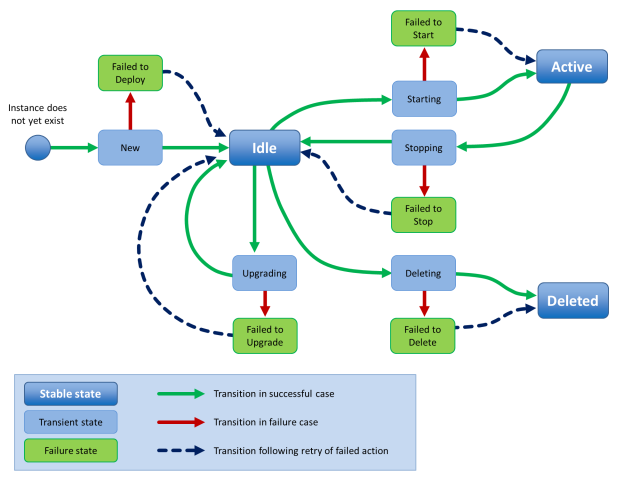
license Resource
A license resource describes an FLA license file that you can use to deploy a Traffic Manager instance. Creating, altering, or deleting the license resource does not affect the existence of the actual license file. You are responsible for ensuring that the license file is available to all Services Director servers.
If you create license resources solely for use with externally-deployed instances, the Services Director does not require a corresponding license file to exist. For more information about externally-deployed instances, see Properties for an Externally-Deployed Instance.
Unlike all other resource types, the Accept header for a license resource allows a MIME type of either application/json or text/plain. Where text/plain is allowed but application/json is not, the returned data from a GET or PUT is the raw text of the FLA license file. Where no corresponding FLA license file exists, an error is returned instead.
When creating a license resource, you can specify the following properties.
|
Property |
Description |
Actions |
|
info |
An optional descriptive string. |
Create/Update |
|
status |
The status of this resource: Active or Inactive. |
Update |
There are no required properties in this resource, but the request body must be a valid JSON object. The license filename is the resource name.
The response body to a GET contains a JSON structure representing the properties of the license resource. For example:
{
"default": true,
"generic_errors": null,
"health_check_results": [],
"health_check_status": "Not yet run",
"info": "Universal license",
"last_health_check_time": null,
"status": "Active",
"type": "universal"
}
You can change the info property by updating an existing license resource.
You can mark the resource as inactive by changing the status property to Inactive.
Reapplying a FLA License
If you want to re-license a Traffic Manager using its assigned FLA license, use the REST API. For example:
$ curl -v -k --basic -H "Content-Type: application/json" -H "Accept: application/json"
-u user:passwd https://x.x.x.x:8100/api/tmcm/2.9/instance/<instance_name>?relicense=true -d '{ }'
log_export Resource
A log_export resource defines one (or more) log or system files that will be exported by a vTM that is configured for vTM analytics.
See the Pulse Secure Services Director Getting Started Guide for full details of vTM analytics.
The log_export resource is located under the 2.8/config/analytics/splunk resource.
The log_export resource will accept the following HTTP methods:
•POST, for creation.
•PUT, for update.
•GET.
•DELETE.
The following table lists properties for backup.
|
Property |
Description |
|
files |
A comma-separated list of log files. The files identified by this list will be sent by the vTM to its assigned collection endpoint. You can include wildcards if required. You can also include the %ZEUSHOME% variable if required, which represents the Services Director's home directory. For example: %ZEUSHOME%/zxtm/log/stingrayafm/log-master/* |
|
appliance_only |
(Optional) a Boolean setting that indicates log-export usage: true: the log_export is only supported on virtual appliance installations, and not on software installations. false: the log_export is supported on all installations. This is the default setting. |
|
tag |
(Optional) The customer-facing name for the resource. If this is not set, the tag is set to the UUID value for the resource automatically. |
|
built_in |
Boolean that indicates if the log_export resource was supplied with the Services Director product. You cannot change this property. |
|
history |
(Optional) Identifies how much historic activity should be exported for this log. Use one of the following settings: None. This indicates that only current activity logs will be exported. All historic activity logs will not be included. This is the default setting. All. This indicates that all current and historic activity logs will be exported. |
|
log_export_id |
The UUID of the resource. |
The response body to a POST contains a JSON structure representing the properties of the created backup resource. For example:
{
"files": ["%ZEUSHOME%/zxtm/log/stingrayafm/log-master/*",
"%ZEUSHOME%/zxtm/log/stingrayafm/log/*"],
"appliance_only": false,
"tag": "Application Firewall",
"built_in": true,
"log_export_id": "Application Firewall",
"history": "none"}
}
See also the following analytics resources:
•collection_endpoint Resource.
manager Resource
A manager resource represents an instance of the Services Director and contains properties that apply specifically to that instance. You can use the resource properties, known as mode settings , to provide HA to a Services Director deployment. The name of a manager resource is its hostname.
You do not need to create a manager resource to use an installation of the Services Director. If a manager resource does not already exist, it is created with reasonable default mode settings when the Services Director starts.
A manager resource contains the following properties.
|
Property |
Description |
Actions |
|
management |
Determines whether or not the named Services Director is accessible through the REST API. This is set to enabled or disabled. To recover from the scenario where every Services Director in your deployment has its management property set to disabled, or has failed, Ivanti provides a script, INSTALLROOT/bin/toggle_management , that is used to read and update the management property for the Services Director on which it is run. |
Update |
|
metering |
Determines whether the named Services Director meters all Traffic Manager instances or none. This is set to none or all. |
Update |
|
licensing |
Determines whether and how the named Services Director responds to license requests from Traffic Manager instances. You can set this to enabled, disabled, or enabledwithalerts. In enabledwithalerts mode, Services Director alert messages are sent to all configured alert email addresses when the rate at which license requests are being received exceeds a specified threshold setting. |
Update |
|
monitoring |
Determines the monitoring mode for this Services Director. This mode is one of the following: all - This Services Director monitors all other Services Directors and all Traffic Manager instances, regardless of the mode setting on any other Services Director in the cluster. shared - This Services Director monitors all other Services Directors, but together with other Services Directors in the same mode, each one monitors only a proportion of all active Traffic Manager instances. none - This Services Director does not perform any monitoring. |
Update |
|
external_ip |
If the Services Director Service Endpoint Address is in a private network behind a NAT device, this string property is set to the external IP address for the Services Director Service Endpoint Address. Otherwise, this property is null. |
Update |
Deleting Manager Resources
You can delete a manager resources in the following ways:
•You can issue a DELETE request via the REST API to a manager resource that monitoring has marked as failed. This enables you to de-cluster unhealthy Services Directors. To do this, issue an HTTP DELETE request to:
https://<SD-host:port>2.8/manager/<manager-ref>
•You can issue a forced DELETE request via the REST API to a manager resource that monitoring has not marked as failed. This enables you to de-cluster any Services Directors. To do this, issue an HTTP DELETE request with a force query parameter set:
https://<SD-host:port>2.8/manager/<manager-ref>?force=true
monitoring Resource
The monitoring resource contains stored monitoring state data. This is a read-only resource and accepts only the GET request method.
The monitoring resource contains the following properties.
|
Property |
Description |
Actions |
|
manager |
Contains monitoring state data for all Services Director nodes. A request for this URI returns an array of JSON objects containing properties (see below) that describe the monitoring state for all Services Director nodes in your cluster. Append the name of a specific Services Director to the URI (for example, /monitoring/manager/sd1 ) to retrieve its properties alone. |
Read Only |
|
instance |
Contains monitoring state data for all Traffic Manager instances. A request for this URI returns an array of JSON objects containing properties (see below) that describe the monitoring state for all Traffic Manager instances in your cluster. Append the name of a specific instance to the URI (for example, /monitoring/instance/tm1) to retrieve its properties alone. |
Read Only |
|
failures |
Contains monitoring state data for all failed Services Director nodes and Traffic Manager instances. This property returns a JSON structure with two elements, managers and instances. Each of these is an array of objects, one for each currently failed Services Director or Traffic Manager instance. |
Read Only |
Each object returned from a request contains properties that describe the monitoring state for Services Directors or Traffic Manager instances in your cluster. These properties are listed below.
|
Property |
Description |
Actions |
|
name |
The name of the Services Director or Traffic Manager instance. |
Read Only |
|
monitor_date |
The time stamp of the latest monitoring action. |
Read Only |
|
monitor_health |
A string representation of the health of this Services Director or Traffic Manager instance. |
Read Only |
|
gone_down_date |
The time stamp of when the Services Director or Traffic Manager instance was first detected to have failed. This property is present only for items in the failures array. |
Read Only |
|
notified_down_date |
The time stamp of when the Services Director or Traffic Manager instance was considered to have failed. This property is present only for items in the failures array. |
Read Only |
|
cpu_idle_percent |
The time, in percent (%), that CPUs are idle on the Traffic Manager instance's host. This property is present only for items in the instance array. It is available only for Traffic Manager instances with a status of Active and running a software version that supports performance monitoring. |
Read Only |
|
mem_free_percent |
The percentage (%) of free memory available on the Traffic Manager instance's host. This property is present only for items in the instance array. It is available only for Traffic Manager instances with a status of Active and running a software version that supports performance monitoring. |
Read Only |
|
current_conn |
The number of current connections for the Traffic Manager instance. This property is present only for items in the instance array. It is available only for Traffic Manager instances with a status of Active and running a software version that supports performance monitoring. |
Read Only |
|
total_bytes_in |
The total number of connections the Traffic Manager instance is currently handling. This property is present only for items in the instance array. It is available only for Traffic Manager instances with a status of Active and running a software version that supports performance monitoring. |
Read Only |
|
total_bytes_out |
The cumulative total of bytes received by the Traffic Manager instance from its clients. This property is present only for items in the instance array. It is available only for Traffic Manager instances with a status of Active and running a software version that supports performance monitoring. |
Read Only |
|
throughput_in |
The average throughput, in bytes per second, received by the Traffic Manager instance from its clients, calculated between the previous two monitoring events. This property is present only for items in the instance array. It is available only for Traffic Manager instances with a status of Active and running a software version that supports performance monitoring. |
Read Only |
|
throughput_out |
The average throughput, in bytes per second, sent by the Traffic Manager instance to its clients, calculated between the previous two monitoring events. This property is present only for items in the instance array. It is available only for Traffic Manager instances with a status of Active and running a software version that supports performance monitoring. |
Read Only |
|
licensing_activity |
A summary of licensing activity for the Traffic Manager instance. This includes: alert_level - The reported alert level. This can be 0, 1, 2, 3 or 4. Each setting corresponds to an alert_level_short_text. When alert_level is either 3 or 4, an alert_reason is also included. alert_level_short_text - A text summary. This can be either "N/A", "Licensed", "Pending", "Grace period" or "Expired". Each setting corresponds to an alert_level. alert_reason - This is only present when alert_level is either 3 or 4. |
Read Only |
|
metering_health |
A summary of metering health for the Traffic Manager instance, which reflects possible billing discrepancies based on instance activity. This includes: alert_level - The reported alert level. This can be 1 (for "OK") or 3 (for "Warning"). alert_level_short_text - A text summary. This can be either "OK" or "Warning". alert_reason - Only present if alert_level is 3. Can be either "Possible under-accounting" or "Possible uptime over-accounting". alert_resolution_text - Only present if alert_level is 3. A potential solution for the billing discrepancy. Can be "Enable REST or SNMP connectivity for this instance" (for under-accounting) or "Mark instance as deleted if no longer in use" (for over-accounting". See the Pulse Secure Services Director Getting Started Guide for a full description of metering warnings for billing discrepancies. |
Read Only |
|
rest_access |
A REST access summary for the Traffic Manager instance. This includes: alert_level - The reported alert level. This can be 0, 1, 2, 3 or 4. Each setting corresponds to an alert_level_short_text. When alert_level is either 3 or 4, an alert_reason is also included. alert_level_short_text - A text summary. This can be either "N/A", "OK", "Pending", "Unhealthy" or "Failed". Each setting corresponds to an alert_level. alert_reason - This is only present when alert_level is either 3 or 4. |
Read Only |
|
id_health |
A summary of instance health for the Traffic Manager instance. This includes: alert_level - The reported alert level. This can be 0, 1, 2, 3 or 4. Each setting corresponds to an alert_level_short_text. When alert_level is either 3 or 4, an alert_reason is also included. alert_level_short_text - A text summary. This can be either "N/A", "OK", "Pending", "Unverified" or "Unavailable". Each setting corresponds to an alert_level. alert_reason - This is only present when alert_level is either 3 or 4. See the Pulse Secure Services Director Getting Started Guide for a full description of instance health. |
Read Only |
|
traffic_health |
A summary of traffic health for the Traffic Manager instance. This includes: errors - a list of errors for the instance. failed_nodes - a list of failed instance nodes. license - the license name for the instance. For example: Universal_v4. tip_errors - a list of tip errors for the instance. error_level - the reported error level. For example: 1 virtual_servers - a list of virtual servers for the instance. See the Pulse Secure Services Director Getting Started Guide for a full description of traffic health. |
Read Only |
|
em_licensing_ compliant |
Boolean. Indicates whether the Traffic Manager instance supports Enterprise Management features. |
Read Only |
owner Resource
There are several Services Director resources that require an owner. This property identifies a person or organisation that is associated with a resource, and optionally includes contact information.
A single owner entry might be used for all resources owned by a Enterprise customer. Alternatively, an owner entry might be created to identify individual customers for resources supplied by a Cloud Service Provider.
The following resources require an owner:
•An externally-deployed vTM Traffic Manager instance. See Registering Externally-Deployed Traffic Managers.
•A vTM Traffic Manager instance that is deployed using an instance host. See Using an Instance Host with a Services Director VA.
•A vTM Cluster. See cluster Resource.
The owner resource has the following properties.
|
Property |
Description |
Actions |
|
clusters |
A list of clusters that have this owner. |
Read Only |
|
email_address |
An optional e-mail address for the owner. |
Create/Update |
|
instances |
A list of instances that have this owner. |
Read Only |
|
owner_id |
The ID of the owner. |
Read Only |
|
secret |
An optional password for the owner. |
Create/Update |
|
tag |
(Optional) If unset, this is set to the ID of the owner. The name of the owner. This must be unique amongst IDs and tags of owner resources, except when empty or set to its own ID. |
Create/Update |
|
timezone |
The timezone occupied by the owner. |
Create/Update |
The response body to a GET contains a JSON structure representing the properties of the owner resource. For example:
{
"clusters": [],
"email_address": "",
"instances": [],
"owner_id": "Owner-00O3-F9E3-UQW5-QONU",
"secret": "",
"tag": "Bernie",
"timezone": "Europe/London"
}
permission_group Resource
There are two different permission_group API resources:
•A permission_group resource for vTM user authentication, refer to permission_group (vTM User Authentication).
•A permission_group resource for Services Director user authentication, refer to permission_group (Services Director User Authentication).
permission_group (vTM User Authentication)
A permission_group resource for vTM user authentication defines what a user in the group can do, by combining permission names with access levels. This information is applied to a Virtual Traffic Manager (vTM) when the vTM’s user authentication is set from the Services Director.
There are four default permission groups:
•admin - this group has full access to all vTM pages.
•Demo - this group has full access, except to user management / system.
•Monitoring - this group has access only to config summary / monitoring pages.
•Guest - this group has read-only access.
You can update these permission groups, or create additional permission groups.
An access_profile resource (see access_profile Resource) combines an authenticator resource (see authenticator Resource) with one or more permission_group resources for the purposes of user authentication.
The permission_group resource for vTM user authentication is located under the 2.8/config/authentication resource, and will accept the following HTTP methods:
•POST, for creation.
•PUT, for update.
•GET.
•DELETE. This can only succeed if the permission_group resource is not in use by an access_profile resource (see access_profile Resource).
A permission_group resource for vTM user authentication contains the following properties.
|
Property |
Description |
|
tag |
(Optional) If unset, this is set to the ID of the permission group. The name of the permission group. This must be unique amongst IDs and tags of permission_group resources, except when empty or set to its own ID. |
|
description |
(Optional) A description for the permission group. |
|
timeout |
(Optional) The timeout period (in minutes) for a connection. Must be an integer between 0 and 4294967295. Default is 30. |
|
permissions |
A list of paired objects. Each pair is a permission and its access level for users of the permission_group. The pairs are as follows: access_level: a string, set to ‘none’, ‘ro’ (read-only) or ‘full’. name: the name of a permission. For a full list of permissions, see Permissions for permission_group Resources. |
Create a permission_group resource using the REST API. For example:
$ curl -k --basic -H "Content-Type: application/json" -H "Accept: application/json" -D headers.txt -u admin:adminPassword -X POST -d '{"description":"VServer admin", "permissions":[{"access_level":"full","name":"Virtual_Servers"},{"access_level":
"ro","name": "Pools"},{"access_level": "ro","name":"Traffic_IP_Groups"}, {"access_level":"ro","name":"Monitors"}],"tag":"VSAdmin","timeout":30}' https://servicesdirector1.demo.com:8100/api/tmcm/2.9/config/authentication/permission_group/
The response body to a POST contains the properties of the created permission_group resource. For example:
{"description":"VServer admin","permission_group_id":"Permission-Group-0XZS-8EIJ-420T-T59D","permissions":[{"access_level":"ro","name":"Pools"},{"access_level":"full",
"name":"Virtual_Servers"},{"access_level":"ro","name":"Traffic_IP_Groups"},
{"access_level":"ro","name":"Monitors"}],"tag":"VSAdmin","timeout":30}
Permissions for permission_group Resources
The permission_group resource for vTM user authentication can reference any permission that is supported by the Virtual Traffic Manager (vTM). Each such permission can be used as the name in a permissions pair. The list of supported permissions changes between vTM releases, and so each specified name is not verified by the Services Director; the vTM performs this function when the permission group is applied to the vTM. Any name that is not recognised when received by the vTM is ignored.
A current list of permissions is shown below:
all
Access_Management
Access_Management!AuthenticationMethods
Access_Management!AuthenticationMethods!Edit
Access_Management!Groups
Access_Management!Groups!Edit
Access_Management!LocalUsers
Access_Management!LocalUsers!Edit
Access_Management!LocalUsers!EditOtherUsers
Access_Management!LocalUsers!PasswordPolicy
Access_Management!Suspended_Users
AFM
AFM!Administration
Alerting
Alerting!Actions
Alerting!Actions!Edit
Alerting!Event_Types
Alerting!Event_Types!Edit
Appliance_Console
Aptimizer
Aptimizer!Aptimizer_Profiles
Aptimizer!Aptimizer_Profiles!Edit
Aptimizer!URL Sets
Aptimizer!URL Sets!Edit
Audit_Log
Audit_Log!Audit_Archive
Authenticators
Authenticators!Edit
Backup
Backup!Compare
Backup!Edit
Backup!Partial
Bandwidth
Bandwidth!Edit
Bandwidth!Edit!CopyClass
Catalog
Cloud_Credentials
Cloud_Credentials!Edit
Config_Summary
Connections
Connections!Details
Custom
DateTime
Diagnose
Diagnose!Replicate
DNS_Server
DNS_Server!Zone_Files
DNS_Server!Zones
DNS_Server!Zones!Edit
Draining
Event_Log
Event_Log!Clear
Event_Log!Event_Archive
Extra_Files
Extra_Files!Action_Programs
Extra_Files!ExternProgMonitors
Extra_Files!Miscellaneous_Files
Fault_Tolerance
Fault_Tolerance!BGP_Neighbors
Fault_Tolerance!BGP_Neighbors!Edit
GLB_Services
GLB_Services!Edit
GLB_Services!Edit!DNS_Settings
GLB_Services!Edit!DNSSEC
GLB_Services!Edit!Load_Balancing
GLB_Services!Edit!Locations
GLB_Services!Edit!Request_Logging
GLB_Services!Edit!Rules
Global_Settings
Global_Settings!Restore_Defaults
Help
Java
Java!Edit
Kerberos
Kerberos!Kerberos_Keytabs
Kerberos!Kerberos_Principals
Kerberos!Kerberos_Principals!Edit
Kerberos!krb5confs
License_Keys
License_Keys!Install_New
License_Keys!Register
License_Keys!Remove
Locations
Locations!Edit
Log_Viewer
Log_Viewer!View
MainIndex
Map
Monitoring
Monitoring!Edit
Monitors
Monitors!Edit
Monitors!Edit!CopyMonitor
Networking
Networking!NAT
Persistence
Persistence!Edit
Persistence!Edit!CopyClass
Pools
Pools!Edit
Pools!Edit!Autoscaling
Pools!Edit!Bandwidth
Pools!Edit!Connection_Management
Pools!Edit!DNSAutoscaling
Pools!Edit!Kerberos_Protocol_Transition
Pools!Edit!Load_Balancing
Pools!Edit!Monitors
Pools!Edit!Persistence
Pools!Edit!SSL
Rate
Rate!Edit
Reboot
Request_Logs
Restart
Rollback
Routing
Rules
Rules!Edit
Rules!Edit!CheckSyntax
Rules!Edit!SaveAs
Rules!GEdit
Rules!GEdit!AddAction
Rules!GEdit!AddCondition
Rules!GEdit!Convert
Security
Service_Protection
Service_Protection!Edit
Service_Protection!Edit!CopyClass
Shutdown
SLM
SLM!Edit
SLM!Edit!CopyClass
SNMP
SOAP_API
SSL
SSL!CAs
SSL!CAs!Edit
SSL!CAs!Import
SSL!Client_Certs
SSL!Client_Certs!Edit
SSL!Client_Certs!Edit!Chain
SSL!Client_Certs!Edit!CopyCert
SSL!Client_Certs!Edit!Sign
SSL!Client_Certs!Import
SSL!Client_Certs!New
SSL!DNSSEC_Keys
SSL!SSL_Certs
SSL!SSL_Certs!Edit
SSL!SSL_Certs!Edit!Chain
SSL!SSL_Certs!Edit!CopyCert
SSL!SSL_Certs!Edit!Sign
SSL!SSL_Certs!Import
SSL!SSL_Certs!New
Statd
Steelhead
Support
Support!TSR
Support_Files
Sysctl
Traffic_IP_Groups
Traffic_IP_Groups!Edit
Traffic_IP_Groups!Networking
Traffic_Managers
Traffic_Managers!AddRemove
Traffic_Managers!Upgrade
Virtual_Servers
Virtual_Servers!Edit
Virtual_Servers!Edit!Aptimizer_Settings
Virtual_Servers!Edit!Classes
Virtual_Servers!Edit!Connection_Management
Virtual_Servers!Edit!Content_Caching
Virtual_Servers!Edit!Content_Compression
Virtual_Servers!Edit!DNS_Server
Virtual_Servers!Edit!GLB_Services
Virtual_Servers!Edit!Kerberos_Protocol_Transition
Virtual_Servers!Edit!Request_Logging
Virtual_Servers!Edit!Request_Tracing
Virtual_Servers!Edit!Rules
Virtual_Servers!Edit!Rules!EnableDisable
Virtual_Servers!Edit!Rules!Move
Virtual_Servers!Edit!Rules!OnceEvery
Virtual_Servers!Edit!Rules!Remove
Virtual_Servers!Edit!SSL_Decryption
Web_Cache
Web_Cache!Clear
Wizard
Wizard!AptimizeService
Wizard!Backup
Wizard!ClusterJoin
Wizard!DisableNode
Wizard!DrainNode
Wizard!EnableRule
Wizard!FreeDiskSpace
Wizard!NewService
Wizard!ReactivateNode
Wizard!RemoveNode
Wizard!Restore
Wizard!SSLDecryptService
permission_group (Services Director User Authentication)
A permission_group resource for Services Director user authentication defines what a Services Director user in the group can do.
Typically, there is a single permission group for Services Director user authentication with access to all permissions. The name of this permission group must match the group returned by the authenticator.
The permission_group resource for Services Director user authentication is located under the /api/sd/1.1/authentication/ resource, and will accept the following HTTP methods:
•POST, for creation.
•PUT, for update.
•GET.
•DELETE.
A permission_group resource for Services Director user authentication contains the following properties.
|
Property |
Description |
|
tag |
(Optional) If unset, this is set to the ID of the permission group. The name of the permission group. This must be unique amongst IDs and tags of permission_group resources for Services Director user authentication, except when empty or set to its own ID. |
|
description |
(Optional) A description for the permission group. |
Create a permission_group resource using the REST API. For example:
$ curl -k --basic -H "Content-Type: application/json" -H "Accept: application/json" -D headers.txt -u admin:adminPassword -X POST -d '{"description":"administration group example","tag":"admin_grp"}' https://servicesdirector1.demo.com:8100/api/sd/1.1/authentication/permission_group/
The response body to a POST contains the properties of the created permission_group resource. For example:
{"permission_group_id": "Permission-Group-9XTL-5BXH-I8CI-D2FB", "tag": "admin_grp", "description": "administration group example"}
profile Resource
A profile resource is an analytics profile that can be applied to a vTM cluster to enable vTM analytics.
See the Pulse Secure Services Director Getting Started Guide for full details of vTM analytics.
The profile resource is located under the 2.8/config/analytics/splunk/ resource.
The profile resource will accept the following HTTP methods:
•POST, for creation.
•PUT, for update.
•GET.
•DELETE.
The following table lists properties for backup.
|
Property |
Description |
|
enable_transaction_export |
If true, the analytics profile will record that transaction data is enabled. This ensures that any vTM configured using this profile will transmit transaction data (in addition to its assigned logs) to its assigned collection endpoint. |
|
vtm_logs_to_export |
A comma-separated list of identifiers for log-export resources. By default, this list can include the following log-export resources: Audit Log Application Firewall Process Monitor Admin Server Access System - syslog Event Log Routing Software Data Plane Acceleration System - authentication log For example: ["Audit Log","Event Log","System - authentication log"] For details of these logs, see the Pulse Secure Virtual Traffic Manager: User’s Guide. |
|
tag |
(Optional) The customer-facing name for the resource. If this is not set, the tag is set to the UUID value for the resource automatically. |
|
analytics_profile_id |
The UUID for the resource. |
The response body to a POST contains a JSON structure representing the properties of the created backup resource. For example:
{
"enable_transaction_export": true,
"tag": "Audit_and_Event",
"vtm_logs_to_export": ["Audit Log", "Event Log"],
"analytics_profile_id": "Analytics-Profile-GRHL-E0QO-DCOK-TXAV"}
}
See also the following analytics resources:
•collection_endpoint Resource.
registration Resource
A registration resource is created automatically by the Services Director in response to a Traffic Manager instance sending a self-registration request. See the Pulse Secure Services Director Getting Started Guide for full details of self-registration.
The registration resource is located under the 2.8/ resource.
The registration resource will accept the following HTTP methods:
•POST, for creation.
•PUT, for update.
•GET.
•DELETE. This can only succeed if the permission_group resource is not in use by an access_profile resource (see access_profile Resource).
You cannot use the POST method to create a registration resource. The use of POST for an existing registration will be ignored, unless the details of the registration request have changed. If the registration token matches (implying that the vTM has received at least one response from the Services Director) then the user credentials stored by the Services Director are not updated.
The 2.8/settings collection includes a registration end-point resource, refer to settings Resources.
The following table lists properties for registrations.
|
Property |
Description |
|
instance_uuid |
The UUID of the instance that made the registration request. |
|
registration_time |
The Services Director local time and date of creation of this registration record. |
|
pending_time |
The Services Director local time and date of when this record was set to Pending. This is used to calculate when a registration should be automatically blacklisted (see blacklist_timeout in the settings Resources). Blacklisting can be overridden by user setting this record to Pending once more. |
|
status |
The state of the registration request – Pending, Accepted, Blacklisted, Declined. |
|
instance_version |
The version number of the instance making the registration request, in the format "<major>.<minor>r<revision>". |
|
cluster_identifier |
Cluster ID supplied by the instance making the registration request. Can be empty. |
|
management_ip |
The IP address of the instance’s management interface. |
|
hostname |
The IPv4 address/hostname at which the vTM can be found. |
|
rest_address |
The IPv4 address/hostname and port at which the vTM can be contacted by REST. |
|
admin_address |
The IPv4 address/hostname and port at which the vTM Admin GUI can be reached. |
|
snmp_address |
The IPv4 address/hostname and port at which the vTM can be contacted via SNMP. |
|
snmp_community |
The community string for the instance’s SNMP server. |
|
email_address |
(Optional) Email address of the person (typically the instance’s Administrator) who is seeking acceptance of this registration. |
|
registration_message |
Message from the person (typically the instance’s Administrator) who is seeking acceptance of this registration. This is seen by the Services Director Administrator. |
|
declined_reason |
(Optional) Only relevant when a registration transitions to ‘Declined’. Human-readable string describing the reason for declination of this registration. |
|
feature_pack |
Required when a registration transitions to 'Accepted'. Must be a valid feature pack resource for the instance. |
|
bandwidth |
Required when a registration transitions to 'Accepted'. The bandwidth for the instance. |
|
owner |
Required when a registration transitions to 'Accepted'. The owner resource for the instance. See owner Resource. |
|
valid_owner |
Indicates whether the owner is valid. |
|
instance_name |
Required when a registration transitions to 'Accepted'. The tag or ID of the instance. |
|
access_profile |
(Optional) Only used when a registration transitions to 'Accepted'. The user authentication defined by the access profile is applied to the instance. Existing authenticators and permission groups may be overwritten, but none will be deleted. All members of a cluster are affected. See access_profile Resource. |
|
analytics_profile |
(Optional) Only used when a registration transitions to 'Accepted'. The settings defined by the analytics profile are applied to the instance. Existing resources may be overwritten, but none will be deleted. All members of a cluster are affected. See profile Resource. |
|
aws_instance_id |
The instance ID for an AWS cloud-based instance. Read Only. |
|
aws_vpc_id |
The ID for the chosen Virtual Private Cloud for an AWS cloud-based instance. Read Only. |
|
client_cert |
The unique identifier required by the Services Director to authenticate the vTM instance. This property is only present when the vTM instance uses vTM Communications Channel. |
The response body to a POST contains a JSON structure representing the properties of the created registration resource.
For example:
{
"access_profile": "",
"admin_address": "10.8.2.10:9090",
"analytic_profile": "",
"aws_instance_id": "i-7e23cef1",
"aws_vpc_id": "vpc-ec1da988",
"cluster_identifier": "",
"email_address": "",
"hostname": "10.8.2.10",
"instance_version": "11.1b3",
"management_ip": "10.8.2.10",
"owner": "Owner-X287-ZB46-SCYV-HEZT",
"pending_time": "2016-09-28 14:57:23",
"registration_message": "",
"registration_time": "2016-09-28 14:57:23",
"rest_address": "10.8.2.10:9070",
"snmp_address": "10.8.2.10:161",
"snmp_community": "public",
"status": "Accepted",
"uuid": "128c4184-b967-3401-8f35-0a0947d1967b",
"valid_owner": true
}
registration_policy Resource
This resource describes an auto-accept policy. This is used for automatic self-registration of Traffic Managers.
The registration_policy resource has the following properties.
|
Property |
Description |
Actions |
|
bandwidth |
The bandwidth that will be applied to instances that are self-registered using this policy. |
Create/Update |
|
feature_pack |
The feature pack that will be applied to instances that are self-registered using this policy. |
Create/Update |
|
instance_version_range_high |
The highest version number that is accepted for instances that are self-registered using this policy. |
Create/Update |
|
instance_version_range_low |
The lowest version number that is accepted for instances that are self-registered using this policy. |
Create/Update |
|
management_ip_subnet |
The management subnet to which instances must belong for them to be accepted for self-registeration using this policy. |
Create/Update |
|
policy_id |
The ID of the registration policy. |
Read Only |
|
access_profile |
(Optional) The Access Profile that will be applied to instances that are self-registered using this policy. All cluster members are affected by his change. |
Create/Update |
|
analytics_profile |
(Optional) The Analytics Profile that will be applied to instances that are self-registered using this policy. All cluster members are affected by his change. See profile Resource. |
Create/Update |
|
tag |
(Optional) If unset, this is set to the policy ID. The name of the registration policy. This must be unique amongst IDs and tags of registration_policy resources, except when empty or set to its own ID. |
Create/Update |
The response body to a GET contains a JSON structure representing the properties of the registration_policy resource. For example:
{
"bandwidth": 1000,
"feature_pack": "STM-400-FP",
"instance_version_range_high": "11.0",
"instance_version_range_low": "11.0",
"management_ip_subnet": "10.8.0.0/16",
"policy_id": "Policy-T1HN-946O-EO5T-25Z8",
"access_profile": "",
"analytic_profile": "",
"tag": "AWS-Accept"
}
resource_pack_license_key Resource
A resource_pack_license_key resource describes the contents of a decoded Services Director Resource license key.
The resource_pack_license_key resource is located under the /api/tmcm/2.9/ resource.
A resource_pack_license_key resource contains the following properties.
|
Property |
Description |
Actions |
|
valid_from |
The license start date (Perpetual). |
Read Only |
|
valid_until |
The license end date (Perpetual). |
Read Only |
|
stm_sku |
A list of skus resource supported by this key. |
Read Only |
|
timestamp |
A timestamp encoded in this license. |
Read Only |
|
license_key |
The license key string. |
Read Only |
|
controller_license |
The name of the optional associated Services Director controller_license_key resource. |
Read Only |
|
controller_license_serial |
The serial number of the optional associated Services Director controller_license_key resource. |
Read Only |
|
resource_amount |
The resource limit for this license. |
Read Only |
|
serial |
The serial number of this license. |
Read Only |
|
valid |
Describes whether the key was successfully validated (with a currently active controller license key): true or false. |
Read Only |
Create a new resource_pack_license_key resource by making a POST request to the resource with the license key text in the request body.
POST /api/tmcm/2.9/resource_pack_license_key HTTP/1.1
Content-Type: text/plain
LK1-BR_ADC_ADD_EM5N_S_01:5:897189:2018016872516-0000-449E-5-7640-31FB-5970
You must include a Content-Type header set to text/plain.
schedule Resource
A schedule resource is a definition of when a cluster backup will be created. This includes general frequency (hourly, daily, weekly, monthly, and instant backups) and information to specify an exact backup time. Any cluster backup will be performed for any resource that is associated with a schedule resource.
See the Pulse Secure Services Director Getting Started Guide for full details of cluster backup and restore.
The schedule resource is located under the 2.8/config/backup resource.
The schedule resource will accept the following HTTP methods:
•POST, for creation.
•PUT, for update.
•GET.
•DELETE.
The following table lists properties for schedule.
|
Property |
Description |
|
backup_time |
The time (hh:mm) at which the backup will be taken. This is not needed for daily and user-defined frequencies. |
|
frequency |
The frequency of the schedule. This can be: hourly - this schedule will be performed once every hour. By default, this is on the hour. You can also choose an offset to schedule at 15, 30 and 45 minutes past the hour. The default is represented by 0. daily - this schedule will be performed once per day. By default, this is at midnight (00:00). Alternatively, you choose to schedule at a specific backup_time. No offset is supported. weekly - this schedule will be performed once per week. By default, this is on Monday at midnight. Alternatively, you can choose to schedule it on the required offset day (Monday to Sunday are numbered 0 to 6) at a different backup_time. monthly - this schedule will be performed once per month. By default, this is on the first at midnight. Alternatively, you can choose to schedule it on the required offset day (typically 1-28) at a different backup_time. userdefined - this schedule will be performed at a custom frequency. Instead of specifying an exact time, the first backup will be taken immediately when the schedule is applied to a cluster resource, and then at a defined offset frequency, expressed in minutes. |
|
info |
A text description for the schedule resource. |
|
offset |
A difference between the default start time and the actual start time of the backup. Settings for this depend on the schedule's frequency. |
|
schedule_id |
The UUID of the schedule. |
|
tag |
The user-facing (and reusable) schedule resource name. This field can be set by the user at any time. |
The response body to a POST for an hourly schedule resource contains a JSON structure representing the properties of the resource. The offset represents the number of minutes past the hour (0, 15, 30, and 45) at which the backup will be taken. For example:
{
"backup_time": "N/A",
"frequency": "hourly",
"info": "Every hour at 15 mins past",
"offset": 15,
"schedule_id": "BackupSchedule-QWXN-VU4Z-QHMH-7HS0",
"tag": "Quarter past the hour"
}
The response body to a POST for a daily schedule resource contains a JSON structure representing the properties of the resource. The offset is a default value (100) that is unused for this schedule. For example:
{
"backup_time": "02:00",
"frequency": "daily",
"info": "Backup daily the small hours",
"offset": 100,
"schedule_id": "BackupSchedule-SM57-DZJH-O7FB-M86C",
"tag": "Daily at 2am"
}
The response body to a POST for a weekly schedule resource contains a JSON structure representing the properties of the resource. The offset represents a day, where Monday to Sunday are numbered 0 to 6. For example:
{
"backup_time": "03:00",
"frequency": "weekly",
"info": "For medium-churn systems",
"offset": 1,
"schedule_id": "BackupSchedule-50DF-FDNA-SVV2-U222",
"tag": "Tuesday at 3am"
}
The response body to a POST for a monthly schedule resource contains a JSON structure representing the properties of the resource. The offset represents a day number, typically 1 to 28. For example:
{
"backup_time": "23:30",
"frequency": "monthly",
"info": "For very low churn setups",
"offset": 1,
"schedule_id": "BackupSchedule-BP3X-UPFA-CBFS-GXWZ",
"tag": "First of the month, 11.30pm"
}
The response body to a POST for a user-defined schedule resource contains a JSON structure representing the properties of the resource. The offset represents the number of minutes between scheduled backups. For example:
{
"backup_time": "N/A",
"frequency": "userdefined",
"info": "For high churn systems",
"offset": 120,
"schedule_id": "BackupSchedule-FJO6-T9M3-72D4-1D9E",
"tag": "Frequent periodic"
}
See cluster Resource for details of a cluster that can be backed up.
See backup Resource for details of backups taken for a cluster.
search_endpoint Resource
A search_endpoint resource on the Services Director records the search endpoint from your analytics system.
The Services Director uses two kinds of endpoints for vTM analytics:
•Collection endpoints, described in collection_endpoint Resource.
•Search endpoints, described in this section.
See the Pulse Secure Services Director Getting Started Guide for full details of vTM analytics.
The search_endpoint resource is located under the 2.8/config/analytics/splunk resource.
The search_endpoint resource will accept the following HTTP methods:
•POST, for creation.
•PUT, for update.
•GET.
•DELETE.
The following table lists properties for search_endpoint.
|
Property |
Description |
|
search_endpoint_address |
The address of the search endpoint on the Splunk platform, in the form <server>:<port>. For example: example.com:2020 |
|
use_tls |
Boolean. Indicates whether queries require secure transmission. If true, you must also specify both search_endpoint_certificate and specify verify_tls. |
|
verify_tls |
Boolean. If true, indicates whether queries require verification. This can only be specified if use_tls is true. |
|
transaction_index |
This is the index used for transactions on the Splunk platform. For example, "zxtm_transactions" |
|
logs_index |
This is the index used for logs on the Splunk platform. For example, "zxtm_logs" |
|
search_endpoint_certificate |
The certificate of the transaction export collection endpoint. This is required if transaction_export_tls is true. |
|
auth_username |
The username for HTTP Basic authentication. |
|
auth_password |
The password for HTTP Basic authentication. |
|
tag |
(Optional) The customer-facing name for the resource. If this is not set, the tag is set to the UUID value for the resource automatically. |
|
search_endpoint_id |
The UUID of the resource. |
The response body to a POST contains a JSON structure representing the properties of the created backup resource. For example:
{
"search_endpoint_address": "example.com:2020"
"use_tls": true,
"verify_tls": true,
"transaction_index": "zxtm_transactions",
"logs_index": "zxtm_logs",
"search_endpoint_certificate": "LS0tLS1CRUdJTiBDRVJUS…VEUgS0VZLS0tLS0K",
"auth_password": "password",
"auth_username": "admin",
"tag": "JK-EP-Search-01",
"search_endpoint_id": "Search-Endpoint-8PC9-T1V6-BH8D-PDZ9",
}
See also the following analytics resources:
•collection_endpoint Resource.
settings Resources
There is a collection of settings end-point resources that control certain aspects of Services Director operation.
The following resources are collected under the /api/tmcm/2.9/settings/ resource:
•backup_scheduler
•bandwidthpack_licensing
•cluster
•controller_licensing
•deployment
•external_ip
•fla_check
•licensing
•logging
•master_password
•metering
•monitoring
•phone_home
•registration
•security
•telemetry
These resources exist automatically whenever a Services Director is installed, and will accept the following HTTP methods:
•GET, for inspection.
•POST or PUT, for updates.
You cannot DELETE a settings resource.
The following table lists properties for all settings resources.
|
Settings Resource |
Property |
Description |
Actions |
|
backup_scheduler |
scheduler_interval |
The number of seconds between checks for backup jobs being due. The default is 300. |
Update |
|
bandwidthpack_licensing |
expiry_warning_days |
The number of days warning that is given for an impending bandwidth pack license expiry. The default is 30. |
Update |
|
cluster |
cluster_id |
The cluster ID of the Primary Services Director node. |
Update |
|
controller_licensing |
expiry_warning_days |
The number of days warning that is given for an impending controller license expiry. The default is 30. |
Update |
|
deployment |
max_instances |
The maximum number of Traffic Manager instances that can be deployed from an instance host. The default is 0, which indicates that there is no limit. Ivanti recommends that the default value is used. |
Update |
|
external_ip |
external_ip |
When the Services Endpoint Address of the Services Director is in a private network behind a NAT device, this is the external IP address of the Services Endpoint Address. The default is unset. |
Update |
|
fla_check |
fla_check_enabled |
A Boolean that controls whether FLA checking is enabled. The default is true. |
Update |
|
licensing |
alert_threshold |
The threshold number of alerts that can be raised before an alarm is raised. The default is 1. This property is only used when the licensing property of the manager resource is set to "enabledwithalerts." |
Update |
|
alert_threshold_interval |
The minimum interval (in seconds) between threshold alarms. The default is 300. This property is only used when the licensing property of the manager resource is set to "enabledwithalerts." |
Update |
|
|
logging |
authentication_logging |
This property should only be used by Ivanti Support. |
N/A |
|
monitoring_logging |
This property should only be used by Ivanti Support. |
N/A |
|
|
metering_logging |
This property should only be used by Ivanti Support. |
N/A |
|
|
inventory_logging |
This property should only be used by Ivanti Support. |
N/A |
|
|
license_logging |
This property should only be used by Ivanti Support. |
N/A |
|
|
backupschedule_logging |
This property should only be used by Ivanti Support. |
N/A |
|
|
master_password |
status |
Indicates the status of master password usage. The default is Active. |
Update |
|
metering |
alerts_and_notifications |
A Boolean that controls whether metering alerts and notifications are handled. The default value is true, which indicates that the metering health icon will be displayed in the header for the Services Director VA graphical user interface, and that daily emails about metering warnings will be sent. |
Update |
|
meter_interval |
The period of time, in seconds, between metering actions. The range is from 1-3600. The default value is 3600 (1 hour). |
Update |
|
|
snmp_enabled |
A Boolean that controls whether SNMP can be used to gather certain types of information (such as metering) from the Traffic Managers in the estate of the Services Director. The default is false. That is, SNMP is disabled by default. SNMP is only used after attempts to gather information via the REST API have failed. |
Update |
|
|
log_check_interval |
The period of time, in seconds, between checks for log space. The range is from 1-3600. The default is 3600 (1 hour). |
Update |
|
|
monitoring |
controller_failure_period |
The number of seconds that a Services Director must be unavailable before it is flagged as Failed. The default is 180. |
Update |
|
instance_failure_period |
The number of seconds that a Traffic Manager instance must be unavailable before it is flagged as Failed. The default is 180. |
Update |
|
|
host_failure_period |
The number of seconds that an instance host must be unavailable before it is flagged as Failed. The default is 180. |
Update |
|
|
overdue_monitoring_ |
The period of time, in seconds, that must elapse before any pending monitoring actions are considered overdue. This might occur during periods of unusually heavy load. If defined, a breach of this interval causes the Services Director to issue an alert. The default is 300. |
Update |
|
|
instance_monitor_interval |
The number of seconds between monitoring cycles for Traffic Manager instances. The default is 60. |
Update |
|
|
host_monitor_interval |
The number of seconds between monitoring cycles for instance hosts. The default is 60. |
Update |
|
|
controller_monitor_interval |
The number of seconds between monitoring cycles for Services Directors. The default is 60. |
Update |
|
|
monitor_email_interval |
The mimimum number of seconds between email notifications. The default is 60. |
Update |
|
|
auto_cleanup_vtms |
The auto cleanup setting. Can be off (default), self_registered_vtms, or all_vtms. |
Update |
|
|
purge_deleted_vtm |
Boolean. If True, deleted vTMs will be purged, subject to the purge_deleted_vtm_interval and purge_deleted_vtm_check_period settings. Default is False. |
Update |
|
|
purge_deleted_vtm_ |
The period of time, in days, after which vTMs deleted from the Services Director are purged. Default is 42. |
Update |
|
|
purge_deleted_vtm_ |
The purge check period, in seconds. Default is 86400. |
Update |
|
|
monitoring (continued) |
auto_cleanup_vtms |
Indicates auto-cleanup configuration for when a vTM fails monitoring. Supported values are: off (default), all_vtms, self_reg_auto_accept_vtms. |
Update |
|
purge_deleted_vtm_interval |
The period of time (in days) after which deleted vTMs are purged from the database. The default is 42. |
Update |
|
|
purge_deleted_vtm |
Boolean. If True, deleted vTMs will be purged from the database after a number of days defined by purge_deleted_vtm_interval. |
Update |
|
|
purge_deleted_vtm_check_ |
The scheduled of time (in seconds) between vTM purges. The default is one day (86400 seconds). |
Update |
|
|
phone_home |
username |
The user name on the phone home server. The default is sftpuserssc. |
Update |
|
server_address |
The phone home server. The default is 64.13.174.195. |
Update |
|
|
password |
The password on the phone home server. |
Update |
|
|
phone_home_enabled |
A Boolean that controls whether phone home is enabled. The default is false. |
Update |
|
|
server_port |
The phone home server port. The default is 22. |
Update |
|
|
registration |
validate_owners |
A Boolean that controls whether self-registration requests must have an owner_id/tag and secret properties set correctly before registration can succeed. The default is true. |
Update |
|
blacklist_timeout |
A timeout period (in seconds) for the automatic transition of a Pending registration request to Blacklisted. The default is 86400, equivalent to one day. |
Update |
|
|
security |
user_lockout_duration_ |
A suspension lockout duration (in minutes). If the max_login_attempts threshold limit is reached, the suspension duration lockout is applied. The default is 1 minute, and the maximum is 1440 minutes (equal to one day). |
Update |
|
max_login_attempts |
The maximum number of failed Services Director login attempts for a user. The default is 0, which indicates that there is no maximum. |
Update |
|
|
auth_success_cache_time_ |
The lifetime, in seconds, of authentication cache entries for the success of logins. The default is 30. |
Update |
|
|
auth_failure_cache_time_ |
The lifetime, in seconds, of authentication cache entries for the failure of logins. The default is 10. |
Update |
|
|
telemetry |
destination |
The URL to which telemetry is sent at Pulse Secure. |
Update |
|
phone_home_enabled |
A Boolean that controls whether usage information is collected and exported to Pulse Secure. The default is true. |
Update |
The response body to a POST contains a JSON structure representing the properties of the updated resource. For example, a monitoring resource:
{
"controller_failure_period": 150,
"instance_failure_period": 150,
"host_failure_period": 150,
"overdue_monitoring_warning_period": 200,
"instance_monitor_interval": 45,
"controller_monitor_interval": 45,
"monitor_email_interval": 45,
"host_monitor_interval": 45,
"auto_cleanup_vtms": off,
"purge_deleted_vtm": false,
"purge_deleted_vtm_interval": 30,
"purge_deleted_vtm_check_period": 86400
}
sku Resource
A sku resource contains a SKU that defines a set of licensable features. You do not apply a SKU directly to a Traffic Manager instance, but you can use it as the basis for a feature pack.
The sku resources are pre-installed in the Services Director software, based on sets of features described by existing Traffic Manager template licenses. The sku resource is read-only; PUT and POST HTTP requests to create or modify sku resources are not possible.
A sku resource contains the following properties.
|
Property |
Description |
Actions |
|
add_on_skus |
Add-on SKUs that are compatible with the SKU. For example, for the STM-400 SKU, the ADD-FIPS, ADD-WAF, ADD-WEBACCEL add-on SKUs are supported. |
Read Only |
|
csp |
Indicates if this SKU is for CSP customers. |
Read Only |
|
ent |
Indicates if this SKU is for Enterprise customers. |
Read Only |
|
features |
The features enabled for this SKU. (see below) |
Read Only |
|
info |
An optional descriptive string. |
Read Only |
|
status |
The status of this resource: Active or Inactive. |
Read Only |
|
feature_tier |
A data model change for a future release. |
|
|
pricing_model |
A data model change for a future release. |
|
|
stm_sku |
A data model change for a future release. |
|
|
resource_unit |
A data model change for a future release. |
|
|
fixed_resource_usage |
A data model change for a future release. |
|
The features property is a string containing a space-separated list of licensable feature names that the SKU enables. This list is supplied by Ivanti as part of a contractual definition. The possible feature names are listed below.
|
Feature |
Description |
|
afm |
Enable Ivanti Application Firewall. |
|
anlyt |
Enable Realtime Analytics. |
|
apt |
Enable Advanced Web Accelerator. |
|
auto |
Enable Autoscaling. |
|
bwm |
Enable Bandwidth Management classes. |
|
cache |
Enable Web Caching. |
|
comp |
Enable Compression. |
|
cr |
Do not limit the user to cut-down RuleBuilder content routing for TrafficScript. |
|
evnts |
Enable Events and Actions. |
|
glb |
Enable Global Load Balancing. |
|
java |
Enable Java. |
|
kcd |
Enable Kerberos Constrained Delegation support. |
|
loca |
Enable Location support. |
|
moni |
Enable Active Monitors. |
|
rate |
Enable Rate Shaping classes. |
|
rb |
Do not limit the user to RuleBuilder for TrafficScript. |
|
rhi |
Enable Route Health Injection support. |
|
safpx |
Enable Ivanti Application Firewall Proxy. |
|
slm |
Enable Service Level Monitoring. |
|
ssl |
Enable Secure Socket Layer (SSL). |
|
svcprt |
Enable Service Protection classes. |
|
ts |
Enable TrafficScript. |
|
xml |
Enable XML functions in TrafficScript. |
The list below provides licensable features for allowed session persistence algorithms.
|
Feature |
Description |
|
spasp |
ASP session persistence. |
|
spip |
IP-based session persistence. |
|
spj2 |
J2EE session persistence. |
|
spkip |
Application cookie session persistence. |
|
spnam |
Named node session persistence. |
|
spsar |
Transparent session affinity. |
|
spssl |
SSL session ID session persistence. |
|
spuni |
Universal session persistence. |
|
spxze |
X-Zeus-backend cookie session persistence. |
The list below provides licensable features for allowed load balancing algorithms.
|
Feature |
Description |
|
lbrnd |
Random. |
|
lbrob |
Round robin. |
|
lbwrob |
Weighted round robin. |
|
lbcon |
Least connection based. |
|
lbwcon |
Weighted least connection based. |
|
lbrsp |
Fastest response times. |
|
lbcel |
Array of cells. |
|
lbfail |
Balance failure class (used only for testing and debugging purposes). |
|
lbone |
Always choose first node in a pool (used only for testing and debugging purposes). |
The response body to a GET contains a JSON structure representing the properties of the sku resource. For example:
{
"add_on_skus": [
"ADD-FIPS",
"ADD-WAF",
"ADD-WEBACCEL"
],
"csp": xxxxx,
"ent": xxxxx,
"feature_tier": "STM-400",
"features": "rb anlyt loca java ts cr comp moni ssl svcprt evnts cache xml glb
bwm rate slm auto rhi kcd spxze spsar spkip spip spssl spuni spnam spj2 spasp
lbrnd lbrob lbwrob lbcon lbwcon lbrsp lbcel lbfail lbone",
"info": "",
"pricing_model": "xxxxxx",
"status": "Active",
"stm_sku": "STM-400"
}
template Resource
A template resource on the Services Director records the parameters that can be set during the creation of a vTM instance resource.
The template resource is located under the /api/tmpl/1.0/ resource.
The /api/tmpl/1.0/ resource is only exposed for the VA form factor of Services Director.
The template resource will accept the following HTTP methods:
•POST, for creation.
•PUT, for update.
•GET.
•DELETE.
The structure of a template resource is variable, as it uses two arrays. That is:
•A template resource contains an array of one or more parameter groups.
•A parameter group contains an array of one or more parameters.
The following table lists properties for the template resource.
|
Property |
Description |
|
name |
The customer-facing name for the template. This appears as Name in the Application Template page. |
|
required_features |
This property is not used at this release. vvv |
|
author |
The creator of the template. |
|
min_vtm_version |
The minimum vTM version required for the template. |
|
version |
The template version. This appears as Version in the Application Template page. |
|
date_created |
A timestamp for the creation of the template. This appears as Date created in the Application Template page. |
|
parameters |
This property is an array of parameter groups. See the next table for a description of a parameter group. |
|
template_id |
The customer-facing tag for the template. |
|
description |
A text description of the template. This appears as Description in the Application Template page. |
The following table lists properties for individual parameter groups.
One or more parameter groups are required for the parameters array in the template resource.
|
Property |
Description |
|
name |
The customer-facing name of the parameter group. This appears in italics above its collected parameters in the Instantiate a Template wizard, see the Services Director Getting Started Guide. |
|
parameters |
This property is an array of individual parameters. See the next table for a description of an individual parameter. |
The following table lists properties for individual parameters, as displayed in the Instantiate a Template wizard, see the Services Director Getting Started Guide.
One or more parameters are required for each parameter group in the template resource.
|
Property |
Description |
|
default |
The default value(s) for the parameter. The formatting of this property depends on the parameter type. (see below) This property appears in the Instantiate a Template wizard, see the Services Director Getting Started Guide. |
|
type |
The type of the parameter. That is, number, string, array, and so on. |
|
description |
This text description appears at the beginning of the displayed text for the parameter in the Instantiate a Template wizard, see the Services Director Getting Started Guide. |
|
name |
The customer-facing name of the parameter. This property appears at the end of the displayed text (in brackets) for the parameter in the Instantiate a Template wizard, see the Services Director Getting Started Guide. |
The response body to a POST contains a JSON structure representing the properties of the created template resource. For example:
{
"name": "HTTP Service",
"required_features": [""],
"author": "www.pulsesecure.net",
"min_vtm_version": "18.2",
"version": "1.0",
"date_created": "2019-05-16 12:55:56",
"parameters": [
{
"name": "Specify the back-end nodes",
"parameters": [
{
"default": ["127.0.0.1:80", "127.0.0.2:80"],
"type": "array",
"description": "Please enter the hostname and port of each node",
"name": "nodes_list"
} ]
},
{
"name": "Specify the service",
"parameters": [
{
"default": "Service Name",
"type": "string",
"description": "A brief name to identify the service you would
like to balance",
"name": "instance_name"
},
{
"default": 80,
"type": "number",
"description": "Please specify a port for the service to listen on",
"name": "public_port"
} ]
} ],
"template_id": "HTTP Service__1.0",
"description": "A basic HTTP web service"
See also:
template_instance Resource
A template instance resource on the Services Director records a single vTM-specific use of an application template to configure a cluster of vTMs.
The template_instance resource is located under the /api/tmpl/1.0/ resource.
The /api/tmpl/1.0/ resource is only exposed for the VA form factor of Services Director.
The template resource will accept the following HTTP methods:
•POST, for creation.
•PUT, for update.
•GET.
•DELETE.
The structure of a template_instance resource is variable, as it uses an array to store one or more parameters and their values.
The following table lists properties for the template resource.
|
Property |
Description |
|
template_instance_id |
The unique identifier for the template instance. |
|
tag |
The customer-facing name for the template instance. This is created as the Name in the Instantiate a Template wizard, see the Services Director Getting Started Guide. This appears as Name in the vTM Template Instances page. If no name is specified, the template_instance_id is used. |
|
cluster_id |
The cluster to which the template instance applies. |
|
template_id |
The customer-facing tag for the template. |
|
parameters |
This property is an array of parameters and their values. Each parameter is one that was defined in the template resource, see template Resource. Each parameter was listed in the Instantiate a Template wizard, see the Services Director Getting Started Guide. The array includes all parameters, even where default values were retained. |
The response body to a POST contains a JSON structure representing the properties of the created template_instance resource. For example:
{
"template_instance_id": "Template-Instance-RIO1-R5UO-4MVI-FVRJ",
"tag": "HTTP-Service-01",
"cluster_id": "Cluster-CRCF-9WDA-T1HE-Z5WS",
"template_id": "HTTP Service__1.0",
"parameters":
{
"instance_name": "Service Name",
"nodes_list": ["127.0.0.1:80", "127.0.0.2:80"],
"public_port": 80
}
}
See also:
user Resource
A user resource describes a Services Director administrative user. There is no system of privileges; all active Services Director users have full read and write access to the inventory database.
The user also stores AWS credentials for the user.
The user resource supports the following properties:
|
Property |
Description |
Supported |
|
aws_access_key |
(Optional) The user name for AWS operations. |
Create/Update |
|
aws_secret_access_key |
(Optional) The password for AWS operations. |
Create/Update |
|
password |
Mandatory when creating a user. Cannot be empty. The user password string. This is supplied in clear text, although it is stored as a salted hash value. This is not included in output from a GET command. |
Create/Update |
|
status |
The user status: Active or false. A non-active user cannot be used for requests. |
Update |
It is unlikely that you will create a user.
The password property is mandatory when creating a user, and it must not be empty. There are no other quality constraints.
For internal implementation reasons, user resource names are effectively case-insensitive, although other resource names are case-sensitive. Therefore, resources named admin and Admin refer to the same underlying user resource.
The response body to a GET contains a JSON structure representing the properties of the user resource. For example:
{
"aws_access_key": "XXXXXXXXXXXXXXXXXXXX",
"aws_secret_access_key": "xxxxxxxxxxxxxxxxxxxxxxxxxxxxxxxxxxxxxxx",
"status": "Active",
"username": "admin"
}
user_data Resource
A user_data resource describes a cloud registration. This includes the user data required to create the first instance in a cluster.
The user_data resource supports the following properties:
|
Property |
Description |
Supported |
|
date_created |
The timestamp for the creation of the cloud registration. |
Read Only. |
|
owner |
The owner resource for the cloud registration. See owner Resource. |
Create/Update |
|
registration_policy |
The registration policy for this cloud registration. |
Create/Update |
|
tag |
The display name for the cloud registration. |
Create/Update |
|
user_data |
The user data for the cloud registration, presented with base64 encoding. |
Read Only. |
|
user_data_id |
The ID for the cloud registration. |
Read Only. |
The response body to a GET contains a JSON structure representing the properties of the user_data resource. For example:
{
"date_created": "2016-09-26 08:53:08",
"owner": "Owner-X287-ZB46-SCYV-HEZT",
"registration_policy": "Policy-T1HN-946O-EO5T-25Z8",
"tag": "ClusterFirst",
"user_data": "dGltZXpvbmU9IkV0Yy9VVEMi...<truncated>...1VC0yNVo4Ig==",
"user_data_id": "UserData-42RL-FJA6-11T5-HHCX"
}
When a GET is performed, a new password is assigned automatically, and the encoded user data updates.
Ivanti recommends that you perform a GET between each deployment, to ensure that the password is not re-used.
version Resource
A version resource describes a specific Traffic Manager installation file. A version resource is specific to a Traffic Manager version and architecture, and you can have multiple version resources for the same Traffic Manager version number (corresponding to different architectures). Creating, altering, or deleting the version resource does not affect the existence of the actual version file. You are responsible for ensuring that the Traffic Manager installation file is available to the Services Director servers.
If you create version resources solely for use with externally-deployed instances, the Services Director does not use the version_filename property. In this case, you do not need to make the Traffic Manager installation file available. For more information about externally-deployed instances, refer to Properties for an Externally-Deployed Instance.
When creating a version resource, you can specify the following properties.
|
Property |
Description |
Actions |
|
info |
An optional descriptive string. |
Create/Update |
|
version_filename |
The Traffic Manager installation file (not the complete path). |
Create/Update |
|
status |
The status of this resource: Active or Inactive. |
Update |
|
md5sum |
The md5sum of the version tarball. This is an optional field that is used to validate STM tarballs during deployment. If you do not provide a value, the Services Director will calculate the md5sum itself during the first deployment of that version, and continue to use that value for later validations. |
Create/Update |
You can change the version_filename and info properties by updating an existing version resource.
You can mark the resource as inactive by changing the status property to Inactive.
When deploying a Traffic Manager instance, if a Traffic Manager installation file with the same filename as the version_filename property is already present on the target instance host, it is re-used to save both time and bandwidth. The Services Director does not attempt to verify the metadata or content of the installation file. As such, if you replace an installation file with different content under the same filename, you should manually remove any cached installation files with that name from your instance hosts.
Using the REST API to Check Status
You can check the status of various entities through the REST API. Some of these are directly associated with inventory items, while others are more universal:
•files
•threads
Checking the Status of Files
You can check the state of the files associated with the current Services Director deployment by performing a GET request on the following URI:
/api/tmcm/2.9/status/files
This URI supports only GET requests.
Example output is shown below:
% Total % Received % Xferd Average Speed Time Time Time Current
Dload Upload Total Spent Left Speed
100 615 0 615 0 0 2266 0 --:--:-- --:--:-- --:--:-- 2383
{ "licenses" : [ { "filename" : "/var/cache/ssc/fla-ssl",
"href" : "2.8/license/fla-ssl",
"name" : "fla-ssl",
"present" : true
} ],
"versions" : [ { "filename" : "/var/cache/ssc/ZeusTM_101_Linux-x86_64.tgz",
"href" : "2.8/version/ZeusTM_103_Linux-x86_64",
"name" : "ZeusTM_101_Linux-x86_64",
"present" : true
},
{ "filename" : "/var/cache/ssc/ZeusTM_100_Linux-x86_64.tgz",
"href" : "2.8/version/ZeusTM_103_Linux-x86_64",
"name" : "ZeusTM_100_Linux-x86_64",
"present" : true
},
{ "filename" : "/var/cache/ssc/ZeusTM_98_Linux-x86_64.tgz",
"href" : "2.8/version/STM98",
"name" : "STM98",
"present" : true
}
]
}
This URI produces a response with the following properties:
•licenses - An array of objects, one for each active license, each with the following properties:
•name - The name of the license.
•href - The URI of the license resource.
•filename - The absolute path of the file associated with the license.
•present - true if the file is found or false if not.
•versions - An array of objects, one for each active version, each with the following properties:
•name - The name of the version.
•href - The URI of the version resource.
•filename - The absolute path of the file associated with the version.
•present - true if the file is found or false if not.
This operation applies to only the specific Services Director on which the REST request is run.
Checking the Status of Threads
You can view a summary of the threads associated with the current Services Director deployment by performing a GET request on the following URI:
/api/tmcm/2.9/status/threads
This URI supports only GET requests.
Example output is shown below:
% Total % Received % Xferd Average Speed Time Time Time Current
Dload Upload Total Spent Left Speed
100 84 0 84 0 0 465 0 --:--:-- --:--:-- --:--:-- 491
{ "active_thread_count" : 0,
"queue_length" : 0,
"thread_count" : 54,
"thread_info" : { }
}
Sending a Test Notification Email
You can send a test email to the configured notification email address by performing a GET request on the following URI:
/api/tmcm/2.9/status/email
This URI supports only GET requests.
Understanding REST Request Errors
If the Services Director REST service is unable to handle or interpret a request, it returns a HTTP response with an appropriate HTTP error code. The response body contains a JSON data structure that describes the error:
{
"error_id": <error identifier>,
"error_text": <error description>,
"error_info": {<error-specific data structure, optional>}
}
For certain error conditions, the error_info property can contain a data structure to further describe the error.