Detailed Debugging of Connections
If a connection fails, the information logged in the connection activity report and request log will be incomplete because the connection did not complete normally. Connections may fail because of a variety of reasons, including protocol errors, timeouts or unexpected TCP closes.
To debug such unexpected problems, enable the log!client_connection_failures and log!server_connection_failures settings in the Virtual Servers > Edit > Error Handling configuration page for the affected service, as described in Handling Errors. These settings configure your Virtual Traffic Manager to write detailed debug messages to the Event Log whenever a connection fails:
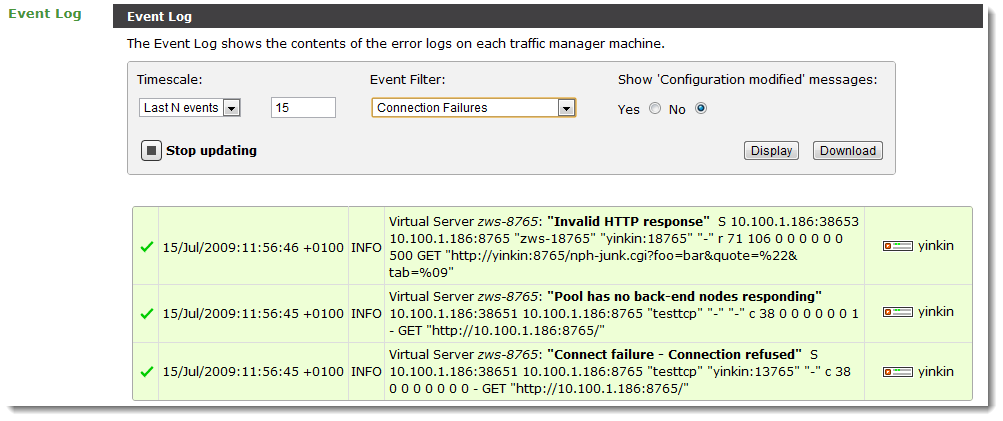
You can filter the event log to only display these messages using the “Connection Failures” Event Filter as illustrated above.
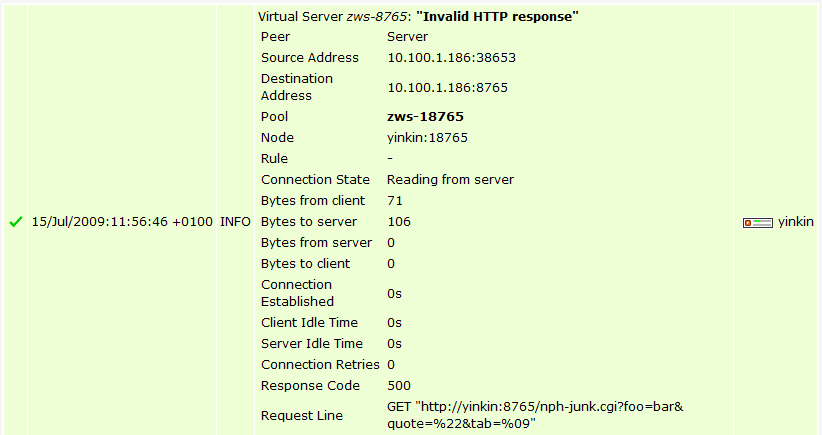
The log line contains a description of the error (for example, “Invalid HTTP Response”) and details that describe the nature of the connection (node used, connection times, retries, and so on). The Online Help for the Services > Virtual Servers > Edit > Error Logging configuration page describes the log format in detail.
Click the description to unfold a more readable representation of the connection error:
By default, connection errors are logged to the global Event Log. You can create an Event Handler that captures all Connection Failure events and writes them to a separate log file, and bypasses the global Event Log. For more details, see Event Handling and Alerts.