AI-based Migration of ICS Configurations to ZTA Gateways (Preview)
Overview
The migration from Ivanti Connect Secure (ICS) to Zero Trust Access (ZTA) often brings operational complexity requiring administrators to manually reconstruct intricate policies, authentication rules, applications, and user access configurations.
This AI-driven assistant, embedded within the Ivanti Neurons for Secure Access (NSA), platform analyzes existing ICS Gateway configurations and automatically generates recommended ZTA Secure Access Policies and associated objects. This enables organizations to visualize how their VPN environment translates into ZTA—without manual effort or risk. The embedded AI interprets ICS configurations—including authentication servers, user realms, resource profiles, and more—and converts them into ZTA-aligned recommendations.
The Preview Release is fully ‘read-only’, enabling you to explore recommendations safely without altering your live environment.
How it works
1.Administrator Interaction:
Administrators access the controller through a user-friendly interface, with support from the AI assistant for smart guidance.
2.AI-Driven Operations:
Requests and commands are handled by the built-in AI and external AI resources as needed.
3.Automated Policy Management:
The controller translates ICS Gateway configurations into ZTA Gateway policy recommendations.
4.Enforcement:
The device then propagates updated rules and controls to the ZTA Gateways, ensuring that network and operational security remains robust and adaptive.
Benefits
•Simplifies migration from ICS to modern ZTA using AI recommendations.
•Lower risk through accurate role/app mapping
•Reduced workload for admins
Configuration
Step-by-Step Process:
1.Log in to the Ivanti Neurons for Secure Access portal as a Tenant Admin. See Logging in to Ivanti Neurons for Secure Access.
2.Gateway Selection:
Use the Gateway Switcher, and select Ivanti Connect Secure.
3.Access AI Migration:
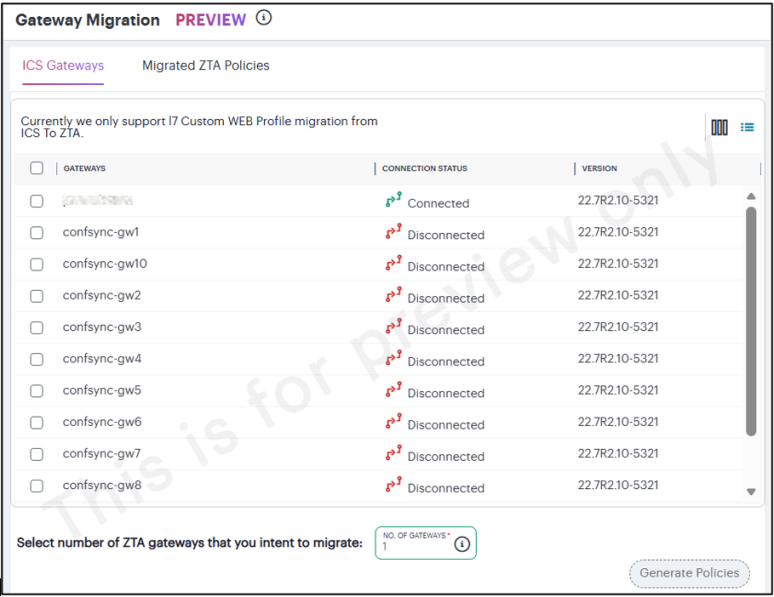
Select AI Migration > AI Gateway Migration. The Gateway Migration (PREVIEW) page appears.
4.Select Gateways:
In the ICS Gateways tab, choose one or more ICS Gateways from whose configurations you want to migrate.
5.Choose Target ZTA Gateways:
In the Select number of ZTA Gateways that you intent to migrate box, enter the number of ZTA Gateways to which you want to migrate the ICS configurations.
6.Generate Policies:
•Click Generate Policies.
•The integrated OpenAI engine analyzes the selected ICS configurations.
•It recommends ZTA Secure Access Policies and associated objects visible in the Migrated ZTA Policies tab.
•Review or apply the recommended ZTA policies.
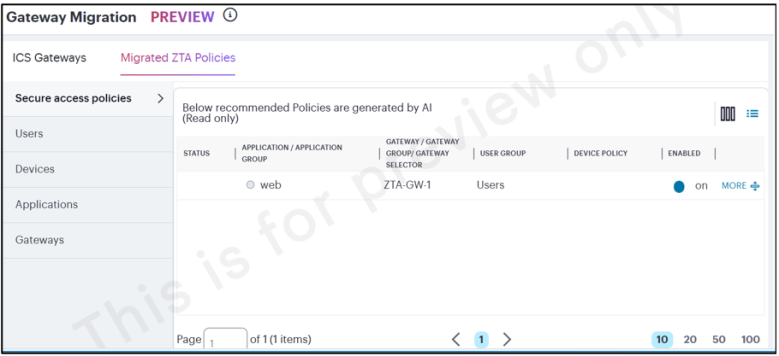
For details about Secure Access Policies, Applications, Users, Devices related to ZTA Gateways, refer to ZTA Tenant Administration Guide.