Staging via Neighborcast
In a DSM environment, staging has the following meaning: The mass data needed for the installation of packages is downloaded from the depot before the actual installation starts. This procedure reduces the network load. To reduce the network load even more, DSM also allows for downloading the mass data from other clients in the same subnet. This is referred to as Staging via Neighborcast.
Behavior of the DSM Client
When you activate the staging via neighborcast, the DSM Client automatically searches for other DSM Clients in the same subnet so as to download packages from there rather than from the depot. If there is an installation medium available, it will be preferred in any case.
The following requirements/limitations apply for Staging via Neighborcast:
- Packages cannot be downloaded via neighborcast if they are needed for a pilot installation.
- Packages for Staging via Neighborcast must have a checksum. This checksum ensures that packages downloaded from other clients match the original packages. The checksum is stored in the package file package.fpi.checksum (only in the original copy of the repository) and in the DSMDB and is transmitted to the managed computer for the integrity check.
- Checksums for new or changed packages are created automatically starting with DSM 2016.1. By default, Staging via Neighborcast is not available for older packages. Use the configuration table setting Checksum for existing packages (prior to DSM 2016.1) to calculate the checksum for older packages per repository.
Finding suited download clients (Client Discovery)
If one client wants to find other clients in the same subnet from where it can download the packages it needs, it sends out broadcasts during the staging process, which last 5 seconds with 1 second in between the individual broadcasts.
If a client finds another client that has the required package, it can start downloading the package from there. If a client cannot find a suited client, he starts the download process from the depot as usual.
As a result of his broadcasts, the client gets a list of IP addresses of the clients that have the package it wants. Then, the client randomly selects the IP addresses from this list and tries to start the download from there.
Package Download
After the Client Discovery, the client has a list of IP addresses of other clients from where it can download the package he wants.
The packages these clients provide may take a different status:
- The package is available for download from the cache of the other client.
- The package is currently being downloaded to the cache of the other client and will be available as soon as the download is finished.
The client tries to download the package it wants from one of the clients on the IP list. It will go through the complete list until it finds a suited client from where it can download the package. If the client, where it finds the package, is still busy downloading the package itself, the client waits until the download is finished and then starts to download the package.
If the client has gone through the complete IP address list and still cannot find another client from where it can download the package, it will send another broadcast to find other clients.
Settings
There are several different settings available in the configuration table in the Staging via Neigborcast section for this purpose:
These include:
- Allow staging from other clients in the same subnet
- Maximum number of simultaneous downloads from one client
- Depot access
- Broadcast port for client discovery
- Port for package download
- Automatically configure Windows firewall
Downloading with minimized depot access
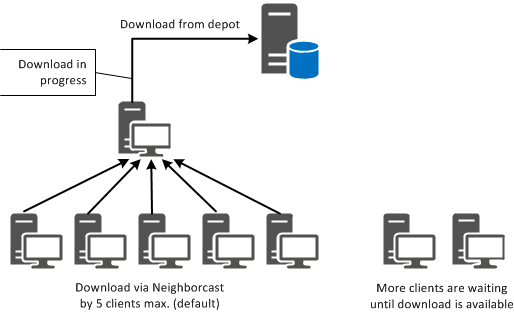
When you activate Staging via Neigborcast, the depot is only accessed if a client cannot find other clients from where it can download the package immediately or after the download process is finished on the other client.
In this case, the Depot access setting takes the default value Minimize.
Diagram of a download process with minimized depot access
Download with allowed depot access during peak loads
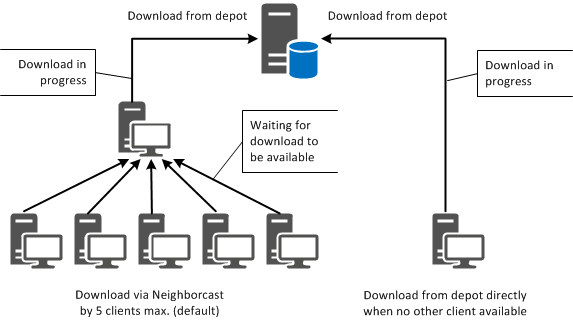
If the Depot access setting takes on the Also allow during peak loads value, the client is allowed to download the package it wants from the depot even if all the other clients that provide this specific package are currently busy.
Diagram of a download process during peak loads