Bind a Report to Data
The Report Designer is primarily designed to work with data-aware reports, meaning that a report obtains its general (dynamic) data from an external data source (most types of which are supported). This document describes how a newly created report can be bound to a data source.
To bind a report to data, do the following.
-
Setup the report within Xtraction using the Custom Report Designer.
-
Use the Template > Export Designer Data Source menu to export a data source file.
-
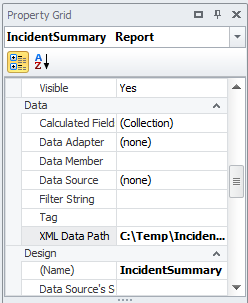
In the Properties form of the tool, in the Data section, locate the XML Data Path
-
Enter or browse to the path of the Data Source file exported from Xtraction.
-
Your field list will now be updated showing the available fields.
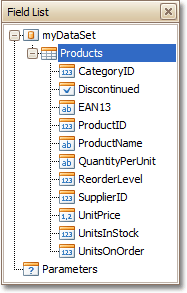
This means that the report has been successfully bound to the data.
To learn how report controls can be assigned to data fields; refer to Display Values from a Database (Bind Report Elements to Data).